Follow us on our LinkedIn page

Simplified GSTR-2B reconciliation for accurate ITC claims

Manage IMS based ITC in WhiteBooks with ITC overview, alerts, summaries, reconciliation, auto matching, bulk actions, search, and validation tracking for. WhiteBooks Auto GSTR-2B Reconciliation & ITC is part of the WhiteBooks platform — a GSP-certified, cloud-first business management suite used by Indian SMBs and mid-market enterprises.

WhiteBooks streamlines GSTR 2B reconciliation with ITC dashboard, auto matching, overrides, reversals, categorization, and claim ready reports.

gstr2B-reconcile-dashboard
Reconciliation Dashboard

Complete GSTR2B Reconciliation Overview

WhiteBooks provides a consolidated view of ITC status, claim progress, reconciliation counts, and key summary metrics—all in a single, centralized dashboard for easy monitoring and decision-making.
gstr2B-reconcile-register

ITC Status Overview

Displays invoice categories such as Safe to Claim, Needs Review, and Can’t Claim. Helps quickly assess which invoices are eligible for ITC and which require further verification.

Eligible vs Claimed ITC

Shows comparison between Purchase Register ITC, GSTR-2B Eligible ITC, and the net claimed ITC amount. Provides clear visibility into differences before finalizing claims.

Reconciliation Counters

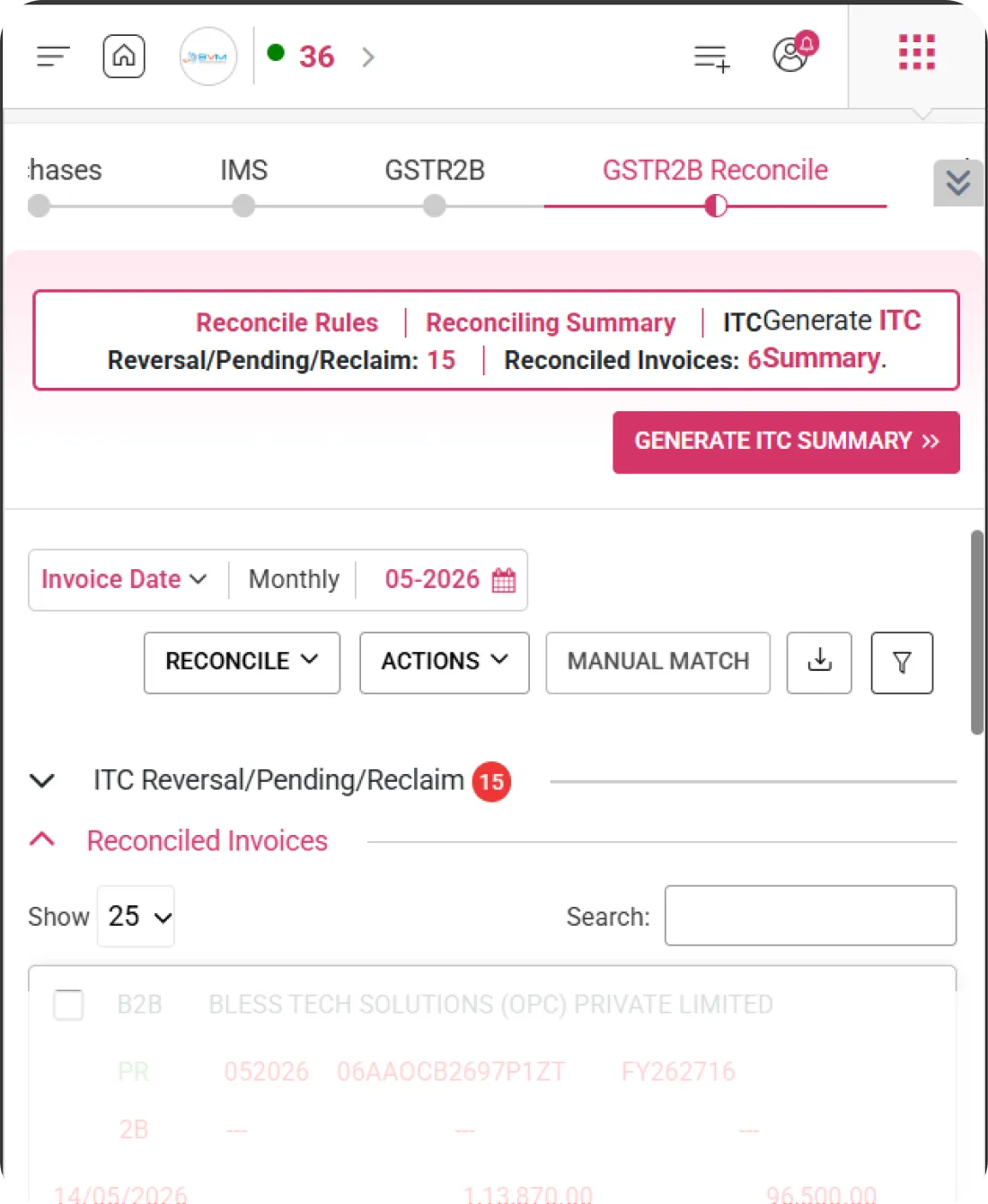
Tracks the number of Reconciled Invoices along with ITC Reversal, Pending, and Reclaim counts. Offers a real-time snapshot of ITC impact based on reconciliation and IMS actions.
Reconcile Rules & Summary

Reconciliation Rules & Summary Controls

WhiteBooks lets users configure reconciliation logic, monitor ITC impact, and generate compliance-ready summaries—all from a centralized control panel.
gstr2B-reconciling-Summary

Reconcile Rules Panel

Configure system-driven matching rules for invoice reconciliation. Define parameters such as GSTIN, invoice value, and date tolerance to ensure accurate auto-matching.

Reconciling Summary

Displays summarized totals for ITC Reversal, Pending, and Reclaim amounts. Provides a quick financial snapshot of reconciliation impact before finalization.

Generate ITC Summary

Generate a finalized ITC summary report aligned with GSTR-2B data for reporting and compliance purposes. Helps maintain proper documentation and audit readiness.
ITC Classification Overview

Smart ITC Categorization & Review

WhiteBooks enables users to quickly categorize invoices by reconciliation and validation status, ensuring accurate and compliant ITC claims.
Gstr2B Reconcile Register

Safe to Claim

Invoices that are fully matched with purchase records and GSTR-2B data. These invoices are eligible and ready for ITC claim without further review.

Needs Review

Invoices with partial mismatches, value differences, or validation flags. Requires manual verification before proceeding with ITC claim.

Can’t Claim

Invoices marked as ineligible or restricted for ITC. These may include blocked credits or non-compliant entries that cannot be claimed.
Eligible ITC Calculation

Accurate Eligible ITC Computation

WhiteBooks displays eligible ITC calculated using Purchase Register data and GSTR-2B claim-fully logic, ensuring accurate and reliable ITC reporting.
gstr2B-reconcile-itcClassification

Purchases

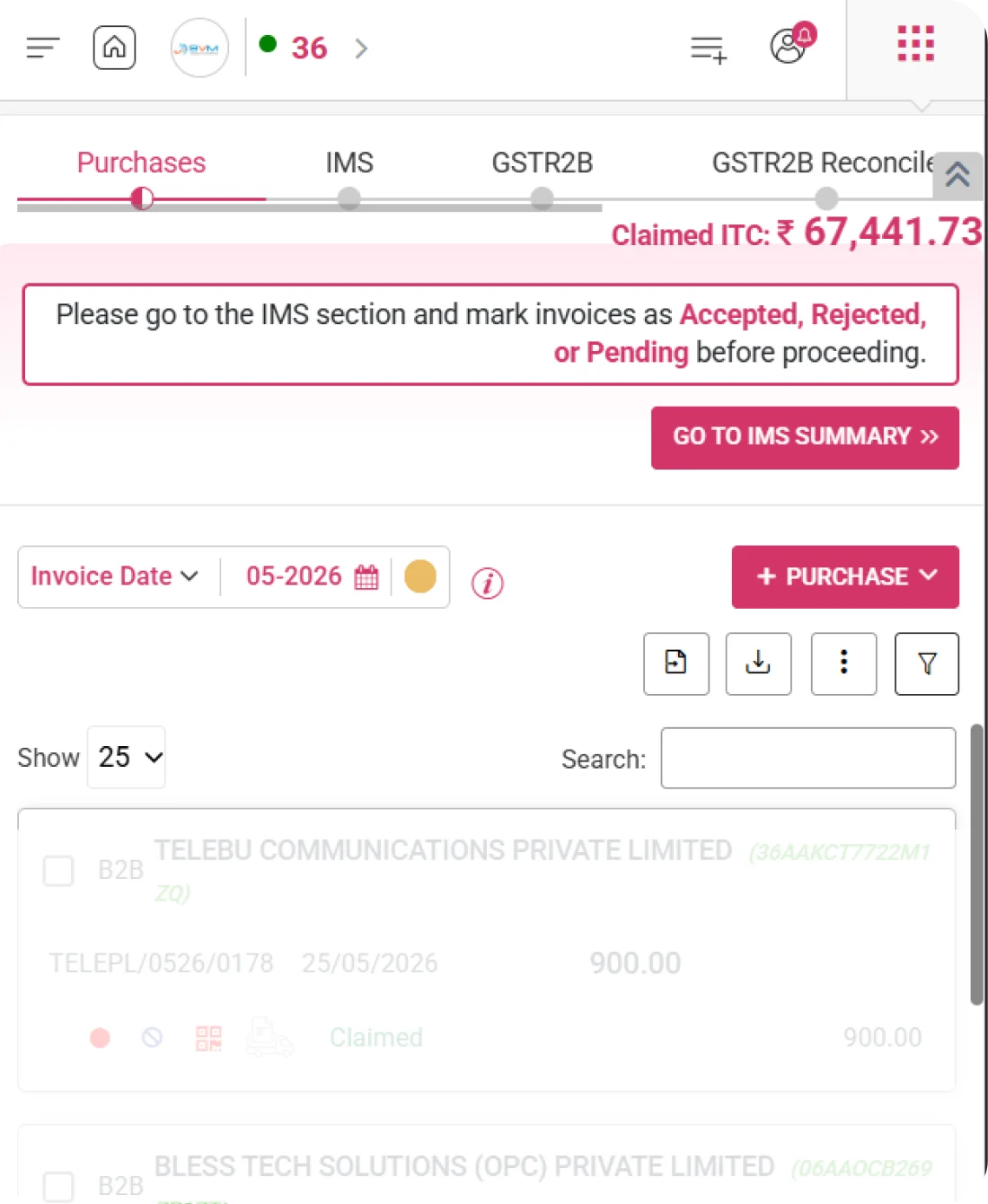
Shows eligible ITC calculated from the Purchase Register as per claim-fully criteria. Reflects ITC available based on recorded inward supplies.

GSTR-2B

Displays eligible ITC derived directly from GSTR-2B portal data. Ensures ITC is aligned with supplier-reported invoices.

Net ITC Calculation

Shows the final net claimable ITC after applying adjustments, reversals, or reconciliation differences between Purchases and GSTR-2B.
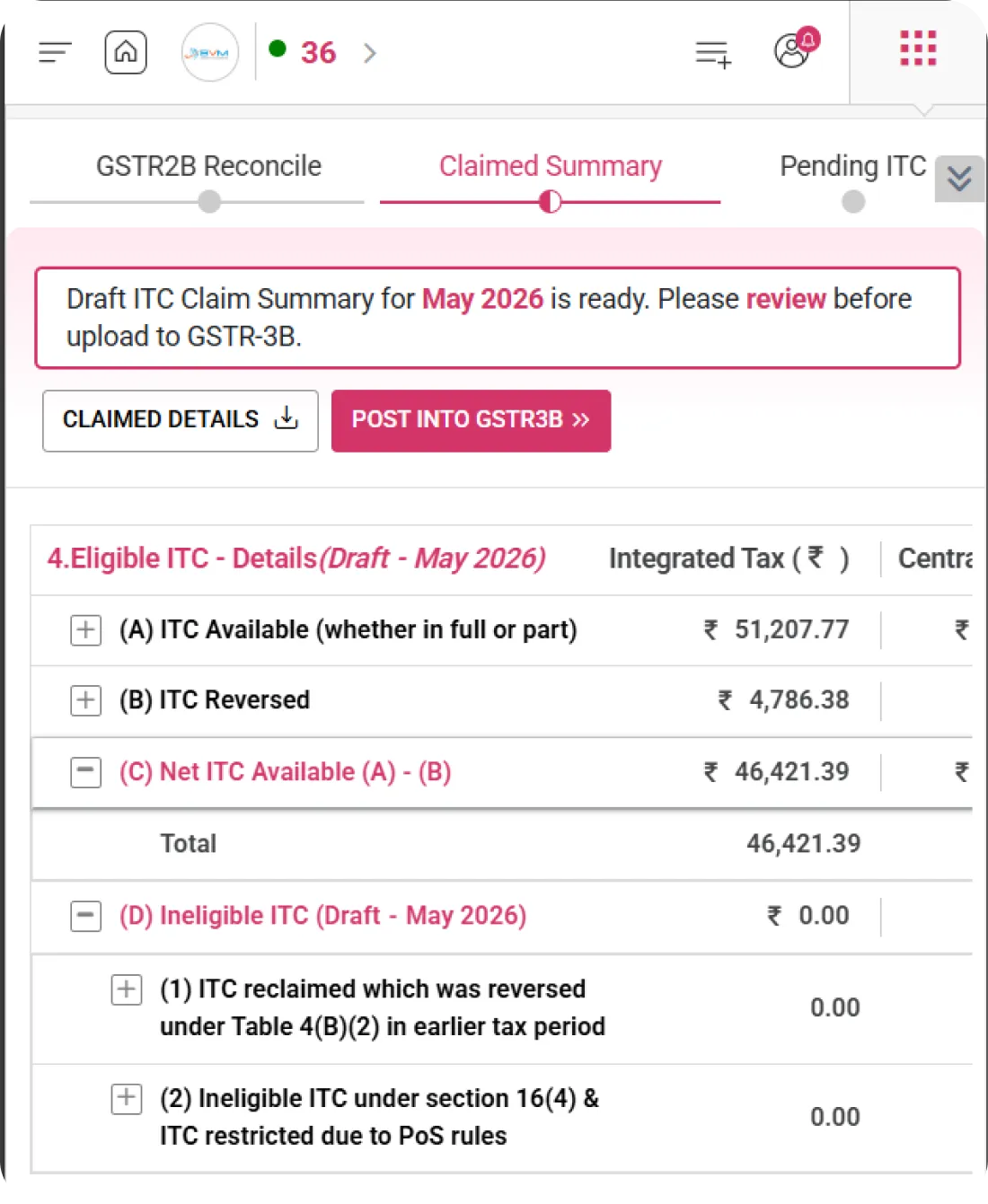
ITC Claimed Breakdown

Detailed ITC Claimed Analysis

WhiteBooks lets users view ITC Available, ITC Reversed, and Net Claimed amounts in a clear, structured format, enabling better financial tracking and accurate reconciliation.
gstr2B-reconcile-itcClassification

ITC Available

Displays the total ITC available for the selected transaction period based on reconciled purchase data and GSTR-2B.

ITC Reversed

Shows ITC amounts reduced due to mismatches, ineligible credits, or reversal conditions identified during reconciliation.

Net Claimed

Displays the final ITC successfully claimed after applying reversals and adjustments, ensuring compliance and accurate return filing.
ITC Performance Indicator

Visual ITC Claim Performance Meter

WhiteBooks offers a visual gauge-style indicator highlighting ITC claim accuracy and alignment with reconciliation data, providing instant clarity on how precisely ITC has been claimed.
gstr2B-reconcile-register

Claim Accuracy Meter

Displays a dynamic gauge representing ITC claim correctness based on reconciliation with GSTR-2B and purchase records. Helps assess claim precision at a glance.

Claimed Perfectly Indicator

Shows whether ITC is fully aligned with eligible amounts. Clearly indicates when claims are perfectly matched without discrepancies.

Performance Feedback

Provides immediate visual feedback on claim efficiency, highlighting whether improvements or corrections are required before finalization.
Transaction Period Selection

Flexible Transaction Period Control

WhiteBooks allows users to select the relevant monthly period and return month, ensuring accurate reconciliation and ITC review.
gstr2B-reconTransaction-period

Transaction Date Filter

Filter invoices based on transaction date to narrow down records for the selected reconciliation period. Ensures accurate period-wise data review.

Monthly Selector

Toggle between monthly reconciliation options to analyze ITC data month-by-month for better compliance tracking.

Period Picker(MM-YYYY)

Select a specific return period to align reconciliation data with the applicable GST return cycle, including verification with GSTR-2B.
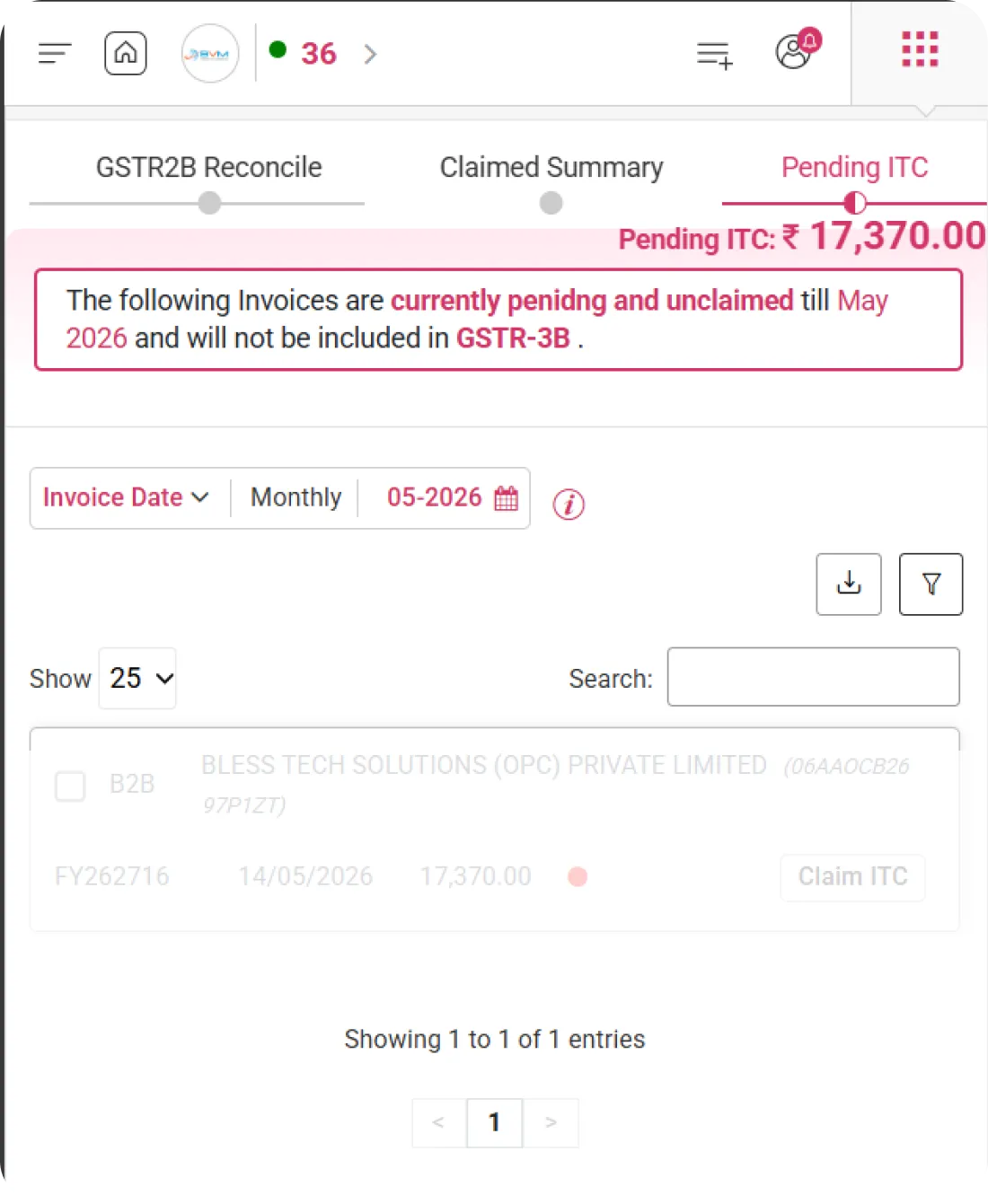
ITC Reversal / Pending

ITC Reversal & Pending Invoice Tracking

WhiteBooks lets users track invoices categorized under reversal, pending review, or reclaim, providing clear visibility of ITC impact during reconciliation.
gstr2B-reconcile-itcReversal

Reversal Count

Displays the total ITC amount and number of invoices marked for reversal based on reconciliation with GSTR-2B and purchase data.

Pending Review

Shows invoices awaiting validation, clarification, or confirmation before final ITC action is taken.

Reclaim Tracking

Monitors invoices eligible for ITC reclaim after corrections or subsequent matching updates, ensuring no eligible credit is missed.
Reconciled Invoice Tracking

Reconciled Invoice Monitoring

WhiteBooks allows users to view and manage all successfully reconciled invoices in a single, structured table, enabling quick review and streamlined action handling.
gstr2B-reconcile-register

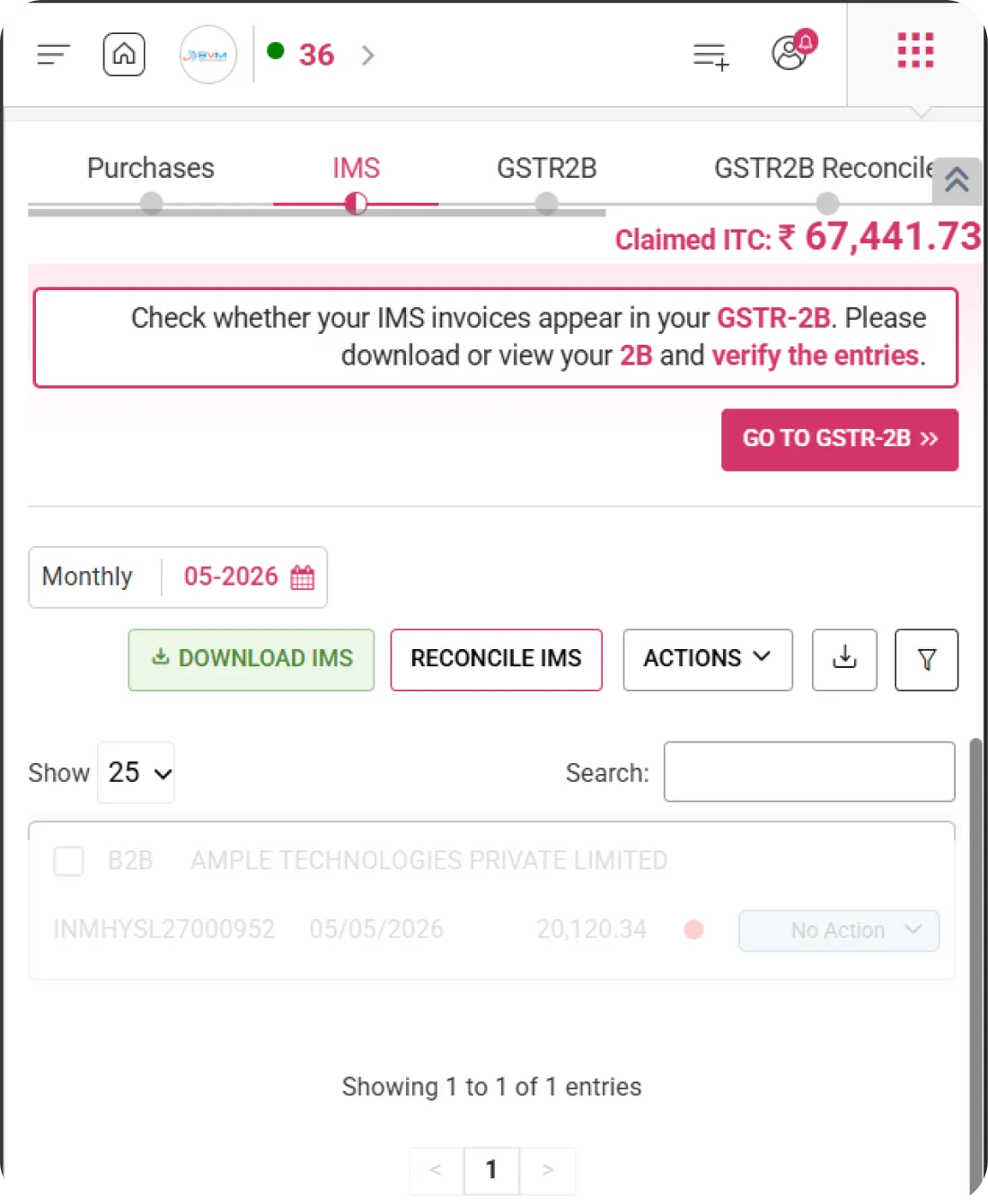
Invoice Table View

Displays key details such as Invoice Type, GSTIN, Invoice Number, Invoice Value, Tax Amount, and Reconciliation Status. Provides a complete snapshot in one view.

Sorting & Search

Quickly search invoices by GSTIN, invoice number, or value and sort columns for efficient data analysis and navigation.

Status & Actions

Perform invoice-level actions directly from the list, such as viewing details, updating status, or verifying alignment with GSTR-2B.
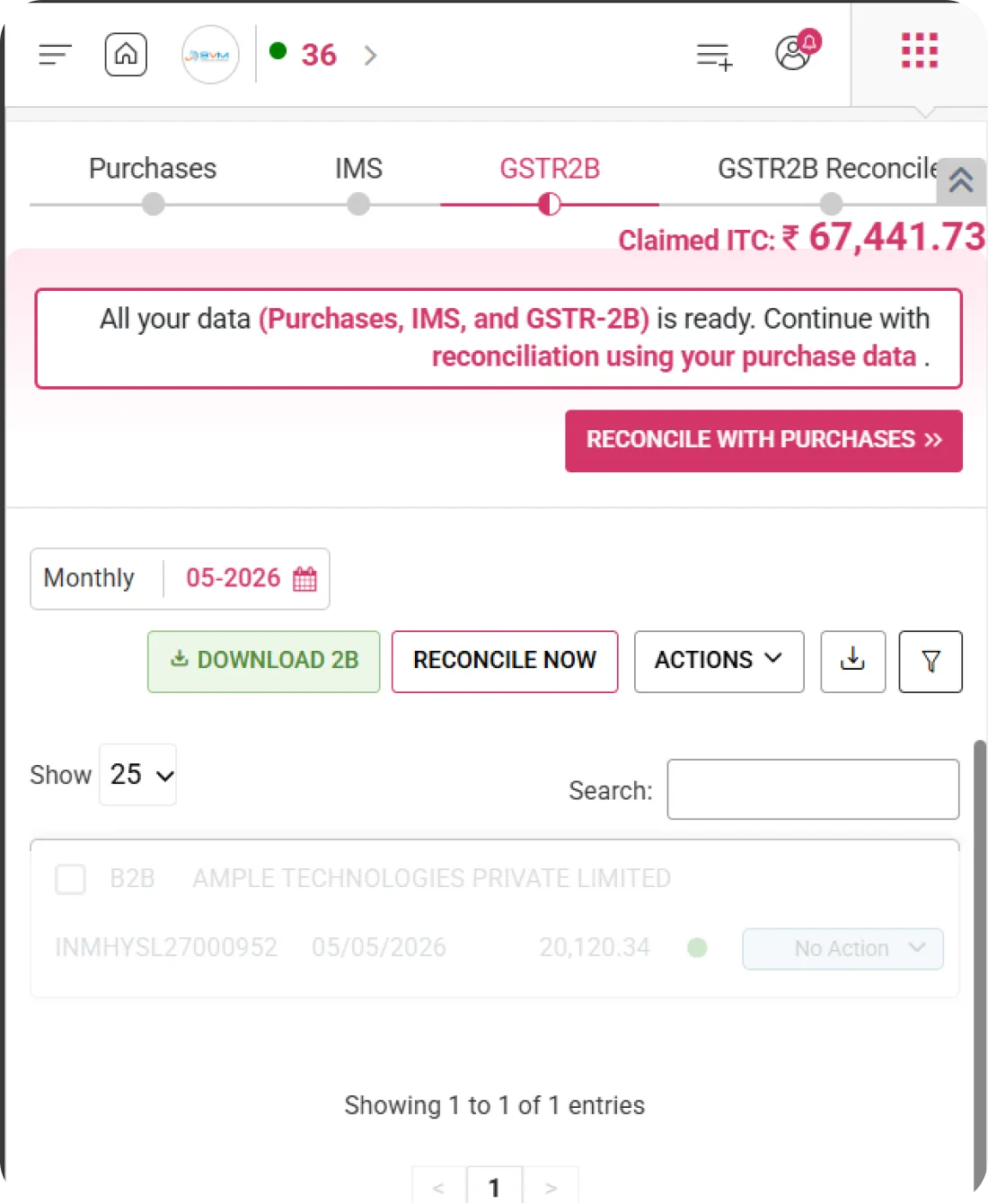
One-Click Reconcile

Instant Automated Reconciliation

WhiteBooks enables users to quickly reconcile invoices using system-defined rules, ensuring faster ITC validation and accurate matching with portal data.
gstr2B-reconcilation-process

Reconcile

Trigger the automated reconciliation process with a single click. Initiates system-driven matching between purchase records and GSTR-2B data.

Smart Matching Logic

Matches invoices based on GSTIN, invoice value, tax amount, and defined tolerance rules. Ensures precise identification of matched and mismatched records.

Real-Time Status Update

Instantly updates reconciliation counters and invoice statuses after processing. Provides immediate visibility into matched, mismatched, and pending results.
Manual Match Option

Manual Invoice Matching Control

WhiteBooks allows users to manually match invoices when automated reconciliation fails, ensuring no eligible ITC is missed and all discrepancies are properly resolved.
gstr2B-recon-manualMatching

Manual Match Action

Manually pair mismatched invoices between purchase records and GSTR-2B data. Enables direct selection and linking of corresponding invoices.

Correction Flexibility

Edit invoice details such as value or tax amount before finalizing the match. Helps resolve minor mismatches and validation differences.

Override Capability

Override automated reconciliation rules where necessary with proper justification. Provides controlled flexibility while maintaining compliance transparency.
Generate ITC Summary

Generate Final ITC Summary Report

WhiteBooks enables users to generate a comprehensive ITC summary report after reconciliation, supporting accurate filing and efficient compliance tracking.
gstr2B-reconcile-summary

Summary Generation Button

Generate the ITC summary instantly with a single click after completing reconciliation. Consolidates all ITC calculations and actions into one structured report.

Period-Based Report

Generates the summary based on the selected return period (Month & Financial Year). Ensures alignment with GSTR-2B and reconciled purchase data.

Claim-Ready Output

Provides a claim-ready ITC summary suitable for filing reference and internal documentation. Helps maintain audit readiness and compliance accuracy.
Bulk Actions & Controls

Bulk Invoice Management Controls

WhiteBooks enables users to perform bulk reconciliation, actions, and controls on multiple invoices, improving efficiency and reducing manual effort during IMS processing.
gstr2B-reconcile-actions

Bulk Reconcile

Reconcile multiple selected invoices at once using system-defined rules. Quickly match purchase data with GSTR-2B records in a single action.

Actions Dropdown

Access grouped actions such as Accept, Reject, or Pending for multiple invoices simultaneously. Simplifies large-volume invoice processing.

Manual Match Shortcut

Use a quick bulk manual match option to resolve multiple mismatches efficiently. Enables faster correction and reconciliation without handling invoices individually.
Detailed Invoice View

Comprehensive Invoice Detail Access

WhiteBooks provides a single, detailed view panel giving complete invoice information, including GSTIN, values, tax breakdown, and reconciliation status.
gstr2B-recon-viewInvoice

Invoice Metadata

View key details such as GSTIN, Return Period, and Invoice Date as reported in Goods and Services Tax Network records. Ensures proper identification and period alignment.

Tax Breakdown

Displays Taxable Amount, CGST, SGST/IGST, and Total Tax for accurate ITC verification and reconciliation comparison.

Action Controls

Perform reconciliation actions such as Accept, Reject, Pending, or Manual Match directly at the invoice level for precise control and validation.
Get started with WhiteBooks
WhiteBooks automates GSTR 2B reconciliation with rule based matching, real time ITC tracking, and compliance ready summaries for accurate, audit ready filing.
No Credit Card Required

All the Pricing you will need in an Accounting Software

WhiteBooks streamlines GSTR 2B reconciliation with ITC dashboard, auto matching, overrides, reversals, categorization, and claim ready reports.

features-banner
Reconcile Rules & Summary

Reconciliation Rules & Summary Controls

WhiteBooks lets users configure reconciliation logic, monitor ITC impact, and generate compliance-ready summaries—all from a centralized control panel.

Reconcile Rules Panel

Configure system-driven matching rules for invoice reconciliation. Define parameters such as GSTIN, invoice value, and date tolerance to ensure accurate auto-matching.

Reconciling Summary

Displays summarized totals for ITC Reversal, Pending, and Reclaim amounts. Provides a quick financial snapshot of reconciliation impact before finalization.

Generate ITC Summary

Generate a finalized ITC summary report aligned with GSTR-2B data for reporting and compliance purposes. Helps maintain proper documentation and audit readiness.
Reconcile Rules & Summary

Reconciliation Rules & Summary Controls

WhiteBooks lets users configure reconciliation logic, monitor ITC impact, and generate compliance-ready summaries—all from a centralized control panel.

Reconcile Rules Panel

Configure system-driven matching rules for invoice reconciliation. Define parameters such as GSTIN, invoice value, and date tolerance to ensure accurate auto-matching.

Reconciling Summary

Displays summarized totals for ITC Reversal, Pending, and Reclaim amounts. Provides a quick financial snapshot of reconciliation impact before finalization.

Generate ITC Summary

Generate a finalized ITC summary report aligned with GSTR-2B data for reporting and compliance purposes. Helps maintain proper documentation and audit readiness.
Get started with WhiteBooks
WhiteBooks automates GSTR 2B reconciliation with rule based matching, real time ITC tracking, and compliance ready summaries for accurate, audit ready filing.
No Credit Card Required
Reconciliation Dashboard

Complete GSTR2B Reconciliation Overview

WhiteBooks provides a consolidated view of ITC status, claim progress, reconciliation counts, and key summary metrics—all in a single, centralized dashboard for easy monitoring and decision-making.

ITC Status Overview

Displays invoice categories such as Safe to Claim, Needs Review, and Can’t Claim. Helps quickly assess which invoices are eligible for ITC and which require further verification.

Eligible vs Claimed ITC

Shows comparison between Purchase Register ITC, GSTR-2B Eligible ITC, and the net claimed ITC amount. Provides clear visibility into differences before finalizing claims.

Reconciliation Counters

Tracks the number of Reconciled Invoices along with ITC Reversal, Pending, and Reclaim counts. Offers a real-time snapshot of ITC impact based on reconciliation and IMS actions.
Reconciliation Dashboard

Complete GSTR2B Reconciliation Overview

WhiteBooks provides a consolidated view of ITC status, claim progress, reconciliation counts, and key summary metrics—all in a single, centralized dashboard for easy monitoring and decision-making.

ITC Status Overview

Displays invoice categories such as Safe to Claim, Needs Review, and Can’t Claim. Helps quickly assess which invoices are eligible for ITC and which require further verification.

Eligible vs Claimed ITC

Shows comparison between Purchase Register ITC, GSTR-2B Eligible ITC, and the net claimed ITC amount. Provides clear visibility into differences before finalizing claims.

Reconciliation Counters

Tracks the number of Reconciled Invoices along with ITC Reversal, Pending, and Reclaim counts. Offers a real-time snapshot of ITC impact based on reconciliation and IMS actions.
Get started with WhiteBooks
WhiteBooks automates GSTR 2B reconciliation with rule based matching, real time ITC tracking, and compliance ready summaries for accurate, audit ready filing.
No Credit Card Required
ITC Classification Overview

Smart ITC Categorization & Review

WhiteBooks enables users to quickly categorize invoices by reconciliation and validation status, ensuring accurate and compliant ITC claims.

Safe to Claim

Invoices that are fully matched with purchase records and GSTR-2B data. These invoices are eligible and ready for ITC claim without further review.

Needs Review

Invoices with partial mismatches, value differences, or validation flags. Requires manual verification before proceeding with ITC claim.

Can’t Claim

Invoices marked as ineligible or restricted for ITC. These may include blocked credits or non-compliant entries that cannot be claimed.
ITC Classification Overview

Smart ITC Categorization & Review

WhiteBooks enables users to quickly categorize invoices by reconciliation and validation status, ensuring accurate and compliant ITC claims.

Safe to Claim

Invoices that are fully matched with purchase records and GSTR-2B data. These invoices are eligible and ready for ITC claim without further review.

Needs Review

Invoices with partial mismatches, value differences, or validation flags. Requires manual verification before proceeding with ITC claim.

Can’t Claim

Invoices marked as ineligible or restricted for ITC. These may include blocked credits or non-compliant entries that cannot be claimed.
Get started with WhiteBooks
WhiteBooks automates GSTR 2B reconciliation with rule based matching, real time ITC tracking, and compliance ready summaries for accurate, audit ready filing.
No Credit Card Required
Eligible ITC Calculation

Accurate Eligible ITC Computation

WhiteBooks displays eligible ITC calculated using Purchase Register data and GSTR-2B claim-fully logic, ensuring accurate and reliable ITC reporting.

Purchases

Shows eligible ITC calculated from the Purchase Register as per claim-fully criteria. Reflects ITC available based on recorded inward supplies.

GSTR-2B

Displays eligible ITC derived directly from GSTR-2B portal data. Ensures ITC is aligned with supplier-reported invoices.

Net ITC Calculation

Shows the final net claimable ITC after applying adjustments, reversals, or reconciliation differences between Purchases and GSTR-2B.
Eligible ITC Calculation

Accurate Eligible ITC Computation

WhiteBooks displays eligible ITC calculated using Purchase Register data and GSTR-2B claim-fully logic, ensuring accurate and reliable ITC reporting.

Purchases

Shows eligible ITC calculated from the Purchase Register as per claim-fully criteria. Reflects ITC available based on recorded inward supplies.

GSTR-2B

Displays eligible ITC derived directly from GSTR-2B portal data. Ensures ITC is aligned with supplier-reported invoices.

Net ITC Calculation

Shows the final net claimable ITC after applying adjustments, reversals, or reconciliation differences between Purchases and GSTR-2B.
Get started with WhiteBooks
WhiteBooks automates GSTR 2B reconciliation with rule based matching, real time ITC tracking, and compliance ready summaries for accurate, audit ready filing.
No Credit Card Required
ITC Claimed Breakdown

Detailed ITC Claimed Analysis

WhiteBooks lets users view ITC Available, ITC Reversed, and Net Claimed amounts in a clear, structured format, enabling better financial tracking and accurate reconciliation.

ITC Available

Displays the total ITC available for the selected transaction period based on reconciled purchase data and GSTR-2B.

ITC Reversed

Shows ITC amounts reduced due to mismatches, ineligible credits, or reversal conditions identified during reconciliation.

Net Claimed

Displays the final ITC successfully claimed after applying reversals and adjustments, ensuring compliance and accurate return filing.
ITC Claimed Breakdown

Detailed ITC Claimed Analysis

WhiteBooks lets users view ITC Available, ITC Reversed, and Net Claimed amounts in a clear, structured format, enabling better financial tracking and accurate reconciliation.

ITC Available

Displays the total ITC available for the selected transaction period based on reconciled purchase data and GSTR-2B.

ITC Reversed

Shows ITC amounts reduced due to mismatches, ineligible credits, or reversal conditions identified during reconciliation.

Net Claimed

Displays the final ITC successfully claimed after applying reversals and adjustments, ensuring compliance and accurate return filing.
Get started with WhiteBooks
WhiteBooks automates GSTR 2B reconciliation with rule based matching, real time ITC tracking, and compliance ready summaries for accurate, audit ready filing.
No Credit Card Required
ITC Performance Indicator

Visual ITC Claim Performance Meter

WhiteBooks offers a visual gauge-style indicator highlighting ITC claim accuracy and alignment with reconciliation data, providing instant clarity on how precisely ITC has been claimed.

Claim Accuracy Meter

Displays a dynamic gauge representing ITC claim correctness based on reconciliation with GSTR-2B and purchase records. Helps assess claim precision at a glance.

Claimed Perfectly Indicator

Shows whether ITC is fully aligned with eligible amounts. Clearly indicates when claims are perfectly matched without discrepancies.

Performance Feedback

Provides immediate visual feedback on claim efficiency, highlighting whether improvements or corrections are required before finalization.
ITC Performance Indicator

Visual ITC Claim Performance Meter

WhiteBooks offers a visual gauge-style indicator highlighting ITC claim accuracy and alignment with reconciliation data, providing instant clarity on how precisely ITC has been claimed.

Claim Accuracy Meter

Displays a dynamic gauge representing ITC claim correctness based on reconciliation with GSTR-2B and purchase records. Helps assess claim precision at a glance.

Claimed Perfectly Indicator

Shows whether ITC is fully aligned with eligible amounts. Clearly indicates when claims are perfectly matched without discrepancies.

Performance Feedback

Provides immediate visual feedback on claim efficiency, highlighting whether improvements or corrections are required before finalization.
Get started with WhiteBooks
WhiteBooks automates GSTR 2B reconciliation with rule based matching, real time ITC tracking, and compliance ready summaries for accurate, audit ready filing.
No Credit Card Required
Transaction Period Selection

Flexible Transaction Period Control

WhiteBooks allows users to select the relevant monthly period and return month, ensuring accurate reconciliation and ITC review.

Transaction Date Filter

Filter invoices based on transaction date to narrow down records for the selected reconciliation period. Ensures accurate period-wise data review.

Monthly Selector

Toggle between monthly reconciliation options to analyze ITC data month-by-month for better compliance tracking.

Period Picker(MM-YYYY)

Select a specific return period to align reconciliation data with the applicable GST return cycle, including verification with GSTR-2B.
Transaction Period Selection

Flexible Transaction Period Control

WhiteBooks allows users to select the relevant monthly period and return month, ensuring accurate reconciliation and ITC review.

Transaction Date Filter

Filter invoices based on transaction date to narrow down records for the selected reconciliation period. Ensures accurate period-wise data review.

Monthly Selector

Toggle between monthly reconciliation options to analyze ITC data month-by-month for better compliance tracking.

Period Picker(MM-YYYY)

Select a specific return period to align reconciliation data with the applicable GST return cycle, including verification with GSTR-2B.
Get started with WhiteBooks
WhiteBooks automates GSTR 2B reconciliation with rule based matching, real time ITC tracking, and compliance ready summaries for accurate, audit ready filing.
No Credit Card Required
ITC Reversal / Pending

ITC Reversal & Pending Invoice Tracking

WhiteBooks lets users track invoices categorized under reversal, pending review, or reclaim, providing clear visibility of ITC impact during reconciliation.

Reversal Count

Displays the total ITC amount and number of invoices marked for reversal based on reconciliation with GSTR-2B and purchase data.

Pending Review

Shows invoices awaiting validation, clarification, or confirmation before final ITC action is taken.

Reclaim Tracking

Monitors invoices eligible for ITC reclaim after corrections or subsequent matching updates, ensuring no eligible credit is missed.
ITC Reversal / Pending

ITC Reversal & Pending Invoice Tracking

WhiteBooks lets users track invoices categorized under reversal, pending review, or reclaim, providing clear visibility of ITC impact during reconciliation.

Reversal Count

Displays the total ITC amount and number of invoices marked for reversal based on reconciliation with GSTR-2B and purchase data.

Pending Review

Shows invoices awaiting validation, clarification, or confirmation before final ITC action is taken.

Reclaim Tracking

Monitors invoices eligible for ITC reclaim after corrections or subsequent matching updates, ensuring no eligible credit is missed.
Get started with WhiteBooks
WhiteBooks automates GSTR 2B reconciliation with rule based matching, real time ITC tracking, and compliance ready summaries for accurate, audit ready filing.
No Credit Card Required
Reconciled Invoice Tracking

Reconciled Invoice Monitoring

WhiteBooks allows users to view and manage all successfully reconciled invoices in a single, structured table, enabling quick review and streamlined action handling.

Invoice Table View

Displays key details such as Invoice Type, GSTIN, Invoice Number, Invoice Value, Tax Amount, and Reconciliation Status. Provides a complete snapshot in one view.

Sorting & Search

Quickly search invoices by GSTIN, invoice number, or value and sort columns for efficient data analysis and navigation.

Status & Actions

Perform invoice-level actions directly from the list, such as viewing details, updating status, or verifying alignment with GSTR-2B.
Reconciled Invoice Tracking

Reconciled Invoice Monitoring

WhiteBooks allows users to view and manage all successfully reconciled invoices in a single, structured table, enabling quick review and streamlined action handling.

Invoice Table View

Displays key details such as Invoice Type, GSTIN, Invoice Number, Invoice Value, Tax Amount, and Reconciliation Status. Provides a complete snapshot in one view.

Sorting & Search

Quickly search invoices by GSTIN, invoice number, or value and sort columns for efficient data analysis and navigation.

Status & Actions

Perform invoice-level actions directly from the list, such as viewing details, updating status, or verifying alignment with GSTR-2B.
Get started with WhiteBooks
WhiteBooks automates GSTR 2B reconciliation with rule based matching, real time ITC tracking, and compliance ready summaries for accurate, audit ready filing.
No Credit Card Required
One-Click Reconcile

Instant Automated Reconciliation

WhiteBooks enables users to quickly reconcile invoices using system-defined rules, ensuring faster ITC validation and accurate matching with portal data.

Reconcile

Trigger the automated reconciliation process with a single click. Initiates system-driven matching between purchase records and GSTR-2B data.

Smart Matching Logic

Matches invoices based on GSTIN, invoice value, tax amount, and defined tolerance rules. Ensures precise identification of matched and mismatched records.

Real-Time Status Update

Instantly updates reconciliation counters and invoice statuses after processing. Provides immediate visibility into matched, mismatched, and pending results.
One-Click Reconcile

Instant Automated Reconciliation

WhiteBooks enables users to quickly reconcile invoices using system-defined rules, ensuring faster ITC validation and accurate matching with portal data.

Reconcile

Trigger the automated reconciliation process with a single click. Initiates system-driven matching between purchase records and GSTR-2B data.

Smart Matching Logic

Matches invoices based on GSTIN, invoice value, tax amount, and defined tolerance rules. Ensures precise identification of matched and mismatched records.

Real-Time Status Update

Instantly updates reconciliation counters and invoice statuses after processing. Provides immediate visibility into matched, mismatched, and pending results.
Get started with WhiteBooks
WhiteBooks automates GSTR 2B reconciliation with rule based matching, real time ITC tracking, and compliance ready summaries for accurate, audit ready filing.
No Credit Card Required
Manual Match Option

Manual Invoice Matching Control

WhiteBooks allows users to manually match invoices when automated reconciliation fails, ensuring no eligible ITC is missed and all discrepancies are properly resolved.

Manual Match Action

Manually pair mismatched invoices between purchase records and GSTR-2B data. Enables direct selection and linking of corresponding invoices.

Correction Flexibility

Edit invoice details such as value or tax amount before finalizing the match. Helps resolve minor mismatches and validation differences.

Override Capability

Override automated reconciliation rules where necessary with proper justification. Provides controlled flexibility while maintaining compliance transparency.
Manual Match Option

Manual Invoice Matching Control

WhiteBooks allows users to manually match invoices when automated reconciliation fails, ensuring no eligible ITC is missed and all discrepancies are properly resolved.

Manual Match Action

Manually pair mismatched invoices between purchase records and GSTR-2B data. Enables direct selection and linking of corresponding invoices.

Correction Flexibility

Edit invoice details such as value or tax amount before finalizing the match. Helps resolve minor mismatches and validation differences.

Override Capability

Override automated reconciliation rules where necessary with proper justification. Provides controlled flexibility while maintaining compliance transparency.
Get started with WhiteBooks
WhiteBooks automates GSTR 2B reconciliation with rule based matching, real time ITC tracking, and compliance ready summaries for accurate, audit ready filing.
No Credit Card Required
Generate ITC Summary

Generate Final ITC Summary Report

WhiteBooks enables users to generate a comprehensive ITC summary report after reconciliation, supporting accurate filing and efficient compliance tracking.

Summary Generation Button

Generate the ITC summary instantly with a single click after completing reconciliation. Consolidates all ITC calculations and actions into one structured report.

Period-Based Report

Generates the summary based on the selected return period (Month & Financial Year). Ensures alignment with GSTR-2B and reconciled purchase data.

Claim-Ready Output

Provides a claim-ready ITC summary suitable for filing reference and internal documentation. Helps maintain audit readiness and compliance accuracy.
Generate ITC Summary

Generate Final ITC Summary Report

WhiteBooks enables users to generate a comprehensive ITC summary report after reconciliation, supporting accurate filing and efficient compliance tracking.

Summary Generation Button

Generate the ITC summary instantly with a single click after completing reconciliation. Consolidates all ITC calculations and actions into one structured report.

Period-Based Report

Generates the summary based on the selected return period (Month & Financial Year). Ensures alignment with GSTR-2B and reconciled purchase data.

Claim-Ready Output

Provides a claim-ready ITC summary suitable for filing reference and internal documentation. Helps maintain audit readiness and compliance accuracy.
Get started with WhiteBooks
WhiteBooks automates GSTR 2B reconciliation with rule based matching, real time ITC tracking, and compliance ready summaries for accurate, audit ready filing.
No Credit Card Required
Bulk Actions & Controls

Bulk Invoice Management Controls

WhiteBooks enables users to perform bulk reconciliation, actions, and controls on multiple invoices, improving efficiency and reducing manual effort during IMS processing.

Bulk Reconcile

Reconcile multiple selected invoices at once using system-defined rules. Quickly match purchase data with GSTR-2B records in a single action.

Actions Dropdown

Access grouped actions such as Accept, Reject, or Pending for multiple invoices simultaneously. Simplifies large-volume invoice processing.

Manual Match Shortcut

Use a quick bulk manual match option to resolve multiple mismatches efficiently. Enables faster correction and reconciliation without handling invoices individually.
Bulk Actions & Controls

Bulk Invoice Management Controls

WhiteBooks enables users to perform bulk reconciliation, actions, and controls on multiple invoices, improving efficiency and reducing manual effort during IMS processing.

Bulk Reconcile

Reconcile multiple selected invoices at once using system-defined rules. Quickly match purchase data with GSTR-2B records in a single action.

Actions Dropdown

Access grouped actions such as Accept, Reject, or Pending for multiple invoices simultaneously. Simplifies large-volume invoice processing.

Manual Match Shortcut

Use a quick bulk manual match option to resolve multiple mismatches efficiently. Enables faster correction and reconciliation without handling invoices individually.
Get started with WhiteBooks
WhiteBooks automates GSTR 2B reconciliation with rule based matching, real time ITC tracking, and compliance ready summaries for accurate, audit ready filing.
No Credit Card Required
Detailed Invoice View

Comprehensive Invoice Detail Access

WhiteBooks provides a single, detailed view panel giving complete invoice information, including GSTIN, values, tax breakdown, and reconciliation status.

Invoice Metadata

View key details such as GSTIN, Return Period, and Invoice Date as reported in Goods and Services Tax Network records. Ensures proper identification and period alignment.

Tax Breakdown

Displays Taxable Amount, CGST, SGST/IGST, and Total Tax for accurate ITC verification and reconciliation comparison.

Action Controls

Perform reconciliation actions such as Accept, Reject, Pending, or Manual Match directly at the invoice level for precise control and validation.
Detailed Invoice View

Comprehensive Invoice Detail Access

WhiteBooks provides a single, detailed view panel giving complete invoice information, including GSTIN, values, tax breakdown, and reconciliation status.

Invoice Metadata

View key details such as GSTIN, Return Period, and Invoice Date as reported in Goods and Services Tax Network records. Ensures proper identification and period alignment.

Tax Breakdown

Displays Taxable Amount, CGST, SGST/IGST, and Total Tax for accurate ITC verification and reconciliation comparison.

Action Controls

Perform reconciliation actions such as Accept, Reject, Pending, or Manual Match directly at the invoice level for precise control and validation.
Get started with WhiteBooks
WhiteBooks automates GSTR 2B reconciliation with rule based matching, real time ITC tracking, and compliance ready summaries for accurate, audit ready filing.
No Credit Card Required

All the Solutions you will need in an Accounting Software

WhiteBooks streamlines GSTR 2B reconciliation with ITC dashboard, auto matching, overrides, reversals, categorization, and claim ready reports.

features-banner
Reconcile Rules & Summary

Reconciliation Rules & Summary Controls

WhiteBooks lets users configure reconciliation logic, monitor ITC impact, and generate compliance-ready summaries—all from a centralized control panel.

Reconcile Rules Panel

Configure system-driven matching rules for invoice reconciliation. Define parameters such as GSTIN, invoice value, and date tolerance to ensure accurate auto-matching.

Reconciling Summary

Displays summarized totals for ITC Reversal, Pending, and Reclaim amounts. Provides a quick financial snapshot of reconciliation impact before finalization.

Generate ITC Summary

Generate a finalized ITC summary report aligned with GSTR-2B data for reporting and compliance purposes. Helps maintain proper documentation and audit readiness.
Reconcile Rules & Summary

Reconciliation Rules & Summary Controls

WhiteBooks lets users configure reconciliation logic, monitor ITC impact, and generate compliance-ready summaries—all from a centralized control panel.

Reconcile Rules Panel

Configure system-driven matching rules for invoice reconciliation. Define parameters such as GSTIN, invoice value, and date tolerance to ensure accurate auto-matching.

Reconciling Summary

Displays summarized totals for ITC Reversal, Pending, and Reclaim amounts. Provides a quick financial snapshot of reconciliation impact before finalization.

Generate ITC Summary

Generate a finalized ITC summary report aligned with GSTR-2B data for reporting and compliance purposes. Helps maintain proper documentation and audit readiness.
Get started with WhiteBooks
WhiteBooks automates GSTR 2B reconciliation with rule based matching, real time ITC tracking, and compliance ready summaries for accurate, audit ready filing.
No Credit Card Required
Reconciliation Dashboard

Complete GSTR2B Reconciliation Overview

WhiteBooks provides a consolidated view of ITC status, claim progress, reconciliation counts, and key summary metrics—all in a single, centralized dashboard for easy monitoring and decision-making.

ITC Status Overview

Displays invoice categories such as Safe to Claim, Needs Review, and Can’t Claim. Helps quickly assess which invoices are eligible for ITC and which require further verification.

Eligible vs Claimed ITC

Shows comparison between Purchase Register ITC, GSTR-2B Eligible ITC, and the net claimed ITC amount. Provides clear visibility into differences before finalizing claims.

Reconciliation Counters

Tracks the number of Reconciled Invoices along with ITC Reversal, Pending, and Reclaim counts. Offers a real-time snapshot of ITC impact based on reconciliation and IMS actions.
Reconciliation Dashboard

Complete GSTR2B Reconciliation Overview

WhiteBooks provides a consolidated view of ITC status, claim progress, reconciliation counts, and key summary metrics—all in a single, centralized dashboard for easy monitoring and decision-making.

ITC Status Overview

Displays invoice categories such as Safe to Claim, Needs Review, and Can’t Claim. Helps quickly assess which invoices are eligible for ITC and which require further verification.

Eligible vs Claimed ITC

Shows comparison between Purchase Register ITC, GSTR-2B Eligible ITC, and the net claimed ITC amount. Provides clear visibility into differences before finalizing claims.

Reconciliation Counters

Tracks the number of Reconciled Invoices along with ITC Reversal, Pending, and Reclaim counts. Offers a real-time snapshot of ITC impact based on reconciliation and IMS actions.
Get started with WhiteBooks
WhiteBooks automates GSTR 2B reconciliation with rule based matching, real time ITC tracking, and compliance ready summaries for accurate, audit ready filing.
No Credit Card Required
ITC Classification Overview

Smart ITC Categorization & Review

WhiteBooks enables users to quickly categorize invoices by reconciliation and validation status, ensuring accurate and compliant ITC claims.

Safe to Claim

Invoices that are fully matched with purchase records and GSTR-2B data. These invoices are eligible and ready for ITC claim without further review.

Needs Review

Invoices with partial mismatches, value differences, or validation flags. Requires manual verification before proceeding with ITC claim.

Can’t Claim

Invoices marked as ineligible or restricted for ITC. These may include blocked credits or non-compliant entries that cannot be claimed.
ITC Classification Overview

Smart ITC Categorization & Review

WhiteBooks enables users to quickly categorize invoices by reconciliation and validation status, ensuring accurate and compliant ITC claims.

Safe to Claim

Invoices that are fully matched with purchase records and GSTR-2B data. These invoices are eligible and ready for ITC claim without further review.

Needs Review

Invoices with partial mismatches, value differences, or validation flags. Requires manual verification before proceeding with ITC claim.

Can’t Claim

Invoices marked as ineligible or restricted for ITC. These may include blocked credits or non-compliant entries that cannot be claimed.
Get started with WhiteBooks
WhiteBooks automates GSTR 2B reconciliation with rule based matching, real time ITC tracking, and compliance ready summaries for accurate, audit ready filing.
No Credit Card Required
Eligible ITC Calculation

Accurate Eligible ITC Computation

WhiteBooks displays eligible ITC calculated using Purchase Register data and GSTR-2B claim-fully logic, ensuring accurate and reliable ITC reporting.

Purchases

Shows eligible ITC calculated from the Purchase Register as per claim-fully criteria. Reflects ITC available based on recorded inward supplies.

GSTR-2B

Displays eligible ITC derived directly from GSTR-2B portal data. Ensures ITC is aligned with supplier-reported invoices.

Net ITC Calculation

Shows the final net claimable ITC after applying adjustments, reversals, or reconciliation differences between Purchases and GSTR-2B.
Eligible ITC Calculation

Accurate Eligible ITC Computation

WhiteBooks displays eligible ITC calculated using Purchase Register data and GSTR-2B claim-fully logic, ensuring accurate and reliable ITC reporting.

Purchases

Shows eligible ITC calculated from the Purchase Register as per claim-fully criteria. Reflects ITC available based on recorded inward supplies.

GSTR-2B

Displays eligible ITC derived directly from GSTR-2B portal data. Ensures ITC is aligned with supplier-reported invoices.

Net ITC Calculation

Shows the final net claimable ITC after applying adjustments, reversals, or reconciliation differences between Purchases and GSTR-2B.
Get started with WhiteBooks
WhiteBooks automates GSTR 2B reconciliation with rule based matching, real time ITC tracking, and compliance ready summaries for accurate, audit ready filing.
No Credit Card Required
ITC Claimed Breakdown

Detailed ITC Claimed Analysis

WhiteBooks lets users view ITC Available, ITC Reversed, and Net Claimed amounts in a clear, structured format, enabling better financial tracking and accurate reconciliation.

ITC Available

Displays the total ITC available for the selected transaction period based on reconciled purchase data and GSTR-2B.

ITC Reversed

Shows ITC amounts reduced due to mismatches, ineligible credits, or reversal conditions identified during reconciliation.

Net Claimed

Displays the final ITC successfully claimed after applying reversals and adjustments, ensuring compliance and accurate return filing.
ITC Claimed Breakdown

Detailed ITC Claimed Analysis

WhiteBooks lets users view ITC Available, ITC Reversed, and Net Claimed amounts in a clear, structured format, enabling better financial tracking and accurate reconciliation.

ITC Available

Displays the total ITC available for the selected transaction period based on reconciled purchase data and GSTR-2B.

ITC Reversed

Shows ITC amounts reduced due to mismatches, ineligible credits, or reversal conditions identified during reconciliation.

Net Claimed

Displays the final ITC successfully claimed after applying reversals and adjustments, ensuring compliance and accurate return filing.
Get started with WhiteBooks
WhiteBooks automates GSTR 2B reconciliation with rule based matching, real time ITC tracking, and compliance ready summaries for accurate, audit ready filing.
No Credit Card Required
ITC Performance Indicator

Visual ITC Claim Performance Meter

WhiteBooks offers a visual gauge-style indicator highlighting ITC claim accuracy and alignment with reconciliation data, providing instant clarity on how precisely ITC has been claimed.

Claim Accuracy Meter

Displays a dynamic gauge representing ITC claim correctness based on reconciliation with GSTR-2B and purchase records. Helps assess claim precision at a glance.

Claimed Perfectly Indicator

Shows whether ITC is fully aligned with eligible amounts. Clearly indicates when claims are perfectly matched without discrepancies.

Performance Feedback

Provides immediate visual feedback on claim efficiency, highlighting whether improvements or corrections are required before finalization.
ITC Performance Indicator

Visual ITC Claim Performance Meter

WhiteBooks offers a visual gauge-style indicator highlighting ITC claim accuracy and alignment with reconciliation data, providing instant clarity on how precisely ITC has been claimed.

Claim Accuracy Meter

Displays a dynamic gauge representing ITC claim correctness based on reconciliation with GSTR-2B and purchase records. Helps assess claim precision at a glance.

Claimed Perfectly Indicator

Shows whether ITC is fully aligned with eligible amounts. Clearly indicates when claims are perfectly matched without discrepancies.

Performance Feedback

Provides immediate visual feedback on claim efficiency, highlighting whether improvements or corrections are required before finalization.
Get started with WhiteBooks
WhiteBooks automates GSTR 2B reconciliation with rule based matching, real time ITC tracking, and compliance ready summaries for accurate, audit ready filing.
No Credit Card Required
Transaction Period Selection

Flexible Transaction Period Control

WhiteBooks allows users to select the relevant monthly period and return month, ensuring accurate reconciliation and ITC review.

Transaction Date Filter

Filter invoices based on transaction date to narrow down records for the selected reconciliation period. Ensures accurate period-wise data review.

Monthly Selector

Toggle between monthly reconciliation options to analyze ITC data month-by-month for better compliance tracking.

Period Picker(MM-YYYY)

Select a specific return period to align reconciliation data with the applicable GST return cycle, including verification with GSTR-2B.
Transaction Period Selection

Flexible Transaction Period Control

WhiteBooks allows users to select the relevant monthly period and return month, ensuring accurate reconciliation and ITC review.

Transaction Date Filter

Filter invoices based on transaction date to narrow down records for the selected reconciliation period. Ensures accurate period-wise data review.

Monthly Selector

Toggle between monthly reconciliation options to analyze ITC data month-by-month for better compliance tracking.

Period Picker(MM-YYYY)

Select a specific return period to align reconciliation data with the applicable GST return cycle, including verification with GSTR-2B.
Get started with WhiteBooks
WhiteBooks automates GSTR 2B reconciliation with rule based matching, real time ITC tracking, and compliance ready summaries for accurate, audit ready filing.
No Credit Card Required
ITC Reversal / Pending

ITC Reversal & Pending Invoice Tracking

WhiteBooks lets users track invoices categorized under reversal, pending review, or reclaim, providing clear visibility of ITC impact during reconciliation.

Reversal Count

Displays the total ITC amount and number of invoices marked for reversal based on reconciliation with GSTR-2B and purchase data.

Pending Review

Shows invoices awaiting validation, clarification, or confirmation before final ITC action is taken.

Reclaim Tracking

Monitors invoices eligible for ITC reclaim after corrections or subsequent matching updates, ensuring no eligible credit is missed.
ITC Reversal / Pending

ITC Reversal & Pending Invoice Tracking

WhiteBooks lets users track invoices categorized under reversal, pending review, or reclaim, providing clear visibility of ITC impact during reconciliation.

Reversal Count

Displays the total ITC amount and number of invoices marked for reversal based on reconciliation with GSTR-2B and purchase data.

Pending Review

Shows invoices awaiting validation, clarification, or confirmation before final ITC action is taken.

Reclaim Tracking

Monitors invoices eligible for ITC reclaim after corrections or subsequent matching updates, ensuring no eligible credit is missed.
Get started with WhiteBooks
WhiteBooks automates GSTR 2B reconciliation with rule based matching, real time ITC tracking, and compliance ready summaries for accurate, audit ready filing.
No Credit Card Required
Reconciled Invoice Tracking

Reconciled Invoice Monitoring

WhiteBooks allows users to view and manage all successfully reconciled invoices in a single, structured table, enabling quick review and streamlined action handling.

Invoice Table View

Displays key details such as Invoice Type, GSTIN, Invoice Number, Invoice Value, Tax Amount, and Reconciliation Status. Provides a complete snapshot in one view.

Sorting & Search

Quickly search invoices by GSTIN, invoice number, or value and sort columns for efficient data analysis and navigation.

Status & Actions

Perform invoice-level actions directly from the list, such as viewing details, updating status, or verifying alignment with GSTR-2B.
Reconciled Invoice Tracking

Reconciled Invoice Monitoring

WhiteBooks allows users to view and manage all successfully reconciled invoices in a single, structured table, enabling quick review and streamlined action handling.

Invoice Table View

Displays key details such as Invoice Type, GSTIN, Invoice Number, Invoice Value, Tax Amount, and Reconciliation Status. Provides a complete snapshot in one view.

Sorting & Search

Quickly search invoices by GSTIN, invoice number, or value and sort columns for efficient data analysis and navigation.

Status & Actions

Perform invoice-level actions directly from the list, such as viewing details, updating status, or verifying alignment with GSTR-2B.
Get started with WhiteBooks
WhiteBooks automates GSTR 2B reconciliation with rule based matching, real time ITC tracking, and compliance ready summaries for accurate, audit ready filing.
No Credit Card Required
One-Click Reconcile

Instant Automated Reconciliation

WhiteBooks enables users to quickly reconcile invoices using system-defined rules, ensuring faster ITC validation and accurate matching with portal data.

Reconcile

Trigger the automated reconciliation process with a single click. Initiates system-driven matching between purchase records and GSTR-2B data.

Smart Matching Logic

Matches invoices based on GSTIN, invoice value, tax amount, and defined tolerance rules. Ensures precise identification of matched and mismatched records.

Real-Time Status Update

Instantly updates reconciliation counters and invoice statuses after processing. Provides immediate visibility into matched, mismatched, and pending results.
One-Click Reconcile

Instant Automated Reconciliation

WhiteBooks enables users to quickly reconcile invoices using system-defined rules, ensuring faster ITC validation and accurate matching with portal data.

Reconcile

Trigger the automated reconciliation process with a single click. Initiates system-driven matching between purchase records and GSTR-2B data.

Smart Matching Logic

Matches invoices based on GSTIN, invoice value, tax amount, and defined tolerance rules. Ensures precise identification of matched and mismatched records.

Real-Time Status Update

Instantly updates reconciliation counters and invoice statuses after processing. Provides immediate visibility into matched, mismatched, and pending results.
Get started with WhiteBooks
WhiteBooks automates GSTR 2B reconciliation with rule based matching, real time ITC tracking, and compliance ready summaries for accurate, audit ready filing.
No Credit Card Required
Manual Match Option

Manual Invoice Matching Control

WhiteBooks allows users to manually match invoices when automated reconciliation fails, ensuring no eligible ITC is missed and all discrepancies are properly resolved.

Manual Match Action

Manually pair mismatched invoices between purchase records and GSTR-2B data. Enables direct selection and linking of corresponding invoices.

Correction Flexibility

Edit invoice details such as value or tax amount before finalizing the match. Helps resolve minor mismatches and validation differences.

Override Capability

Override automated reconciliation rules where necessary with proper justification. Provides controlled flexibility while maintaining compliance transparency.
Manual Match Option

Manual Invoice Matching Control

WhiteBooks allows users to manually match invoices when automated reconciliation fails, ensuring no eligible ITC is missed and all discrepancies are properly resolved.

Manual Match Action

Manually pair mismatched invoices between purchase records and GSTR-2B data. Enables direct selection and linking of corresponding invoices.

Correction Flexibility

Edit invoice details such as value or tax amount before finalizing the match. Helps resolve minor mismatches and validation differences.

Override Capability

Override automated reconciliation rules where necessary with proper justification. Provides controlled flexibility while maintaining compliance transparency.
Get started with WhiteBooks
WhiteBooks automates GSTR 2B reconciliation with rule based matching, real time ITC tracking, and compliance ready summaries for accurate, audit ready filing.
No Credit Card Required
Generate ITC Summary

Generate Final ITC Summary Report

WhiteBooks enables users to generate a comprehensive ITC summary report after reconciliation, supporting accurate filing and efficient compliance tracking.

Summary Generation Button

Generate the ITC summary instantly with a single click after completing reconciliation. Consolidates all ITC calculations and actions into one structured report.

Period-Based Report

Generates the summary based on the selected return period (Month & Financial Year). Ensures alignment with GSTR-2B and reconciled purchase data.

Claim-Ready Output

Provides a claim-ready ITC summary suitable for filing reference and internal documentation. Helps maintain audit readiness and compliance accuracy.
Generate ITC Summary

Generate Final ITC Summary Report

WhiteBooks enables users to generate a comprehensive ITC summary report after reconciliation, supporting accurate filing and efficient compliance tracking.

Summary Generation Button

Generate the ITC summary instantly with a single click after completing reconciliation. Consolidates all ITC calculations and actions into one structured report.

Period-Based Report

Generates the summary based on the selected return period (Month & Financial Year). Ensures alignment with GSTR-2B and reconciled purchase data.

Claim-Ready Output

Provides a claim-ready ITC summary suitable for filing reference and internal documentation. Helps maintain audit readiness and compliance accuracy.
Get started with WhiteBooks
WhiteBooks automates GSTR 2B reconciliation with rule based matching, real time ITC tracking, and compliance ready summaries for accurate, audit ready filing.
No Credit Card Required
Bulk Actions & Controls

Bulk Invoice Management Controls

WhiteBooks enables users to perform bulk reconciliation, actions, and controls on multiple invoices, improving efficiency and reducing manual effort during IMS processing.

Bulk Reconcile

Reconcile multiple selected invoices at once using system-defined rules. Quickly match purchase data with GSTR-2B records in a single action.

Actions Dropdown

Access grouped actions such as Accept, Reject, or Pending for multiple invoices simultaneously. Simplifies large-volume invoice processing.

Manual Match Shortcut

Use a quick bulk manual match option to resolve multiple mismatches efficiently. Enables faster correction and reconciliation without handling invoices individually.
Bulk Actions & Controls

Bulk Invoice Management Controls

WhiteBooks enables users to perform bulk reconciliation, actions, and controls on multiple invoices, improving efficiency and reducing manual effort during IMS processing.

Bulk Reconcile

Reconcile multiple selected invoices at once using system-defined rules. Quickly match purchase data with GSTR-2B records in a single action.

Actions Dropdown

Access grouped actions such as Accept, Reject, or Pending for multiple invoices simultaneously. Simplifies large-volume invoice processing.

Manual Match Shortcut

Use a quick bulk manual match option to resolve multiple mismatches efficiently. Enables faster correction and reconciliation without handling invoices individually.
Get started with WhiteBooks
WhiteBooks automates GSTR 2B reconciliation with rule based matching, real time ITC tracking, and compliance ready summaries for accurate, audit ready filing.
No Credit Card Required
Detailed Invoice View

Comprehensive Invoice Detail Access

WhiteBooks provides a single, detailed view panel giving complete invoice information, including GSTIN, values, tax breakdown, and reconciliation status.

Invoice Metadata

View key details such as GSTIN, Return Period, and Invoice Date as reported in Goods and Services Tax Network records. Ensures proper identification and period alignment.

Tax Breakdown

Displays Taxable Amount, CGST, SGST/IGST, and Total Tax for accurate ITC verification and reconciliation comparison.

Action Controls

Perform reconciliation actions such as Accept, Reject, Pending, or Manual Match directly at the invoice level for precise control and validation.
Detailed Invoice View

Comprehensive Invoice Detail Access

WhiteBooks provides a single, detailed view panel giving complete invoice information, including GSTIN, values, tax breakdown, and reconciliation status.

Invoice Metadata

View key details such as GSTIN, Return Period, and Invoice Date as reported in Goods and Services Tax Network records. Ensures proper identification and period alignment.

Tax Breakdown

Displays Taxable Amount, CGST, SGST/IGST, and Total Tax for accurate ITC verification and reconciliation comparison.

Action Controls

Perform reconciliation actions such as Accept, Reject, Pending, or Manual Match directly at the invoice level for precise control and validation.
Get started with WhiteBooks
WhiteBooks automates GSTR 2B reconciliation with rule based matching, real time ITC tracking, and compliance ready summaries for accurate, audit ready filing.
No Credit Card Required

All the Partners you will need in an Accounting Software

WhiteBooks streamlines GSTR 2B reconciliation with ITC dashboard, auto matching, overrides, reversals, categorization, and claim ready reports.

features-banner
Reconcile Rules & Summary

Reconciliation Rules & Summary Controls

WhiteBooks lets users configure reconciliation logic, monitor ITC impact, and generate compliance-ready summaries—all from a centralized control panel.

Reconcile Rules Panel

Configure system-driven matching rules for invoice reconciliation. Define parameters such as GSTIN, invoice value, and date tolerance to ensure accurate auto-matching.

Reconciling Summary

Displays summarized totals for ITC Reversal, Pending, and Reclaim amounts. Provides a quick financial snapshot of reconciliation impact before finalization.

Generate ITC Summary

Generate a finalized ITC summary report aligned with GSTR-2B data for reporting and compliance purposes. Helps maintain proper documentation and audit readiness.
Reconcile Rules & Summary

Reconciliation Rules & Summary Controls

WhiteBooks lets users configure reconciliation logic, monitor ITC impact, and generate compliance-ready summaries—all from a centralized control panel.

Reconcile Rules Panel

Configure system-driven matching rules for invoice reconciliation. Define parameters such as GSTIN, invoice value, and date tolerance to ensure accurate auto-matching.

Reconciling Summary

Displays summarized totals for ITC Reversal, Pending, and Reclaim amounts. Provides a quick financial snapshot of reconciliation impact before finalization.

Generate ITC Summary

Generate a finalized ITC summary report aligned with GSTR-2B data for reporting and compliance purposes. Helps maintain proper documentation and audit readiness.
Get started with WhiteBooks
WhiteBooks automates GSTR 2B reconciliation with rule based matching, real time ITC tracking, and compliance ready summaries for accurate, audit ready filing.
No Credit Card Required
Reconciliation Dashboard

Complete GSTR2B Reconciliation Overview

WhiteBooks provides a consolidated view of ITC status, claim progress, reconciliation counts, and key summary metrics—all in a single, centralized dashboard for easy monitoring and decision-making.

ITC Status Overview

Displays invoice categories such as Safe to Claim, Needs Review, and Can’t Claim. Helps quickly assess which invoices are eligible for ITC and which require further verification.

Eligible vs Claimed ITC

Shows comparison between Purchase Register ITC, GSTR-2B Eligible ITC, and the net claimed ITC amount. Provides clear visibility into differences before finalizing claims.

Reconciliation Counters

Tracks the number of Reconciled Invoices along with ITC Reversal, Pending, and Reclaim counts. Offers a real-time snapshot of ITC impact based on reconciliation and IMS actions.
Reconciliation Dashboard

Complete GSTR2B Reconciliation Overview

WhiteBooks provides a consolidated view of ITC status, claim progress, reconciliation counts, and key summary metrics—all in a single, centralized dashboard for easy monitoring and decision-making.

ITC Status Overview

Displays invoice categories such as Safe to Claim, Needs Review, and Can’t Claim. Helps quickly assess which invoices are eligible for ITC and which require further verification.

Eligible vs Claimed ITC

Shows comparison between Purchase Register ITC, GSTR-2B Eligible ITC, and the net claimed ITC amount. Provides clear visibility into differences before finalizing claims.

Reconciliation Counters

Tracks the number of Reconciled Invoices along with ITC Reversal, Pending, and Reclaim counts. Offers a real-time snapshot of ITC impact based on reconciliation and IMS actions.
Get started with WhiteBooks
WhiteBooks automates GSTR 2B reconciliation with rule based matching, real time ITC tracking, and compliance ready summaries for accurate, audit ready filing.
No Credit Card Required
ITC Classification Overview

Smart ITC Categorization & Review

WhiteBooks enables users to quickly categorize invoices by reconciliation and validation status, ensuring accurate and compliant ITC claims.

Safe to Claim

Invoices that are fully matched with purchase records and GSTR-2B data. These invoices are eligible and ready for ITC claim without further review.

Needs Review

Invoices with partial mismatches, value differences, or validation flags. Requires manual verification before proceeding with ITC claim.

Can’t Claim

Invoices marked as ineligible or restricted for ITC. These may include blocked credits or non-compliant entries that cannot be claimed.
ITC Classification Overview

Smart ITC Categorization & Review

WhiteBooks enables users to quickly categorize invoices by reconciliation and validation status, ensuring accurate and compliant ITC claims.

Safe to Claim

Invoices that are fully matched with purchase records and GSTR-2B data. These invoices are eligible and ready for ITC claim without further review.

Needs Review

Invoices with partial mismatches, value differences, or validation flags. Requires manual verification before proceeding with ITC claim.

Can’t Claim

Invoices marked as ineligible or restricted for ITC. These may include blocked credits or non-compliant entries that cannot be claimed.
Get started with WhiteBooks
WhiteBooks automates GSTR 2B reconciliation with rule based matching, real time ITC tracking, and compliance ready summaries for accurate, audit ready filing.
No Credit Card Required
Eligible ITC Calculation

Accurate Eligible ITC Computation

WhiteBooks displays eligible ITC calculated using Purchase Register data and GSTR-2B claim-fully logic, ensuring accurate and reliable ITC reporting.

Purchases

Shows eligible ITC calculated from the Purchase Register as per claim-fully criteria. Reflects ITC available based on recorded inward supplies.

GSTR-2B

Displays eligible ITC derived directly from GSTR-2B portal data. Ensures ITC is aligned with supplier-reported invoices.

Net ITC Calculation

Shows the final net claimable ITC after applying adjustments, reversals, or reconciliation differences between Purchases and GSTR-2B.
Eligible ITC Calculation

Accurate Eligible ITC Computation

WhiteBooks displays eligible ITC calculated using Purchase Register data and GSTR-2B claim-fully logic, ensuring accurate and reliable ITC reporting.

Purchases

Shows eligible ITC calculated from the Purchase Register as per claim-fully criteria. Reflects ITC available based on recorded inward supplies.

GSTR-2B

Displays eligible ITC derived directly from GSTR-2B portal data. Ensures ITC is aligned with supplier-reported invoices.

Net ITC Calculation

Shows the final net claimable ITC after applying adjustments, reversals, or reconciliation differences between Purchases and GSTR-2B.
Get started with WhiteBooks
WhiteBooks automates GSTR 2B reconciliation with rule based matching, real time ITC tracking, and compliance ready summaries for accurate, audit ready filing.
No Credit Card Required
ITC Claimed Breakdown

Detailed ITC Claimed Analysis

WhiteBooks lets users view ITC Available, ITC Reversed, and Net Claimed amounts in a clear, structured format, enabling better financial tracking and accurate reconciliation.

ITC Available

Displays the total ITC available for the selected transaction period based on reconciled purchase data and GSTR-2B.

ITC Reversed

Shows ITC amounts reduced due to mismatches, ineligible credits, or reversal conditions identified during reconciliation.

Net Claimed

Displays the final ITC successfully claimed after applying reversals and adjustments, ensuring compliance and accurate return filing.
ITC Claimed Breakdown

Detailed ITC Claimed Analysis

WhiteBooks lets users view ITC Available, ITC Reversed, and Net Claimed amounts in a clear, structured format, enabling better financial tracking and accurate reconciliation.

ITC Available

Displays the total ITC available for the selected transaction period based on reconciled purchase data and GSTR-2B.

ITC Reversed

Shows ITC amounts reduced due to mismatches, ineligible credits, or reversal conditions identified during reconciliation.

Net Claimed

Displays the final ITC successfully claimed after applying reversals and adjustments, ensuring compliance and accurate return filing.
Get started with WhiteBooks
WhiteBooks automates GSTR 2B reconciliation with rule based matching, real time ITC tracking, and compliance ready summaries for accurate, audit ready filing.
No Credit Card Required
ITC Performance Indicator

Visual ITC Claim Performance Meter

WhiteBooks offers a visual gauge-style indicator highlighting ITC claim accuracy and alignment with reconciliation data, providing instant clarity on how precisely ITC has been claimed.

Claim Accuracy Meter

Displays a dynamic gauge representing ITC claim correctness based on reconciliation with GSTR-2B and purchase records. Helps assess claim precision at a glance.

Claimed Perfectly Indicator

Shows whether ITC is fully aligned with eligible amounts. Clearly indicates when claims are perfectly matched without discrepancies.

Performance Feedback

Provides immediate visual feedback on claim efficiency, highlighting whether improvements or corrections are required before finalization.
ITC Performance Indicator

Visual ITC Claim Performance Meter

WhiteBooks offers a visual gauge-style indicator highlighting ITC claim accuracy and alignment with reconciliation data, providing instant clarity on how precisely ITC has been claimed.

Claim Accuracy Meter

Displays a dynamic gauge representing ITC claim correctness based on reconciliation with GSTR-2B and purchase records. Helps assess claim precision at a glance.

Claimed Perfectly Indicator

Shows whether ITC is fully aligned with eligible amounts. Clearly indicates when claims are perfectly matched without discrepancies.

Performance Feedback

Provides immediate visual feedback on claim efficiency, highlighting whether improvements or corrections are required before finalization.
Get started with WhiteBooks
WhiteBooks automates GSTR 2B reconciliation with rule based matching, real time ITC tracking, and compliance ready summaries for accurate, audit ready filing.
No Credit Card Required
Transaction Period Selection

Flexible Transaction Period Control

WhiteBooks allows users to select the relevant monthly period and return month, ensuring accurate reconciliation and ITC review.

Transaction Date Filter

Filter invoices based on transaction date to narrow down records for the selected reconciliation period. Ensures accurate period-wise data review.

Monthly Selector

Toggle between monthly reconciliation options to analyze ITC data month-by-month for better compliance tracking.

Period Picker(MM-YYYY)

Select a specific return period to align reconciliation data with the applicable GST return cycle, including verification with GSTR-2B.
Transaction Period Selection

Flexible Transaction Period Control

WhiteBooks allows users to select the relevant monthly period and return month, ensuring accurate reconciliation and ITC review.

Transaction Date Filter

Filter invoices based on transaction date to narrow down records for the selected reconciliation period. Ensures accurate period-wise data review.

Monthly Selector

Toggle between monthly reconciliation options to analyze ITC data month-by-month for better compliance tracking.

Period Picker(MM-YYYY)

Select a specific return period to align reconciliation data with the applicable GST return cycle, including verification with GSTR-2B.
Get started with WhiteBooks
WhiteBooks automates GSTR 2B reconciliation with rule based matching, real time ITC tracking, and compliance ready summaries for accurate, audit ready filing.
No Credit Card Required
ITC Reversal / Pending

ITC Reversal & Pending Invoice Tracking

WhiteBooks lets users track invoices categorized under reversal, pending review, or reclaim, providing clear visibility of ITC impact during reconciliation.

Reversal Count

Displays the total ITC amount and number of invoices marked for reversal based on reconciliation with GSTR-2B and purchase data.

Pending Review

Shows invoices awaiting validation, clarification, or confirmation before final ITC action is taken.

Reclaim Tracking

Monitors invoices eligible for ITC reclaim after corrections or subsequent matching updates, ensuring no eligible credit is missed.
ITC Reversal / Pending

ITC Reversal & Pending Invoice Tracking

WhiteBooks lets users track invoices categorized under reversal, pending review, or reclaim, providing clear visibility of ITC impact during reconciliation.

Reversal Count

Displays the total ITC amount and number of invoices marked for reversal based on reconciliation with GSTR-2B and purchase data.

Pending Review

Shows invoices awaiting validation, clarification, or confirmation before final ITC action is taken.

Reclaim Tracking

Monitors invoices eligible for ITC reclaim after corrections or subsequent matching updates, ensuring no eligible credit is missed.
Get started with WhiteBooks
WhiteBooks automates GSTR 2B reconciliation with rule based matching, real time ITC tracking, and compliance ready summaries for accurate, audit ready filing.
No Credit Card Required
Reconciled Invoice Tracking

Reconciled Invoice Monitoring

WhiteBooks allows users to view and manage all successfully reconciled invoices in a single, structured table, enabling quick review and streamlined action handling.

Invoice Table View

Displays key details such as Invoice Type, GSTIN, Invoice Number, Invoice Value, Tax Amount, and Reconciliation Status. Provides a complete snapshot in one view.

Sorting & Search

Quickly search invoices by GSTIN, invoice number, or value and sort columns for efficient data analysis and navigation.

Status & Actions

Perform invoice-level actions directly from the list, such as viewing details, updating status, or verifying alignment with GSTR-2B.
Reconciled Invoice Tracking

Reconciled Invoice Monitoring

WhiteBooks allows users to view and manage all successfully reconciled invoices in a single, structured table, enabling quick review and streamlined action handling.

Invoice Table View

Displays key details such as Invoice Type, GSTIN, Invoice Number, Invoice Value, Tax Amount, and Reconciliation Status. Provides a complete snapshot in one view.

Sorting & Search

Quickly search invoices by GSTIN, invoice number, or value and sort columns for efficient data analysis and navigation.

Status & Actions

Perform invoice-level actions directly from the list, such as viewing details, updating status, or verifying alignment with GSTR-2B.
Get started with WhiteBooks
WhiteBooks automates GSTR 2B reconciliation with rule based matching, real time ITC tracking, and compliance ready summaries for accurate, audit ready filing.
No Credit Card Required
One-Click Reconcile

Instant Automated Reconciliation

WhiteBooks enables users to quickly reconcile invoices using system-defined rules, ensuring faster ITC validation and accurate matching with portal data.

Reconcile

Trigger the automated reconciliation process with a single click. Initiates system-driven matching between purchase records and GSTR-2B data.

Smart Matching Logic

Matches invoices based on GSTIN, invoice value, tax amount, and defined tolerance rules. Ensures precise identification of matched and mismatched records.

Real-Time Status Update

Instantly updates reconciliation counters and invoice statuses after processing. Provides immediate visibility into matched, mismatched, and pending results.
One-Click Reconcile

Instant Automated Reconciliation

WhiteBooks enables users to quickly reconcile invoices using system-defined rules, ensuring faster ITC validation and accurate matching with portal data.

Reconcile

Trigger the automated reconciliation process with a single click. Initiates system-driven matching between purchase records and GSTR-2B data.

Smart Matching Logic

Matches invoices based on GSTIN, invoice value, tax amount, and defined tolerance rules. Ensures precise identification of matched and mismatched records.

Real-Time Status Update

Instantly updates reconciliation counters and invoice statuses after processing. Provides immediate visibility into matched, mismatched, and pending results.
Get started with WhiteBooks
WhiteBooks automates GSTR 2B reconciliation with rule based matching, real time ITC tracking, and compliance ready summaries for accurate, audit ready filing.
No Credit Card Required
Manual Match Option

Manual Invoice Matching Control

WhiteBooks allows users to manually match invoices when automated reconciliation fails, ensuring no eligible ITC is missed and all discrepancies are properly resolved.

Manual Match Action

Manually pair mismatched invoices between purchase records and GSTR-2B data. Enables direct selection and linking of corresponding invoices.

Correction Flexibility

Edit invoice details such as value or tax amount before finalizing the match. Helps resolve minor mismatches and validation differences.

Override Capability

Override automated reconciliation rules where necessary with proper justification. Provides controlled flexibility while maintaining compliance transparency.
Manual Match Option

Manual Invoice Matching Control

WhiteBooks allows users to manually match invoices when automated reconciliation fails, ensuring no eligible ITC is missed and all discrepancies are properly resolved.

Manual Match Action

Manually pair mismatched invoices between purchase records and GSTR-2B data. Enables direct selection and linking of corresponding invoices.

Correction Flexibility

Edit invoice details such as value or tax amount before finalizing the match. Helps resolve minor mismatches and validation differences.

Override Capability

Override automated reconciliation rules where necessary with proper justification. Provides controlled flexibility while maintaining compliance transparency.
Get started with WhiteBooks
WhiteBooks automates GSTR 2B reconciliation with rule based matching, real time ITC tracking, and compliance ready summaries for accurate, audit ready filing.
No Credit Card Required
Generate ITC Summary

Generate Final ITC Summary Report

WhiteBooks enables users to generate a comprehensive ITC summary report after reconciliation, supporting accurate filing and efficient compliance tracking.

Summary Generation Button

Generate the ITC summary instantly with a single click after completing reconciliation. Consolidates all ITC calculations and actions into one structured report.

Period-Based Report

Generates the summary based on the selected return period (Month & Financial Year). Ensures alignment with GSTR-2B and reconciled purchase data.

Claim-Ready Output

Provides a claim-ready ITC summary suitable for filing reference and internal documentation. Helps maintain audit readiness and compliance accuracy.
Generate ITC Summary

Generate Final ITC Summary Report

WhiteBooks enables users to generate a comprehensive ITC summary report after reconciliation, supporting accurate filing and efficient compliance tracking.

Summary Generation Button

Generate the ITC summary instantly with a single click after completing reconciliation. Consolidates all ITC calculations and actions into one structured report.

Period-Based Report

Generates the summary based on the selected return period (Month & Financial Year). Ensures alignment with GSTR-2B and reconciled purchase data.

Claim-Ready Output

Provides a claim-ready ITC summary suitable for filing reference and internal documentation. Helps maintain audit readiness and compliance accuracy.
Get started with WhiteBooks
WhiteBooks automates GSTR 2B reconciliation with rule based matching, real time ITC tracking, and compliance ready summaries for accurate, audit ready filing.
No Credit Card Required
Bulk Actions & Controls

Bulk Invoice Management Controls

WhiteBooks enables users to perform bulk reconciliation, actions, and controls on multiple invoices, improving efficiency and reducing manual effort during IMS processing.

Bulk Reconcile

Reconcile multiple selected invoices at once using system-defined rules. Quickly match purchase data with GSTR-2B records in a single action.

Actions Dropdown

Access grouped actions such as Accept, Reject, or Pending for multiple invoices simultaneously. Simplifies large-volume invoice processing.

Manual Match Shortcut

Use a quick bulk manual match option to resolve multiple mismatches efficiently. Enables faster correction and reconciliation without handling invoices individually.
Bulk Actions & Controls

Bulk Invoice Management Controls

WhiteBooks enables users to perform bulk reconciliation, actions, and controls on multiple invoices, improving efficiency and reducing manual effort during IMS processing.

Bulk Reconcile

Reconcile multiple selected invoices at once using system-defined rules. Quickly match purchase data with GSTR-2B records in a single action.

Actions Dropdown

Access grouped actions such as Accept, Reject, or Pending for multiple invoices simultaneously. Simplifies large-volume invoice processing.

Manual Match Shortcut

Use a quick bulk manual match option to resolve multiple mismatches efficiently. Enables faster correction and reconciliation without handling invoices individually.
Get started with WhiteBooks
WhiteBooks automates GSTR 2B reconciliation with rule based matching, real time ITC tracking, and compliance ready summaries for accurate, audit ready filing.
No Credit Card Required
Detailed Invoice View

Comprehensive Invoice Detail Access

WhiteBooks provides a single, detailed view panel giving complete invoice information, including GSTIN, values, tax breakdown, and reconciliation status.

Invoice Metadata

View key details such as GSTIN, Return Period, and Invoice Date as reported in Goods and Services Tax Network records. Ensures proper identification and period alignment.

Tax Breakdown

Displays Taxable Amount, CGST, SGST/IGST, and Total Tax for accurate ITC verification and reconciliation comparison.

Action Controls

Perform reconciliation actions such as Accept, Reject, Pending, or Manual Match directly at the invoice level for precise control and validation.
Detailed Invoice View

Comprehensive Invoice Detail Access

WhiteBooks provides a single, detailed view panel giving complete invoice information, including GSTIN, values, tax breakdown, and reconciliation status.

Invoice Metadata

View key details such as GSTIN, Return Period, and Invoice Date as reported in Goods and Services Tax Network records. Ensures proper identification and period alignment.

Tax Breakdown

Displays Taxable Amount, CGST, SGST/IGST, and Total Tax for accurate ITC verification and reconciliation comparison.

Action Controls

Perform reconciliation actions such as Accept, Reject, Pending, or Manual Match directly at the invoice level for precise control and validation.
Get started with WhiteBooks
WhiteBooks automates GSTR 2B reconciliation with rule based matching, real time ITC tracking, and compliance ready summaries for accurate, audit ready filing.
No Credit Card Required

All the Resources you will need in an Accounting Software

WhiteBooks streamlines GSTR 2B reconciliation with ITC dashboard, auto matching, overrides, reversals, categorization, and claim ready reports.

features-banner
Reconcile Rules & Summary

Reconciliation Rules & Summary Controls

WhiteBooks lets users configure reconciliation logic, monitor ITC impact, and generate compliance-ready summaries—all from a centralized control panel.

Reconcile Rules Panel

Configure system-driven matching rules for invoice reconciliation. Define parameters such as GSTIN, invoice value, and date tolerance to ensure accurate auto-matching.

Reconciling Summary

Displays summarized totals for ITC Reversal, Pending, and Reclaim amounts. Provides a quick financial snapshot of reconciliation impact before finalization.

Generate ITC Summary

Generate a finalized ITC summary report aligned with GSTR-2B data for reporting and compliance purposes. Helps maintain proper documentation and audit readiness.
Reconcile Rules & Summary

Reconciliation Rules & Summary Controls

WhiteBooks lets users configure reconciliation logic, monitor ITC impact, and generate compliance-ready summaries—all from a centralized control panel.

Reconcile Rules Panel

Configure system-driven matching rules for invoice reconciliation. Define parameters such as GSTIN, invoice value, and date tolerance to ensure accurate auto-matching.

Reconciling Summary

Displays summarized totals for ITC Reversal, Pending, and Reclaim amounts. Provides a quick financial snapshot of reconciliation impact before finalization.

Generate ITC Summary

Generate a finalized ITC summary report aligned with GSTR-2B data for reporting and compliance purposes. Helps maintain proper documentation and audit readiness.
Get started with WhiteBooks
WhiteBooks automates GSTR 2B reconciliation with rule based matching, real time ITC tracking, and compliance ready summaries for accurate, audit ready filing.
No Credit Card Required
Reconciliation Dashboard

Complete GSTR2B Reconciliation Overview

WhiteBooks provides a consolidated view of ITC status, claim progress, reconciliation counts, and key summary metrics—all in a single, centralized dashboard for easy monitoring and decision-making.

ITC Status Overview

Displays invoice categories such as Safe to Claim, Needs Review, and Can’t Claim. Helps quickly assess which invoices are eligible for ITC and which require further verification.

Eligible vs Claimed ITC

Shows comparison between Purchase Register ITC, GSTR-2B Eligible ITC, and the net claimed ITC amount. Provides clear visibility into differences before finalizing claims.

Reconciliation Counters

Tracks the number of Reconciled Invoices along with ITC Reversal, Pending, and Reclaim counts. Offers a real-time snapshot of ITC impact based on reconciliation and IMS actions.
Reconciliation Dashboard

Complete GSTR2B Reconciliation Overview

WhiteBooks provides a consolidated view of ITC status, claim progress, reconciliation counts, and key summary metrics—all in a single, centralized dashboard for easy monitoring and decision-making.

ITC Status Overview

Displays invoice categories such as Safe to Claim, Needs Review, and Can’t Claim. Helps quickly assess which invoices are eligible for ITC and which require further verification.

Eligible vs Claimed ITC

Shows comparison between Purchase Register ITC, GSTR-2B Eligible ITC, and the net claimed ITC amount. Provides clear visibility into differences before finalizing claims.

Reconciliation Counters

Tracks the number of Reconciled Invoices along with ITC Reversal, Pending, and Reclaim counts. Offers a real-time snapshot of ITC impact based on reconciliation and IMS actions.
Get started with WhiteBooks
WhiteBooks automates GSTR 2B reconciliation with rule based matching, real time ITC tracking, and compliance ready summaries for accurate, audit ready filing.
No Credit Card Required
ITC Classification Overview

Smart ITC Categorization & Review

WhiteBooks enables users to quickly categorize invoices by reconciliation and validation status, ensuring accurate and compliant ITC claims.

Safe to Claim

Invoices that are fully matched with purchase records and GSTR-2B data. These invoices are eligible and ready for ITC claim without further review.

Needs Review

Invoices with partial mismatches, value differences, or validation flags. Requires manual verification before proceeding with ITC claim.

Can’t Claim

Invoices marked as ineligible or restricted for ITC. These may include blocked credits or non-compliant entries that cannot be claimed.
ITC Classification Overview

Smart ITC Categorization & Review

WhiteBooks enables users to quickly categorize invoices by reconciliation and validation status, ensuring accurate and compliant ITC claims.

Safe to Claim

Invoices that are fully matched with purchase records and GSTR-2B data. These invoices are eligible and ready for ITC claim without further review.

Needs Review

Invoices with partial mismatches, value differences, or validation flags. Requires manual verification before proceeding with ITC claim.

Can’t Claim

Invoices marked as ineligible or restricted for ITC. These may include blocked credits or non-compliant entries that cannot be claimed.
Get started with WhiteBooks
WhiteBooks automates GSTR 2B reconciliation with rule based matching, real time ITC tracking, and compliance ready summaries for accurate, audit ready filing.
No Credit Card Required
Eligible ITC Calculation

Accurate Eligible ITC Computation

WhiteBooks displays eligible ITC calculated using Purchase Register data and GSTR-2B claim-fully logic, ensuring accurate and reliable ITC reporting.

Purchases

Shows eligible ITC calculated from the Purchase Register as per claim-fully criteria. Reflects ITC available based on recorded inward supplies.

GSTR-2B

Displays eligible ITC derived directly from GSTR-2B portal data. Ensures ITC is aligned with supplier-reported invoices.

Net ITC Calculation

Shows the final net claimable ITC after applying adjustments, reversals, or reconciliation differences between Purchases and GSTR-2B.
Eligible ITC Calculation

Accurate Eligible ITC Computation

WhiteBooks displays eligible ITC calculated using Purchase Register data and GSTR-2B claim-fully logic, ensuring accurate and reliable ITC reporting.

Purchases

Shows eligible ITC calculated from the Purchase Register as per claim-fully criteria. Reflects ITC available based on recorded inward supplies.

GSTR-2B

Displays eligible ITC derived directly from GSTR-2B portal data. Ensures ITC is aligned with supplier-reported invoices.

Net ITC Calculation

Shows the final net claimable ITC after applying adjustments, reversals, or reconciliation differences between Purchases and GSTR-2B.
Get started with WhiteBooks
WhiteBooks automates GSTR 2B reconciliation with rule based matching, real time ITC tracking, and compliance ready summaries for accurate, audit ready filing.
No Credit Card Required
ITC Claimed Breakdown

Detailed ITC Claimed Analysis

WhiteBooks lets users view ITC Available, ITC Reversed, and Net Claimed amounts in a clear, structured format, enabling better financial tracking and accurate reconciliation.

ITC Available

Displays the total ITC available for the selected transaction period based on reconciled purchase data and GSTR-2B.

ITC Reversed

Shows ITC amounts reduced due to mismatches, ineligible credits, or reversal conditions identified during reconciliation.

Net Claimed

Displays the final ITC successfully claimed after applying reversals and adjustments, ensuring compliance and accurate return filing.
ITC Claimed Breakdown

Detailed ITC Claimed Analysis

WhiteBooks lets users view ITC Available, ITC Reversed, and Net Claimed amounts in a clear, structured format, enabling better financial tracking and accurate reconciliation.

ITC Available

Displays the total ITC available for the selected transaction period based on reconciled purchase data and GSTR-2B.

ITC Reversed

Shows ITC amounts reduced due to mismatches, ineligible credits, or reversal conditions identified during reconciliation.

Net Claimed

Displays the final ITC successfully claimed after applying reversals and adjustments, ensuring compliance and accurate return filing.
Get started with WhiteBooks
WhiteBooks automates GSTR 2B reconciliation with rule based matching, real time ITC tracking, and compliance ready summaries for accurate, audit ready filing.
No Credit Card Required
ITC Performance Indicator

Visual ITC Claim Performance Meter

WhiteBooks offers a visual gauge-style indicator highlighting ITC claim accuracy and alignment with reconciliation data, providing instant clarity on how precisely ITC has been claimed.

Claim Accuracy Meter

Displays a dynamic gauge representing ITC claim correctness based on reconciliation with GSTR-2B and purchase records. Helps assess claim precision at a glance.

Claimed Perfectly Indicator

Shows whether ITC is fully aligned with eligible amounts. Clearly indicates when claims are perfectly matched without discrepancies.

Performance Feedback

Provides immediate visual feedback on claim efficiency, highlighting whether improvements or corrections are required before finalization.
ITC Performance Indicator

Visual ITC Claim Performance Meter

WhiteBooks offers a visual gauge-style indicator highlighting ITC claim accuracy and alignment with reconciliation data, providing instant clarity on how precisely ITC has been claimed.

Claim Accuracy Meter

Displays a dynamic gauge representing ITC claim correctness based on reconciliation with GSTR-2B and purchase records. Helps assess claim precision at a glance.

Claimed Perfectly Indicator

Shows whether ITC is fully aligned with eligible amounts. Clearly indicates when claims are perfectly matched without discrepancies.

Performance Feedback

Provides immediate visual feedback on claim efficiency, highlighting whether improvements or corrections are required before finalization.
Get started with WhiteBooks
WhiteBooks automates GSTR 2B reconciliation with rule based matching, real time ITC tracking, and compliance ready summaries for accurate, audit ready filing.
No Credit Card Required
Transaction Period Selection

Flexible Transaction Period Control

WhiteBooks allows users to select the relevant monthly period and return month, ensuring accurate reconciliation and ITC review.

Transaction Date Filter

Filter invoices based on transaction date to narrow down records for the selected reconciliation period. Ensures accurate period-wise data review.

Monthly Selector

Toggle between monthly reconciliation options to analyze ITC data month-by-month for better compliance tracking.

Period Picker(MM-YYYY)

Select a specific return period to align reconciliation data with the applicable GST return cycle, including verification with GSTR-2B.
Transaction Period Selection

Flexible Transaction Period Control

WhiteBooks allows users to select the relevant monthly period and return month, ensuring accurate reconciliation and ITC review.

Transaction Date Filter

Filter invoices based on transaction date to narrow down records for the selected reconciliation period. Ensures accurate period-wise data review.

Monthly Selector

Toggle between monthly reconciliation options to analyze ITC data month-by-month for better compliance tracking.

Period Picker(MM-YYYY)

Select a specific return period to align reconciliation data with the applicable GST return cycle, including verification with GSTR-2B.
Get started with WhiteBooks
WhiteBooks automates GSTR 2B reconciliation with rule based matching, real time ITC tracking, and compliance ready summaries for accurate, audit ready filing.
No Credit Card Required
ITC Reversal / Pending

ITC Reversal & Pending Invoice Tracking

WhiteBooks lets users track invoices categorized under reversal, pending review, or reclaim, providing clear visibility of ITC impact during reconciliation.

Reversal Count

Displays the total ITC amount and number of invoices marked for reversal based on reconciliation with GSTR-2B and purchase data.

Pending Review

Shows invoices awaiting validation, clarification, or confirmation before final ITC action is taken.

Reclaim Tracking

Monitors invoices eligible for ITC reclaim after corrections or subsequent matching updates, ensuring no eligible credit is missed.
ITC Reversal / Pending

ITC Reversal & Pending Invoice Tracking

WhiteBooks lets users track invoices categorized under reversal, pending review, or reclaim, providing clear visibility of ITC impact during reconciliation.

Reversal Count

Displays the total ITC amount and number of invoices marked for reversal based on reconciliation with GSTR-2B and purchase data.

Pending Review

Shows invoices awaiting validation, clarification, or confirmation before final ITC action is taken.

Reclaim Tracking

Monitors invoices eligible for ITC reclaim after corrections or subsequent matching updates, ensuring no eligible credit is missed.
Get started with WhiteBooks
WhiteBooks automates GSTR 2B reconciliation with rule based matching, real time ITC tracking, and compliance ready summaries for accurate, audit ready filing.
No Credit Card Required
Reconciled Invoice Tracking

Reconciled Invoice Monitoring

WhiteBooks allows users to view and manage all successfully reconciled invoices in a single, structured table, enabling quick review and streamlined action handling.

Invoice Table View

Displays key details such as Invoice Type, GSTIN, Invoice Number, Invoice Value, Tax Amount, and Reconciliation Status. Provides a complete snapshot in one view.

Sorting & Search

Quickly search invoices by GSTIN, invoice number, or value and sort columns for efficient data analysis and navigation.

Status & Actions

Perform invoice-level actions directly from the list, such as viewing details, updating status, or verifying alignment with GSTR-2B.
Reconciled Invoice Tracking

Reconciled Invoice Monitoring

WhiteBooks allows users to view and manage all successfully reconciled invoices in a single, structured table, enabling quick review and streamlined action handling.

Invoice Table View

Displays key details such as Invoice Type, GSTIN, Invoice Number, Invoice Value, Tax Amount, and Reconciliation Status. Provides a complete snapshot in one view.

Sorting & Search

Quickly search invoices by GSTIN, invoice number, or value and sort columns for efficient data analysis and navigation.

Status & Actions

Perform invoice-level actions directly from the list, such as viewing details, updating status, or verifying alignment with GSTR-2B.
Get started with WhiteBooks
WhiteBooks automates GSTR 2B reconciliation with rule based matching, real time ITC tracking, and compliance ready summaries for accurate, audit ready filing.
No Credit Card Required
One-Click Reconcile

Instant Automated Reconciliation

WhiteBooks enables users to quickly reconcile invoices using system-defined rules, ensuring faster ITC validation and accurate matching with portal data.

Reconcile

Trigger the automated reconciliation process with a single click. Initiates system-driven matching between purchase records and GSTR-2B data.

Smart Matching Logic

Matches invoices based on GSTIN, invoice value, tax amount, and defined tolerance rules. Ensures precise identification of matched and mismatched records.

Real-Time Status Update

Instantly updates reconciliation counters and invoice statuses after processing. Provides immediate visibility into matched, mismatched, and pending results.
One-Click Reconcile

Instant Automated Reconciliation

WhiteBooks enables users to quickly reconcile invoices using system-defined rules, ensuring faster ITC validation and accurate matching with portal data.

Reconcile

Trigger the automated reconciliation process with a single click. Initiates system-driven matching between purchase records and GSTR-2B data.

Smart Matching Logic

Matches invoices based on GSTIN, invoice value, tax amount, and defined tolerance rules. Ensures precise identification of matched and mismatched records.

Real-Time Status Update

Instantly updates reconciliation counters and invoice statuses after processing. Provides immediate visibility into matched, mismatched, and pending results.
Get started with WhiteBooks
WhiteBooks automates GSTR 2B reconciliation with rule based matching, real time ITC tracking, and compliance ready summaries for accurate, audit ready filing.
No Credit Card Required
Manual Match Option

Manual Invoice Matching Control

WhiteBooks allows users to manually match invoices when automated reconciliation fails, ensuring no eligible ITC is missed and all discrepancies are properly resolved.

Manual Match Action

Manually pair mismatched invoices between purchase records and GSTR-2B data. Enables direct selection and linking of corresponding invoices.

Correction Flexibility

Edit invoice details such as value or tax amount before finalizing the match. Helps resolve minor mismatches and validation differences.

Override Capability

Override automated reconciliation rules where necessary with proper justification. Provides controlled flexibility while maintaining compliance transparency.
Manual Match Option

Manual Invoice Matching Control

WhiteBooks allows users to manually match invoices when automated reconciliation fails, ensuring no eligible ITC is missed and all discrepancies are properly resolved.

Manual Match Action

Manually pair mismatched invoices between purchase records and GSTR-2B data. Enables direct selection and linking of corresponding invoices.

Correction Flexibility

Edit invoice details such as value or tax amount before finalizing the match. Helps resolve minor mismatches and validation differences.

Override Capability

Override automated reconciliation rules where necessary with proper justification. Provides controlled flexibility while maintaining compliance transparency.
Get started with WhiteBooks
WhiteBooks automates GSTR 2B reconciliation with rule based matching, real time ITC tracking, and compliance ready summaries for accurate, audit ready filing.
No Credit Card Required
Generate ITC Summary

Generate Final ITC Summary Report

WhiteBooks enables users to generate a comprehensive ITC summary report after reconciliation, supporting accurate filing and efficient compliance tracking.

Summary Generation Button

Generate the ITC summary instantly with a single click after completing reconciliation. Consolidates all ITC calculations and actions into one structured report.

Period-Based Report

Generates the summary based on the selected return period (Month & Financial Year). Ensures alignment with GSTR-2B and reconciled purchase data.

Claim-Ready Output

Provides a claim-ready ITC summary suitable for filing reference and internal documentation. Helps maintain audit readiness and compliance accuracy.
Generate ITC Summary

Generate Final ITC Summary Report

WhiteBooks enables users to generate a comprehensive ITC summary report after reconciliation, supporting accurate filing and efficient compliance tracking.

Summary Generation Button

Generate the ITC summary instantly with a single click after completing reconciliation. Consolidates all ITC calculations and actions into one structured report.

Period-Based Report

Generates the summary based on the selected return period (Month & Financial Year). Ensures alignment with GSTR-2B and reconciled purchase data.

Claim-Ready Output

Provides a claim-ready ITC summary suitable for filing reference and internal documentation. Helps maintain audit readiness and compliance accuracy.
Get started with WhiteBooks
WhiteBooks automates GSTR 2B reconciliation with rule based matching, real time ITC tracking, and compliance ready summaries for accurate, audit ready filing.
No Credit Card Required
Bulk Actions & Controls

Bulk Invoice Management Controls

WhiteBooks enables users to perform bulk reconciliation, actions, and controls on multiple invoices, improving efficiency and reducing manual effort during IMS processing.

Bulk Reconcile

Reconcile multiple selected invoices at once using system-defined rules. Quickly match purchase data with GSTR-2B records in a single action.

Actions Dropdown

Access grouped actions such as Accept, Reject, or Pending for multiple invoices simultaneously. Simplifies large-volume invoice processing.

Manual Match Shortcut

Use a quick bulk manual match option to resolve multiple mismatches efficiently. Enables faster correction and reconciliation without handling invoices individually.
Bulk Actions & Controls

Bulk Invoice Management Controls

WhiteBooks enables users to perform bulk reconciliation, actions, and controls on multiple invoices, improving efficiency and reducing manual effort during IMS processing.

Bulk Reconcile

Reconcile multiple selected invoices at once using system-defined rules. Quickly match purchase data with GSTR-2B records in a single action.

Actions Dropdown

Access grouped actions such as Accept, Reject, or Pending for multiple invoices simultaneously. Simplifies large-volume invoice processing.

Manual Match Shortcut

Use a quick bulk manual match option to resolve multiple mismatches efficiently. Enables faster correction and reconciliation without handling invoices individually.
Get started with WhiteBooks
WhiteBooks automates GSTR 2B reconciliation with rule based matching, real time ITC tracking, and compliance ready summaries for accurate, audit ready filing.
No Credit Card Required
Detailed Invoice View

Comprehensive Invoice Detail Access

WhiteBooks provides a single, detailed view panel giving complete invoice information, including GSTIN, values, tax breakdown, and reconciliation status.

Invoice Metadata

View key details such as GSTIN, Return Period, and Invoice Date as reported in Goods and Services Tax Network records. Ensures proper identification and period alignment.

Tax Breakdown

Displays Taxable Amount, CGST, SGST/IGST, and Total Tax for accurate ITC verification and reconciliation comparison.

Action Controls

Perform reconciliation actions such as Accept, Reject, Pending, or Manual Match directly at the invoice level for precise control and validation.
Detailed Invoice View

Comprehensive Invoice Detail Access

WhiteBooks provides a single, detailed view panel giving complete invoice information, including GSTIN, values, tax breakdown, and reconciliation status.

Invoice Metadata

View key details such as GSTIN, Return Period, and Invoice Date as reported in Goods and Services Tax Network records. Ensures proper identification and period alignment.

Tax Breakdown

Displays Taxable Amount, CGST, SGST/IGST, and Total Tax for accurate ITC verification and reconciliation comparison.

Action Controls

Perform reconciliation actions such as Accept, Reject, Pending, or Manual Match directly at the invoice level for precise control and validation.
Get started with WhiteBooks
WhiteBooks automates GSTR 2B reconciliation with rule based matching, real time ITC tracking, and compliance ready summaries for accurate, audit ready filing.
No Credit Card Required

Frequently Asked Questions

We have put together some commonly asked questions

WhiteBooks delivers a centralized reconciliation dashboard that displays ITC status categories — Safe to Claim, Needs Review, and Can't Claim — alongside a comparison of Purchase Register ITC, GSTR-2B Eligible ITC, and net claimed amounts. Real-time reconciliation counters for ITC Reversal, Pending, and Reclaim give you an instant snapshot of your overall ITC position before finalizing claims.

WhiteBooks provides a dedicated Reconcile Rules Panel where you can define system-driven matching parameters such as GSTIN, invoice value, and date tolerance to ensure accurate auto-matching. The reconciling summary then displays consolidated totals for ITC Reversal, Pending, and Reclaim amounts — giving you a clear financial picture of reconciliation impact before finalization.

WhiteBooks intelligently classifies invoices into three categories — Safe to Claim for fully matched records, Needs Review for invoices with partial mismatches or validation flags, and Can't Claim for blocked or non-compliant entries. This structured categorization ensures you can quickly assess each invoice's ITC eligibility without manually reviewing every record.

WhiteBooks computes eligible ITC separately from the Purchase Register using claim-fully criteria and directly from GSTR-2B portal data, then presents the final net claimable ITC after applying all adjustments and reconciliation differences. This three-way view — Purchases, GSTR-2B, and Net ITC — ensures your ITC reporting remains accurate and fully aligned with supplier-reported invoices.

WhiteBooks provides a detailed ITC Claimed Breakdown that displays total ITC available for the selected transaction period, ITC amounts reduced due to mismatches or reversal conditions, and the final net claimed ITC after all adjustments — all in a structured format designed for clear financial tracking and reconciliation accuracy.

Yes. WhiteBooks features a gauge-style ITC Performance Indicator that visually represents claim correctness based on reconciliation with GSTR-2B and purchase records. It instantly shows whether your ITC is claimed perfectly or whether corrections are needed — providing immediate feedback on claim efficiency before you finalize the return.

WhiteBooks provides a Manual Match Option that allows you to directly pair mismatched invoices between purchase records and GSTR-2B data. You can also edit invoice details such as value or tax amount before finalizing the match, and override automated reconciliation rules where necessary — all while maintaining full compliance transparency.

WhiteBooks offers Bulk Actions & Controls that allow you to reconcile multiple selected invoices at once using system-defined rules, apply grouped actions such as Accept, Reject, or Pending across invoices simultaneously, and resolve multiple mismatches in a single bulk manual match operation — significantly reducing manual effort during high-volume IMS processing.