Follow us on our LinkedIn page

GST tax payment and liability offset made simple

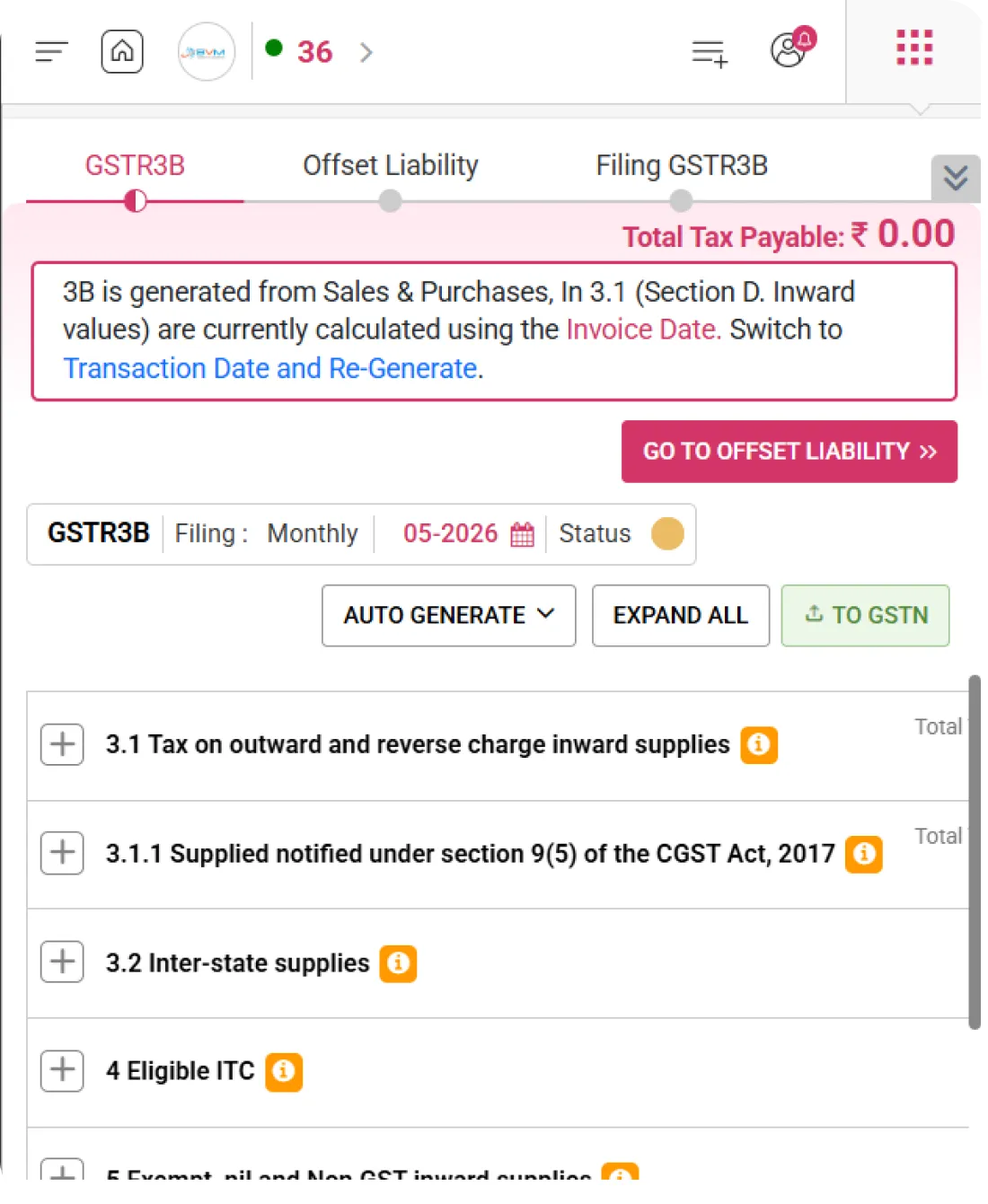
Manage GST payments easily with WhiteBooks. Offset GSTR-3B liability, utilize ITC, track ledgers, calculate interest, and ensure accurate GST compliance. WhiteBooks GST Payment & ITC Utilization in India is part of the WhiteBooks platform — a GSP-certified, cloud-first business management suite used by Indian SMBs and mid-market enterprises.

WhiteBooks manages GST payments with ledger tracking, liability calculation, ITC offsets, penalties, and filing status.

gstr3B-offsetLiability-dashboard
Ledger Overview

Electronic Ledger Snapshot

WhiteBooks displays real-time balances of the Electronic Cash Ledger and Electronic Credit Ledger based on the selected filing date, enabling users to verify available funds and ITC before submission.
gstr3B-offsetLiability-register

Cash Ledger Balance

Displays the available cash balance under IGST, CGST, SGST, and CESS, reflecting the amount deposited in the Electronic Cash Ledger. It enables users to verify sufficient funds are available for tax payment before liability offset.

Credit Ledger Balance

Shows the available Input Tax Credit (ITC) under each tax head, including IGST, CGST, SGST, and CESS. This helps users understand how much credit can be utilized to reduce their tax liability.

Closing Balance Date

Indicates the exact filing period date for which the ledger balances are displayed. This ensures clarity that the shown balances correspond to the selected return period and supports accurate reconciliation.
Tax Liability Summary

Section-Wise Tax Payable Details

WhiteBooks provides a comprehensive, system-driven summary of tax payable, categorizing liabilities under “Other than Reverse Charge” and “Reverse Charge,” along with applicable interest and late fees, enabling clear assessment before payment.
cashLedgerReport-offsetLiability-3B

Component-Wise Tax Payable

Displays tax liabilities under IGST, CGST, SGST/UTGST, and CESS, giving a clear breakdown of the total amount payable under each tax head for accurate review and reconciliation.

Reverse Charge Liability

Separately highlights tax payable under the Reverse Charge Mechanism (RCM), ensuring transparency in liabilities that must be discharged directly by the taxpayer.

Interest & Late Fee Summary

Includes applicable interest and late fee amounts within the payable summary, allowing users to view the complete financial obligation before proceeding with payment or filing.
ITC Utilization Management

Controlled ITC Set-Off

WhiteBooks enables system-driven utilization of available Input Tax Credit (ITC) against outstanding tax liabilities in line with GST adjustment rules, ensuring proper credit sequencing and controlled allocation before final offset.
offsetLiability-itcUtilization-3B

ITC Utilization

Displays the amount of ITC applied against IGST, CGST, SGST, and CESS liabilities, providing a clear view of how credit is being used to reduce the payable tax amount.

Auto Restriction Control

Implements built-in validation logic that restricts ITC usage beyond the available credit balance, ensuring compliance and preventing excess or incorrect adjustment.

Editable Allocation Option

Allows users to modify the ITC allocation within permitted limits before confirming the final offset, offering flexibility while maintaining regulatory compliance.
Offset Liability Processing

Tax Offset & Payment Execution

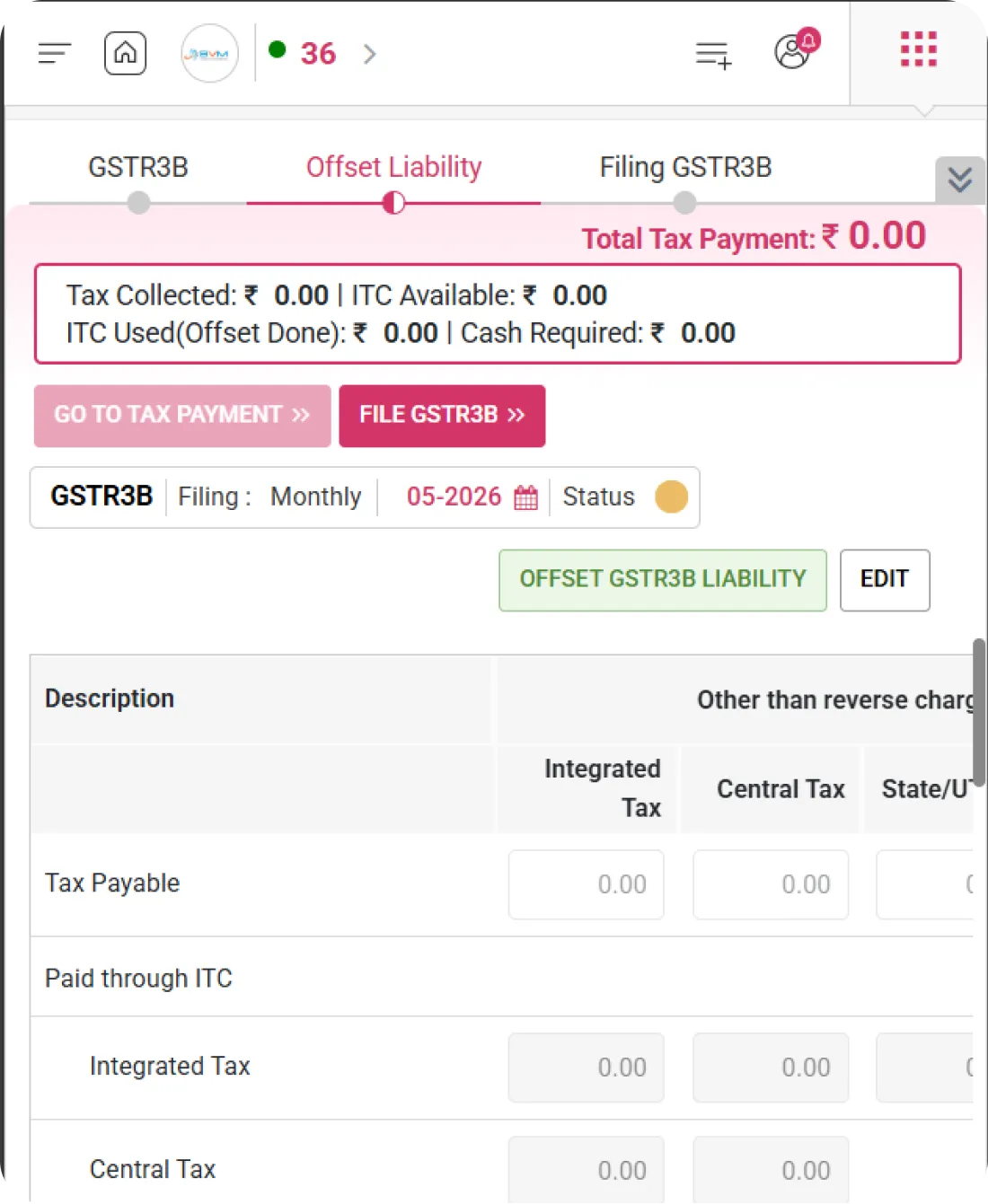
WhiteBooks facilitates system-driven adjustment of tax liability using available Input Tax Credit (ITC) and Electronic Cash Ledger balances, ensuring a controlled settlement process with immediate confirmation of updated balances after offsetting.
gstr3B-offsetLiability

Offset Liability Action

Initiates the liability adjustment process, enabling the system to apply available ITC and cash balances against the total tax payable.

Cash Ledger Adjustment

Applies the remaining payable amount through the available cash balance after ITC utilization, ensuring complete settlement of tax dues.

Real-Time Balance Update

Instantly reflects updated ledger balances and liability status after the offset action, providing transparency and confirmation of successful adjustment.
Interest & Late Fee Handling

Interest & Late Fee Computation

WhiteBooks manages the calculation and reporting of interest on delayed tax payments along with applicable late fees, providing a clear view of dues and payments to ensure accurate compliance before final submission.
gstr3B-offsetLiability-register

Interest Payables

Displays the calculated interest amount applicable for the selected tax period based on outstanding liability and delay duration.

Interest Paid in Cash

Shows the amount paid towards interest through the cash ledger, helping users track settlement against the payable interest.

Late Fee Display

Reflects the applicable late filing fee for the return period, enabling users to review the total additional charges before filing.
Period-Based Filing

Return Period & Filing Status

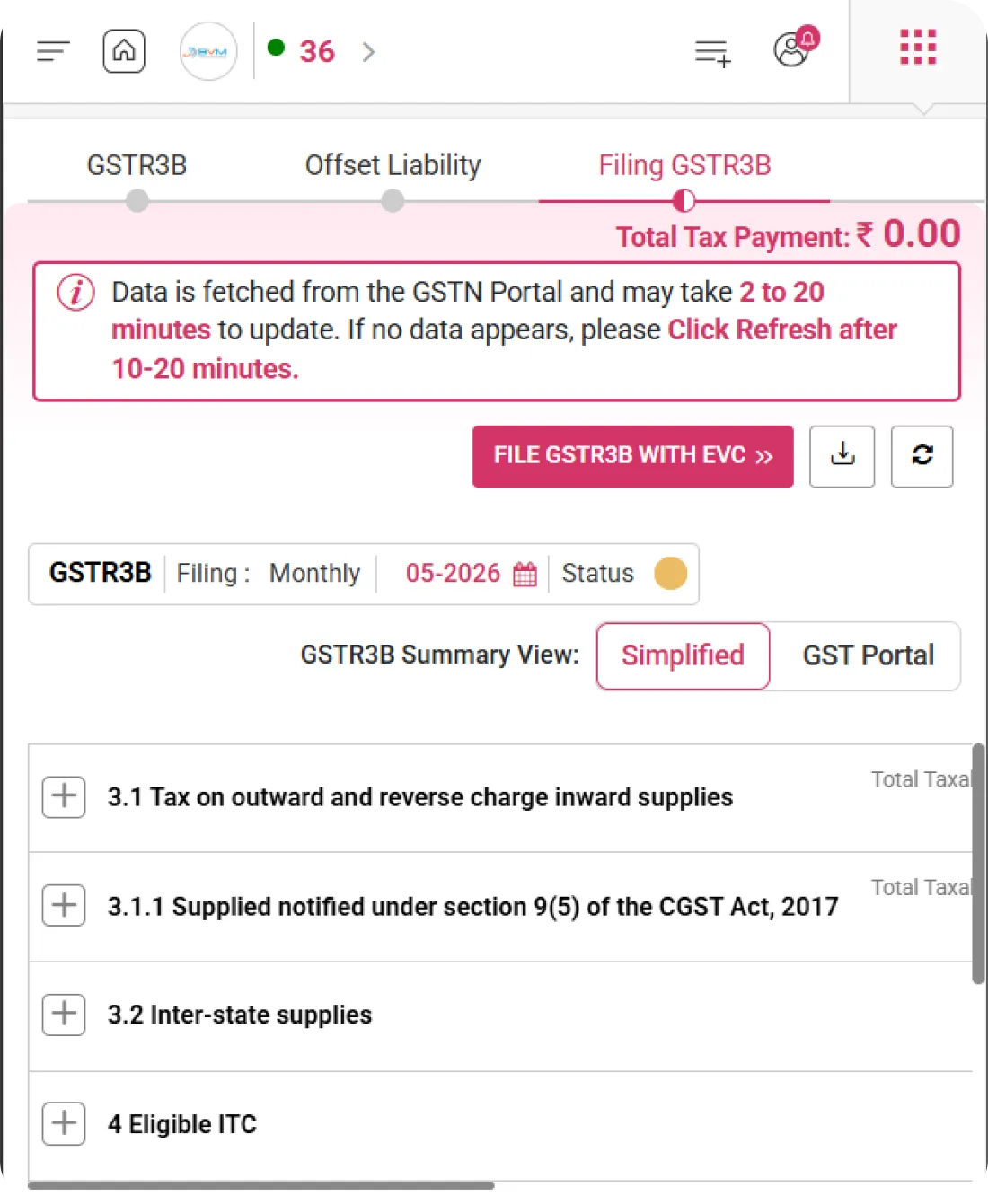
WhiteBooks enables users to select the applicable return filing period while displaying the current return status, providing clear visibility into filing frequency, selected tax period, and progress stage within the filing cycle.
gstr3B-offsetLiability-filingPeriod

Filing Frequency Indicator

Displays whether the return is filed on a Monthly or Quarterly basis, helping users identify the applicable compliance cycle.

Tax Period Selector

Displays the selected tax month along with the relevant financial year, clearly indicating the exact return period for which the filing is being prepared or processed.

Filing Status Badge

Indicates the current stage of the return, such as Not Started, In Progress, Submitted, or Filed, ensuring real-time status visibility.
Get started with WhiteBooks
WhiteBooks automates GST tax payment and ITC offset, applies correct tax sequence, settles cash dues, and updates ledgers in real time for accurate, timely closure.
No Credit Card Required

All the Pricing you will need in an Accounting Software

WhiteBooks manages GST payments with ledger tracking, liability calculation, ITC offsets, penalties, and filing status.

features-banner
Tax Liability Summary

Section-Wise Tax Payable Details

WhiteBooks provides a comprehensive, system-driven summary of tax payable, categorizing liabilities under “Other than Reverse Charge” and “Reverse Charge,” along with applicable interest and late fees, enabling clear assessment before payment.

Component-Wise Tax Payable

Displays tax liabilities under IGST, CGST, SGST/UTGST, and CESS, giving a clear breakdown of the total amount payable under each tax head for accurate review and reconciliation.

Reverse Charge Liability

Separately highlights tax payable under the Reverse Charge Mechanism (RCM), ensuring transparency in liabilities that must be discharged directly by the taxpayer.

Interest & Late Fee Summary

Includes applicable interest and late fee amounts within the payable summary, allowing users to view the complete financial obligation before proceeding with payment or filing.
Tax Liability Summary

Section-Wise Tax Payable Details

WhiteBooks provides a comprehensive, system-driven summary of tax payable, categorizing liabilities under “Other than Reverse Charge” and “Reverse Charge,” along with applicable interest and late fees, enabling clear assessment before payment.

Component-Wise Tax Payable

Displays tax liabilities under IGST, CGST, SGST/UTGST, and CESS, giving a clear breakdown of the total amount payable under each tax head for accurate review and reconciliation.

Reverse Charge Liability

Separately highlights tax payable under the Reverse Charge Mechanism (RCM), ensuring transparency in liabilities that must be discharged directly by the taxpayer.

Interest & Late Fee Summary

Includes applicable interest and late fee amounts within the payable summary, allowing users to view the complete financial obligation before proceeding with payment or filing.
Get started with WhiteBooks
WhiteBooks automates GST tax payment and ITC offset, applies correct tax sequence, settles cash dues, and updates ledgers in real time for accurate, timely closure.
No Credit Card Required
Ledger Overview

Electronic Ledger Snapshot

WhiteBooks displays real-time balances of the Electronic Cash Ledger and Electronic Credit Ledger based on the selected filing date, enabling users to verify available funds and ITC before submission.

Cash Ledger Balance

Displays the available cash balance under IGST, CGST, SGST, and CESS, reflecting the amount deposited in the Electronic Cash Ledger. It enables users to verify sufficient funds are available for tax payment before liability offset.

Credit Ledger Balance

Shows the available Input Tax Credit (ITC) under each tax head, including IGST, CGST, SGST, and CESS. This helps users understand how much credit can be utilized to reduce their tax liability.

Closing Balance Date

Indicates the exact filing period date for which the ledger balances are displayed. This ensures clarity that the shown balances correspond to the selected return period and supports accurate reconciliation.
Ledger Overview

Electronic Ledger Snapshot

WhiteBooks displays real-time balances of the Electronic Cash Ledger and Electronic Credit Ledger based on the selected filing date, enabling users to verify available funds and ITC before submission.

Cash Ledger Balance

Displays the available cash balance under IGST, CGST, SGST, and CESS, reflecting the amount deposited in the Electronic Cash Ledger. It enables users to verify sufficient funds are available for tax payment before liability offset.

Credit Ledger Balance

Shows the available Input Tax Credit (ITC) under each tax head, including IGST, CGST, SGST, and CESS. This helps users understand how much credit can be utilized to reduce their tax liability.

Closing Balance Date

Indicates the exact filing period date for which the ledger balances are displayed. This ensures clarity that the shown balances correspond to the selected return period and supports accurate reconciliation.
Get started with WhiteBooks
WhiteBooks automates GST tax payment and ITC offset, applies correct tax sequence, settles cash dues, and updates ledgers in real time for accurate, timely closure.
No Credit Card Required
ITC Utilization Management

Controlled ITC Set-Off

WhiteBooks enables system-driven utilization of available Input Tax Credit (ITC) against outstanding tax liabilities in line with GST adjustment rules, ensuring proper credit sequencing and controlled allocation before final offset.

ITC Utilization

Displays the amount of ITC applied against IGST, CGST, SGST, and CESS liabilities, providing a clear view of how credit is being used to reduce the payable tax amount.

Auto Restriction Control

Implements built-in validation logic that restricts ITC usage beyond the available credit balance, ensuring compliance and preventing excess or incorrect adjustment.

Editable Allocation Option

Allows users to modify the ITC allocation within permitted limits before confirming the final offset, offering flexibility while maintaining regulatory compliance.
ITC Utilization Management

Controlled ITC Set-Off

WhiteBooks enables system-driven utilization of available Input Tax Credit (ITC) against outstanding tax liabilities in line with GST adjustment rules, ensuring proper credit sequencing and controlled allocation before final offset.

ITC Utilization

Displays the amount of ITC applied against IGST, CGST, SGST, and CESS liabilities, providing a clear view of how credit is being used to reduce the payable tax amount.

Auto Restriction Control

Implements built-in validation logic that restricts ITC usage beyond the available credit balance, ensuring compliance and preventing excess or incorrect adjustment.

Editable Allocation Option

Allows users to modify the ITC allocation within permitted limits before confirming the final offset, offering flexibility while maintaining regulatory compliance.
Get started with WhiteBooks
WhiteBooks automates GST tax payment and ITC offset, applies correct tax sequence, settles cash dues, and updates ledgers in real time for accurate, timely closure.
No Credit Card Required
Offset Liability Processing

Tax Offset & Payment Execution

WhiteBooks facilitates system-driven adjustment of tax liability using available Input Tax Credit (ITC) and Electronic Cash Ledger balances, ensuring a controlled settlement process with immediate confirmation of updated balances after offsetting.

Offset Liability Action

Initiates the liability adjustment process, enabling the system to apply available ITC and cash balances against the total tax payable.

Cash Ledger Adjustment

Applies the remaining payable amount through the available cash balance after ITC utilization, ensuring complete settlement of tax dues.

Real-Time Balance Update

Instantly reflects updated ledger balances and liability status after the offset action, providing transparency and confirmation of successful adjustment.
Offset Liability Processing

Tax Offset & Payment Execution

WhiteBooks facilitates system-driven adjustment of tax liability using available Input Tax Credit (ITC) and Electronic Cash Ledger balances, ensuring a controlled settlement process with immediate confirmation of updated balances after offsetting.

Offset Liability Action

Initiates the liability adjustment process, enabling the system to apply available ITC and cash balances against the total tax payable.

Cash Ledger Adjustment

Applies the remaining payable amount through the available cash balance after ITC utilization, ensuring complete settlement of tax dues.

Real-Time Balance Update

Instantly reflects updated ledger balances and liability status after the offset action, providing transparency and confirmation of successful adjustment.
Get started with WhiteBooks
WhiteBooks automates GST tax payment and ITC offset, applies correct tax sequence, settles cash dues, and updates ledgers in real time for accurate, timely closure.
No Credit Card Required
Interest & Late Fee Handling

Interest & Late Fee Computation

WhiteBooks manages the calculation and reporting of interest on delayed tax payments along with applicable late fees, providing a clear view of dues and payments to ensure accurate compliance before final submission.

Interest Payables

Displays the calculated interest amount applicable for the selected tax period based on outstanding liability and delay duration.

Interest Paid in Cash

Shows the amount paid towards interest through the cash ledger, helping users track settlement against the payable interest.

Late Fee Display

Reflects the applicable late filing fee for the return period, enabling users to review the total additional charges before filing.
Interest & Late Fee Handling

Interest & Late Fee Computation

WhiteBooks manages the calculation and reporting of interest on delayed tax payments along with applicable late fees, providing a clear view of dues and payments to ensure accurate compliance before final submission.

Interest Payables

Displays the calculated interest amount applicable for the selected tax period based on outstanding liability and delay duration.

Interest Paid in Cash

Shows the amount paid towards interest through the cash ledger, helping users track settlement against the payable interest.

Late Fee Display

Reflects the applicable late filing fee for the return period, enabling users to review the total additional charges before filing.
Get started with WhiteBooks
WhiteBooks automates GST tax payment and ITC offset, applies correct tax sequence, settles cash dues, and updates ledgers in real time for accurate, timely closure.
No Credit Card Required
Period-Based Filing

Return Period & Filing Status

WhiteBooks enables users to select the applicable return filing period while displaying the current return status, providing clear visibility into filing frequency, selected tax period, and progress stage within the filing cycle.

Filing Frequency Indicator

Displays whether the return is filed on a Monthly or Quarterly basis, helping users identify the applicable compliance cycle.

Tax Period Selector

Displays the selected tax month along with the relevant financial year, clearly indicating the exact return period for which the filing is being prepared or processed.

Filing Status Badge

Indicates the current stage of the return, such as Not Started, In Progress, Submitted, or Filed, ensuring real-time status visibility.
Period-Based Filing

Return Period & Filing Status

WhiteBooks enables users to select the applicable return filing period while displaying the current return status, providing clear visibility into filing frequency, selected tax period, and progress stage within the filing cycle.

Filing Frequency Indicator

Displays whether the return is filed on a Monthly or Quarterly basis, helping users identify the applicable compliance cycle.

Tax Period Selector

Displays the selected tax month along with the relevant financial year, clearly indicating the exact return period for which the filing is being prepared or processed.

Filing Status Badge

Indicates the current stage of the return, such as Not Started, In Progress, Submitted, or Filed, ensuring real-time status visibility.
Get started with WhiteBooks
WhiteBooks automates GST tax payment and ITC offset, applies correct tax sequence, settles cash dues, and updates ledgers in real time for accurate, timely closure.
No Credit Card Required

All the Solutions you will need in an Accounting Software

WhiteBooks manages GST payments with ledger tracking, liability calculation, ITC offsets, penalties, and filing status.

features-banner
Tax Liability Summary

Section-Wise Tax Payable Details

WhiteBooks provides a comprehensive, system-driven summary of tax payable, categorizing liabilities under “Other than Reverse Charge” and “Reverse Charge,” along with applicable interest and late fees, enabling clear assessment before payment.

Component-Wise Tax Payable

Displays tax liabilities under IGST, CGST, SGST/UTGST, and CESS, giving a clear breakdown of the total amount payable under each tax head for accurate review and reconciliation.

Reverse Charge Liability

Separately highlights tax payable under the Reverse Charge Mechanism (RCM), ensuring transparency in liabilities that must be discharged directly by the taxpayer.

Interest & Late Fee Summary

Includes applicable interest and late fee amounts within the payable summary, allowing users to view the complete financial obligation before proceeding with payment or filing.
Tax Liability Summary

Section-Wise Tax Payable Details

WhiteBooks provides a comprehensive, system-driven summary of tax payable, categorizing liabilities under “Other than Reverse Charge” and “Reverse Charge,” along with applicable interest and late fees, enabling clear assessment before payment.

Component-Wise Tax Payable

Displays tax liabilities under IGST, CGST, SGST/UTGST, and CESS, giving a clear breakdown of the total amount payable under each tax head for accurate review and reconciliation.

Reverse Charge Liability

Separately highlights tax payable under the Reverse Charge Mechanism (RCM), ensuring transparency in liabilities that must be discharged directly by the taxpayer.

Interest & Late Fee Summary

Includes applicable interest and late fee amounts within the payable summary, allowing users to view the complete financial obligation before proceeding with payment or filing.
Get started with WhiteBooks
WhiteBooks automates GST tax payment and ITC offset, applies correct tax sequence, settles cash dues, and updates ledgers in real time for accurate, timely closure.
No Credit Card Required
Ledger Overview

Electronic Ledger Snapshot

WhiteBooks displays real-time balances of the Electronic Cash Ledger and Electronic Credit Ledger based on the selected filing date, enabling users to verify available funds and ITC before submission.

Cash Ledger Balance

Displays the available cash balance under IGST, CGST, SGST, and CESS, reflecting the amount deposited in the Electronic Cash Ledger. It enables users to verify sufficient funds are available for tax payment before liability offset.

Credit Ledger Balance

Shows the available Input Tax Credit (ITC) under each tax head, including IGST, CGST, SGST, and CESS. This helps users understand how much credit can be utilized to reduce their tax liability.

Closing Balance Date

Indicates the exact filing period date for which the ledger balances are displayed. This ensures clarity that the shown balances correspond to the selected return period and supports accurate reconciliation.
Ledger Overview

Electronic Ledger Snapshot

WhiteBooks displays real-time balances of the Electronic Cash Ledger and Electronic Credit Ledger based on the selected filing date, enabling users to verify available funds and ITC before submission.

Cash Ledger Balance

Displays the available cash balance under IGST, CGST, SGST, and CESS, reflecting the amount deposited in the Electronic Cash Ledger. It enables users to verify sufficient funds are available for tax payment before liability offset.

Credit Ledger Balance

Shows the available Input Tax Credit (ITC) under each tax head, including IGST, CGST, SGST, and CESS. This helps users understand how much credit can be utilized to reduce their tax liability.

Closing Balance Date

Indicates the exact filing period date for which the ledger balances are displayed. This ensures clarity that the shown balances correspond to the selected return period and supports accurate reconciliation.
Get started with WhiteBooks
WhiteBooks automates GST tax payment and ITC offset, applies correct tax sequence, settles cash dues, and updates ledgers in real time for accurate, timely closure.
No Credit Card Required
ITC Utilization Management

Controlled ITC Set-Off

WhiteBooks enables system-driven utilization of available Input Tax Credit (ITC) against outstanding tax liabilities in line with GST adjustment rules, ensuring proper credit sequencing and controlled allocation before final offset.

ITC Utilization

Displays the amount of ITC applied against IGST, CGST, SGST, and CESS liabilities, providing a clear view of how credit is being used to reduce the payable tax amount.

Auto Restriction Control

Implements built-in validation logic that restricts ITC usage beyond the available credit balance, ensuring compliance and preventing excess or incorrect adjustment.

Editable Allocation Option

Allows users to modify the ITC allocation within permitted limits before confirming the final offset, offering flexibility while maintaining regulatory compliance.
ITC Utilization Management

Controlled ITC Set-Off

WhiteBooks enables system-driven utilization of available Input Tax Credit (ITC) against outstanding tax liabilities in line with GST adjustment rules, ensuring proper credit sequencing and controlled allocation before final offset.

ITC Utilization

Displays the amount of ITC applied against IGST, CGST, SGST, and CESS liabilities, providing a clear view of how credit is being used to reduce the payable tax amount.

Auto Restriction Control

Implements built-in validation logic that restricts ITC usage beyond the available credit balance, ensuring compliance and preventing excess or incorrect adjustment.

Editable Allocation Option

Allows users to modify the ITC allocation within permitted limits before confirming the final offset, offering flexibility while maintaining regulatory compliance.
Get started with WhiteBooks
WhiteBooks automates GST tax payment and ITC offset, applies correct tax sequence, settles cash dues, and updates ledgers in real time for accurate, timely closure.
No Credit Card Required
Offset Liability Processing

Tax Offset & Payment Execution

WhiteBooks facilitates system-driven adjustment of tax liability using available Input Tax Credit (ITC) and Electronic Cash Ledger balances, ensuring a controlled settlement process with immediate confirmation of updated balances after offsetting.

Offset Liability Action

Initiates the liability adjustment process, enabling the system to apply available ITC and cash balances against the total tax payable.

Cash Ledger Adjustment

Applies the remaining payable amount through the available cash balance after ITC utilization, ensuring complete settlement of tax dues.

Real-Time Balance Update

Instantly reflects updated ledger balances and liability status after the offset action, providing transparency and confirmation of successful adjustment.
Offset Liability Processing

Tax Offset & Payment Execution

WhiteBooks facilitates system-driven adjustment of tax liability using available Input Tax Credit (ITC) and Electronic Cash Ledger balances, ensuring a controlled settlement process with immediate confirmation of updated balances after offsetting.

Offset Liability Action

Initiates the liability adjustment process, enabling the system to apply available ITC and cash balances against the total tax payable.

Cash Ledger Adjustment

Applies the remaining payable amount through the available cash balance after ITC utilization, ensuring complete settlement of tax dues.

Real-Time Balance Update

Instantly reflects updated ledger balances and liability status after the offset action, providing transparency and confirmation of successful adjustment.
Get started with WhiteBooks
WhiteBooks automates GST tax payment and ITC offset, applies correct tax sequence, settles cash dues, and updates ledgers in real time for accurate, timely closure.
No Credit Card Required
Interest & Late Fee Handling

Interest & Late Fee Computation

WhiteBooks manages the calculation and reporting of interest on delayed tax payments along with applicable late fees, providing a clear view of dues and payments to ensure accurate compliance before final submission.

Interest Payables

Displays the calculated interest amount applicable for the selected tax period based on outstanding liability and delay duration.

Interest Paid in Cash

Shows the amount paid towards interest through the cash ledger, helping users track settlement against the payable interest.

Late Fee Display

Reflects the applicable late filing fee for the return period, enabling users to review the total additional charges before filing.
Interest & Late Fee Handling

Interest & Late Fee Computation

WhiteBooks manages the calculation and reporting of interest on delayed tax payments along with applicable late fees, providing a clear view of dues and payments to ensure accurate compliance before final submission.

Interest Payables

Displays the calculated interest amount applicable for the selected tax period based on outstanding liability and delay duration.

Interest Paid in Cash

Shows the amount paid towards interest through the cash ledger, helping users track settlement against the payable interest.

Late Fee Display

Reflects the applicable late filing fee for the return period, enabling users to review the total additional charges before filing.
Get started with WhiteBooks
WhiteBooks automates GST tax payment and ITC offset, applies correct tax sequence, settles cash dues, and updates ledgers in real time for accurate, timely closure.
No Credit Card Required
Period-Based Filing

Return Period & Filing Status

WhiteBooks enables users to select the applicable return filing period while displaying the current return status, providing clear visibility into filing frequency, selected tax period, and progress stage within the filing cycle.

Filing Frequency Indicator

Displays whether the return is filed on a Monthly or Quarterly basis, helping users identify the applicable compliance cycle.

Tax Period Selector

Displays the selected tax month along with the relevant financial year, clearly indicating the exact return period for which the filing is being prepared or processed.

Filing Status Badge

Indicates the current stage of the return, such as Not Started, In Progress, Submitted, or Filed, ensuring real-time status visibility.
Period-Based Filing

Return Period & Filing Status

WhiteBooks enables users to select the applicable return filing period while displaying the current return status, providing clear visibility into filing frequency, selected tax period, and progress stage within the filing cycle.

Filing Frequency Indicator

Displays whether the return is filed on a Monthly or Quarterly basis, helping users identify the applicable compliance cycle.

Tax Period Selector

Displays the selected tax month along with the relevant financial year, clearly indicating the exact return period for which the filing is being prepared or processed.

Filing Status Badge

Indicates the current stage of the return, such as Not Started, In Progress, Submitted, or Filed, ensuring real-time status visibility.
Get started with WhiteBooks
WhiteBooks automates GST tax payment and ITC offset, applies correct tax sequence, settles cash dues, and updates ledgers in real time for accurate, timely closure.
No Credit Card Required

All the Partners you will need in an Accounting Software

WhiteBooks manages GST payments with ledger tracking, liability calculation, ITC offsets, penalties, and filing status.

features-banner
Tax Liability Summary

Section-Wise Tax Payable Details

WhiteBooks provides a comprehensive, system-driven summary of tax payable, categorizing liabilities under “Other than Reverse Charge” and “Reverse Charge,” along with applicable interest and late fees, enabling clear assessment before payment.

Component-Wise Tax Payable

Displays tax liabilities under IGST, CGST, SGST/UTGST, and CESS, giving a clear breakdown of the total amount payable under each tax head for accurate review and reconciliation.

Reverse Charge Liability

Separately highlights tax payable under the Reverse Charge Mechanism (RCM), ensuring transparency in liabilities that must be discharged directly by the taxpayer.

Interest & Late Fee Summary

Includes applicable interest and late fee amounts within the payable summary, allowing users to view the complete financial obligation before proceeding with payment or filing.
Tax Liability Summary

Section-Wise Tax Payable Details

WhiteBooks provides a comprehensive, system-driven summary of tax payable, categorizing liabilities under “Other than Reverse Charge” and “Reverse Charge,” along with applicable interest and late fees, enabling clear assessment before payment.

Component-Wise Tax Payable

Displays tax liabilities under IGST, CGST, SGST/UTGST, and CESS, giving a clear breakdown of the total amount payable under each tax head for accurate review and reconciliation.

Reverse Charge Liability

Separately highlights tax payable under the Reverse Charge Mechanism (RCM), ensuring transparency in liabilities that must be discharged directly by the taxpayer.

Interest & Late Fee Summary

Includes applicable interest and late fee amounts within the payable summary, allowing users to view the complete financial obligation before proceeding with payment or filing.
Get started with WhiteBooks
WhiteBooks automates GST tax payment and ITC offset, applies correct tax sequence, settles cash dues, and updates ledgers in real time for accurate, timely closure.
No Credit Card Required
Ledger Overview

Electronic Ledger Snapshot

WhiteBooks displays real-time balances of the Electronic Cash Ledger and Electronic Credit Ledger based on the selected filing date, enabling users to verify available funds and ITC before submission.

Cash Ledger Balance

Displays the available cash balance under IGST, CGST, SGST, and CESS, reflecting the amount deposited in the Electronic Cash Ledger. It enables users to verify sufficient funds are available for tax payment before liability offset.

Credit Ledger Balance

Shows the available Input Tax Credit (ITC) under each tax head, including IGST, CGST, SGST, and CESS. This helps users understand how much credit can be utilized to reduce their tax liability.

Closing Balance Date

Indicates the exact filing period date for which the ledger balances are displayed. This ensures clarity that the shown balances correspond to the selected return period and supports accurate reconciliation.
Ledger Overview

Electronic Ledger Snapshot

WhiteBooks displays real-time balances of the Electronic Cash Ledger and Electronic Credit Ledger based on the selected filing date, enabling users to verify available funds and ITC before submission.

Cash Ledger Balance

Displays the available cash balance under IGST, CGST, SGST, and CESS, reflecting the amount deposited in the Electronic Cash Ledger. It enables users to verify sufficient funds are available for tax payment before liability offset.

Credit Ledger Balance

Shows the available Input Tax Credit (ITC) under each tax head, including IGST, CGST, SGST, and CESS. This helps users understand how much credit can be utilized to reduce their tax liability.

Closing Balance Date

Indicates the exact filing period date for which the ledger balances are displayed. This ensures clarity that the shown balances correspond to the selected return period and supports accurate reconciliation.
Get started with WhiteBooks
WhiteBooks automates GST tax payment and ITC offset, applies correct tax sequence, settles cash dues, and updates ledgers in real time for accurate, timely closure.
No Credit Card Required
ITC Utilization Management

Controlled ITC Set-Off

WhiteBooks enables system-driven utilization of available Input Tax Credit (ITC) against outstanding tax liabilities in line with GST adjustment rules, ensuring proper credit sequencing and controlled allocation before final offset.

ITC Utilization

Displays the amount of ITC applied against IGST, CGST, SGST, and CESS liabilities, providing a clear view of how credit is being used to reduce the payable tax amount.

Auto Restriction Control

Implements built-in validation logic that restricts ITC usage beyond the available credit balance, ensuring compliance and preventing excess or incorrect adjustment.

Editable Allocation Option

Allows users to modify the ITC allocation within permitted limits before confirming the final offset, offering flexibility while maintaining regulatory compliance.
ITC Utilization Management

Controlled ITC Set-Off

WhiteBooks enables system-driven utilization of available Input Tax Credit (ITC) against outstanding tax liabilities in line with GST adjustment rules, ensuring proper credit sequencing and controlled allocation before final offset.

ITC Utilization

Displays the amount of ITC applied against IGST, CGST, SGST, and CESS liabilities, providing a clear view of how credit is being used to reduce the payable tax amount.

Auto Restriction Control

Implements built-in validation logic that restricts ITC usage beyond the available credit balance, ensuring compliance and preventing excess or incorrect adjustment.

Editable Allocation Option

Allows users to modify the ITC allocation within permitted limits before confirming the final offset, offering flexibility while maintaining regulatory compliance.
Get started with WhiteBooks
WhiteBooks automates GST tax payment and ITC offset, applies correct tax sequence, settles cash dues, and updates ledgers in real time for accurate, timely closure.
No Credit Card Required
Offset Liability Processing

Tax Offset & Payment Execution

WhiteBooks facilitates system-driven adjustment of tax liability using available Input Tax Credit (ITC) and Electronic Cash Ledger balances, ensuring a controlled settlement process with immediate confirmation of updated balances after offsetting.

Offset Liability Action

Initiates the liability adjustment process, enabling the system to apply available ITC and cash balances against the total tax payable.

Cash Ledger Adjustment

Applies the remaining payable amount through the available cash balance after ITC utilization, ensuring complete settlement of tax dues.

Real-Time Balance Update

Instantly reflects updated ledger balances and liability status after the offset action, providing transparency and confirmation of successful adjustment.
Offset Liability Processing

Tax Offset & Payment Execution

WhiteBooks facilitates system-driven adjustment of tax liability using available Input Tax Credit (ITC) and Electronic Cash Ledger balances, ensuring a controlled settlement process with immediate confirmation of updated balances after offsetting.

Offset Liability Action

Initiates the liability adjustment process, enabling the system to apply available ITC and cash balances against the total tax payable.

Cash Ledger Adjustment

Applies the remaining payable amount through the available cash balance after ITC utilization, ensuring complete settlement of tax dues.

Real-Time Balance Update

Instantly reflects updated ledger balances and liability status after the offset action, providing transparency and confirmation of successful adjustment.
Get started with WhiteBooks
WhiteBooks automates GST tax payment and ITC offset, applies correct tax sequence, settles cash dues, and updates ledgers in real time for accurate, timely closure.
No Credit Card Required
Interest & Late Fee Handling

Interest & Late Fee Computation

WhiteBooks manages the calculation and reporting of interest on delayed tax payments along with applicable late fees, providing a clear view of dues and payments to ensure accurate compliance before final submission.

Interest Payables

Displays the calculated interest amount applicable for the selected tax period based on outstanding liability and delay duration.

Interest Paid in Cash

Shows the amount paid towards interest through the cash ledger, helping users track settlement against the payable interest.

Late Fee Display

Reflects the applicable late filing fee for the return period, enabling users to review the total additional charges before filing.
Interest & Late Fee Handling

Interest & Late Fee Computation

WhiteBooks manages the calculation and reporting of interest on delayed tax payments along with applicable late fees, providing a clear view of dues and payments to ensure accurate compliance before final submission.

Interest Payables

Displays the calculated interest amount applicable for the selected tax period based on outstanding liability and delay duration.

Interest Paid in Cash

Shows the amount paid towards interest through the cash ledger, helping users track settlement against the payable interest.

Late Fee Display

Reflects the applicable late filing fee for the return period, enabling users to review the total additional charges before filing.
Get started with WhiteBooks
WhiteBooks automates GST tax payment and ITC offset, applies correct tax sequence, settles cash dues, and updates ledgers in real time for accurate, timely closure.
No Credit Card Required
Period-Based Filing

Return Period & Filing Status

WhiteBooks enables users to select the applicable return filing period while displaying the current return status, providing clear visibility into filing frequency, selected tax period, and progress stage within the filing cycle.

Filing Frequency Indicator

Displays whether the return is filed on a Monthly or Quarterly basis, helping users identify the applicable compliance cycle.

Tax Period Selector

Displays the selected tax month along with the relevant financial year, clearly indicating the exact return period for which the filing is being prepared or processed.

Filing Status Badge

Indicates the current stage of the return, such as Not Started, In Progress, Submitted, or Filed, ensuring real-time status visibility.
Period-Based Filing

Return Period & Filing Status

WhiteBooks enables users to select the applicable return filing period while displaying the current return status, providing clear visibility into filing frequency, selected tax period, and progress stage within the filing cycle.

Filing Frequency Indicator

Displays whether the return is filed on a Monthly or Quarterly basis, helping users identify the applicable compliance cycle.

Tax Period Selector

Displays the selected tax month along with the relevant financial year, clearly indicating the exact return period for which the filing is being prepared or processed.

Filing Status Badge

Indicates the current stage of the return, such as Not Started, In Progress, Submitted, or Filed, ensuring real-time status visibility.
Get started with WhiteBooks
WhiteBooks automates GST tax payment and ITC offset, applies correct tax sequence, settles cash dues, and updates ledgers in real time for accurate, timely closure.
No Credit Card Required

All the Resources you will need in an Accounting Software

WhiteBooks manages GST payments with ledger tracking, liability calculation, ITC offsets, penalties, and filing status.

features-banner
Tax Liability Summary

Section-Wise Tax Payable Details

WhiteBooks provides a comprehensive, system-driven summary of tax payable, categorizing liabilities under “Other than Reverse Charge” and “Reverse Charge,” along with applicable interest and late fees, enabling clear assessment before payment.

Component-Wise Tax Payable

Displays tax liabilities under IGST, CGST, SGST/UTGST, and CESS, giving a clear breakdown of the total amount payable under each tax head for accurate review and reconciliation.

Reverse Charge Liability

Separately highlights tax payable under the Reverse Charge Mechanism (RCM), ensuring transparency in liabilities that must be discharged directly by the taxpayer.

Interest & Late Fee Summary

Includes applicable interest and late fee amounts within the payable summary, allowing users to view the complete financial obligation before proceeding with payment or filing.
Tax Liability Summary

Section-Wise Tax Payable Details

WhiteBooks provides a comprehensive, system-driven summary of tax payable, categorizing liabilities under “Other than Reverse Charge” and “Reverse Charge,” along with applicable interest and late fees, enabling clear assessment before payment.

Component-Wise Tax Payable

Displays tax liabilities under IGST, CGST, SGST/UTGST, and CESS, giving a clear breakdown of the total amount payable under each tax head for accurate review and reconciliation.

Reverse Charge Liability

Separately highlights tax payable under the Reverse Charge Mechanism (RCM), ensuring transparency in liabilities that must be discharged directly by the taxpayer.

Interest & Late Fee Summary

Includes applicable interest and late fee amounts within the payable summary, allowing users to view the complete financial obligation before proceeding with payment or filing.
Get started with WhiteBooks
WhiteBooks automates GST tax payment and ITC offset, applies correct tax sequence, settles cash dues, and updates ledgers in real time for accurate, timely closure.
No Credit Card Required
Ledger Overview

Electronic Ledger Snapshot

WhiteBooks displays real-time balances of the Electronic Cash Ledger and Electronic Credit Ledger based on the selected filing date, enabling users to verify available funds and ITC before submission.

Cash Ledger Balance

Displays the available cash balance under IGST, CGST, SGST, and CESS, reflecting the amount deposited in the Electronic Cash Ledger. It enables users to verify sufficient funds are available for tax payment before liability offset.

Credit Ledger Balance

Shows the available Input Tax Credit (ITC) under each tax head, including IGST, CGST, SGST, and CESS. This helps users understand how much credit can be utilized to reduce their tax liability.

Closing Balance Date

Indicates the exact filing period date for which the ledger balances are displayed. This ensures clarity that the shown balances correspond to the selected return period and supports accurate reconciliation.
Ledger Overview

Electronic Ledger Snapshot

WhiteBooks displays real-time balances of the Electronic Cash Ledger and Electronic Credit Ledger based on the selected filing date, enabling users to verify available funds and ITC before submission.

Cash Ledger Balance

Displays the available cash balance under IGST, CGST, SGST, and CESS, reflecting the amount deposited in the Electronic Cash Ledger. It enables users to verify sufficient funds are available for tax payment before liability offset.

Credit Ledger Balance

Shows the available Input Tax Credit (ITC) under each tax head, including IGST, CGST, SGST, and CESS. This helps users understand how much credit can be utilized to reduce their tax liability.

Closing Balance Date

Indicates the exact filing period date for which the ledger balances are displayed. This ensures clarity that the shown balances correspond to the selected return period and supports accurate reconciliation.
Get started with WhiteBooks
WhiteBooks automates GST tax payment and ITC offset, applies correct tax sequence, settles cash dues, and updates ledgers in real time for accurate, timely closure.
No Credit Card Required
ITC Utilization Management

Controlled ITC Set-Off

WhiteBooks enables system-driven utilization of available Input Tax Credit (ITC) against outstanding tax liabilities in line with GST adjustment rules, ensuring proper credit sequencing and controlled allocation before final offset.

ITC Utilization

Displays the amount of ITC applied against IGST, CGST, SGST, and CESS liabilities, providing a clear view of how credit is being used to reduce the payable tax amount.

Auto Restriction Control

Implements built-in validation logic that restricts ITC usage beyond the available credit balance, ensuring compliance and preventing excess or incorrect adjustment.

Editable Allocation Option

Allows users to modify the ITC allocation within permitted limits before confirming the final offset, offering flexibility while maintaining regulatory compliance.
ITC Utilization Management

Controlled ITC Set-Off

WhiteBooks enables system-driven utilization of available Input Tax Credit (ITC) against outstanding tax liabilities in line with GST adjustment rules, ensuring proper credit sequencing and controlled allocation before final offset.

ITC Utilization

Displays the amount of ITC applied against IGST, CGST, SGST, and CESS liabilities, providing a clear view of how credit is being used to reduce the payable tax amount.

Auto Restriction Control

Implements built-in validation logic that restricts ITC usage beyond the available credit balance, ensuring compliance and preventing excess or incorrect adjustment.

Editable Allocation Option

Allows users to modify the ITC allocation within permitted limits before confirming the final offset, offering flexibility while maintaining regulatory compliance.
Get started with WhiteBooks
WhiteBooks automates GST tax payment and ITC offset, applies correct tax sequence, settles cash dues, and updates ledgers in real time for accurate, timely closure.
No Credit Card Required
Offset Liability Processing

Tax Offset & Payment Execution

WhiteBooks facilitates system-driven adjustment of tax liability using available Input Tax Credit (ITC) and Electronic Cash Ledger balances, ensuring a controlled settlement process with immediate confirmation of updated balances after offsetting.

Offset Liability Action

Initiates the liability adjustment process, enabling the system to apply available ITC and cash balances against the total tax payable.

Cash Ledger Adjustment

Applies the remaining payable amount through the available cash balance after ITC utilization, ensuring complete settlement of tax dues.

Real-Time Balance Update

Instantly reflects updated ledger balances and liability status after the offset action, providing transparency and confirmation of successful adjustment.
Offset Liability Processing

Tax Offset & Payment Execution

WhiteBooks facilitates system-driven adjustment of tax liability using available Input Tax Credit (ITC) and Electronic Cash Ledger balances, ensuring a controlled settlement process with immediate confirmation of updated balances after offsetting.

Offset Liability Action

Initiates the liability adjustment process, enabling the system to apply available ITC and cash balances against the total tax payable.

Cash Ledger Adjustment

Applies the remaining payable amount through the available cash balance after ITC utilization, ensuring complete settlement of tax dues.

Real-Time Balance Update

Instantly reflects updated ledger balances and liability status after the offset action, providing transparency and confirmation of successful adjustment.
Get started with WhiteBooks
WhiteBooks automates GST tax payment and ITC offset, applies correct tax sequence, settles cash dues, and updates ledgers in real time for accurate, timely closure.
No Credit Card Required
Interest & Late Fee Handling

Interest & Late Fee Computation

WhiteBooks manages the calculation and reporting of interest on delayed tax payments along with applicable late fees, providing a clear view of dues and payments to ensure accurate compliance before final submission.

Interest Payables

Displays the calculated interest amount applicable for the selected tax period based on outstanding liability and delay duration.

Interest Paid in Cash

Shows the amount paid towards interest through the cash ledger, helping users track settlement against the payable interest.

Late Fee Display

Reflects the applicable late filing fee for the return period, enabling users to review the total additional charges before filing.
Interest & Late Fee Handling

Interest & Late Fee Computation

WhiteBooks manages the calculation and reporting of interest on delayed tax payments along with applicable late fees, providing a clear view of dues and payments to ensure accurate compliance before final submission.

Interest Payables

Displays the calculated interest amount applicable for the selected tax period based on outstanding liability and delay duration.

Interest Paid in Cash

Shows the amount paid towards interest through the cash ledger, helping users track settlement against the payable interest.

Late Fee Display

Reflects the applicable late filing fee for the return period, enabling users to review the total additional charges before filing.
Get started with WhiteBooks
WhiteBooks automates GST tax payment and ITC offset, applies correct tax sequence, settles cash dues, and updates ledgers in real time for accurate, timely closure.
No Credit Card Required
Period-Based Filing

Return Period & Filing Status

WhiteBooks enables users to select the applicable return filing period while displaying the current return status, providing clear visibility into filing frequency, selected tax period, and progress stage within the filing cycle.

Filing Frequency Indicator

Displays whether the return is filed on a Monthly or Quarterly basis, helping users identify the applicable compliance cycle.

Tax Period Selector

Displays the selected tax month along with the relevant financial year, clearly indicating the exact return period for which the filing is being prepared or processed.

Filing Status Badge

Indicates the current stage of the return, such as Not Started, In Progress, Submitted, or Filed, ensuring real-time status visibility.
Period-Based Filing

Return Period & Filing Status

WhiteBooks enables users to select the applicable return filing period while displaying the current return status, providing clear visibility into filing frequency, selected tax period, and progress stage within the filing cycle.

Filing Frequency Indicator

Displays whether the return is filed on a Monthly or Quarterly basis, helping users identify the applicable compliance cycle.

Tax Period Selector

Displays the selected tax month along with the relevant financial year, clearly indicating the exact return period for which the filing is being prepared or processed.

Filing Status Badge

Indicates the current stage of the return, such as Not Started, In Progress, Submitted, or Filed, ensuring real-time status visibility.
Get started with WhiteBooks
WhiteBooks automates GST tax payment and ITC offset, applies correct tax sequence, settles cash dues, and updates ledgers in real time for accurate, timely closure.
No Credit Card Required

Frequently Asked Questions

We have put together some commonly asked questions

WhiteBooks gives you a comprehensive summary of tax payable by categorizing liabilities under "Other than Reverse Charge" and "Reverse Charge." You can view tax components along with applicable interest and late fee — helping you clearly assess your total financial obligation before proceeding with payment or filing.

WhiteBooks displays real-time balances of the Electronic Cash Ledger and Electronic Credit Ledger based on the selected filing date. You can verify available cash and credit balances under IGST, CGST, SGST, and CESS — ensuring sufficient funds and ITC are in place before you submit your return.

Yes. WhiteBooks enables systematic utilization of available Input Tax Credit against outstanding liabilities in accordance with prescribed GST adjustment rules. It includes built-in validation that restricts ITC usage beyond available credit balance, and allows you to modify allocations within permitted limits before confirming the final offset.

WhiteBooks facilitates the final adjustment of tax liability by utilizing available ITC and Electronic Cash Ledger balances. Once the offset action is initiated, the system applies available credit and cash against total tax payable and instantly reflects updated ledger balances — providing full transparency and confirmation of successful adjustment.

WhiteBooks manages the calculation and reporting of interest payable on delayed tax payments along with applicable late fees for return filing. It displays the calculated interest amount, tracks what has been paid through the cash ledger, and reflects the applicable late filing fee — giving you a complete picture of all additional charges before final submission.

Yes. WhiteBooks enables you to select the applicable return filing period while displaying the current status of the return. It shows whether your filing frequency is Monthly or Quarterly, the selected tax month with the relevant financial year, and the current filing stage such as Not Started, In Progress, Submitted, or Filed — ensuring real-time visibility throughout the filing cycle.

WhiteBooks displays tax liabilities separately under IGST, CGST, SGST/UTGST, and CESS — giving you a clear breakdown of the total amount payable under each tax head. This helps you accurately review and reconcile each component before proceeding with the offset or payment process.

WhiteBooks separately highlights tax payable under the Reverse Charge Mechanism (RCM), ensuring complete transparency in liabilities that must be discharged directly by the taxpayer. This clear separation helps you identify and settle RCM obligations without confusion alongside your regular tax liability.