Follow us on our LinkedIn page

Reconcile GSTR-1, e-Invoice & e-WayBill Data — All in One Portal Workspace

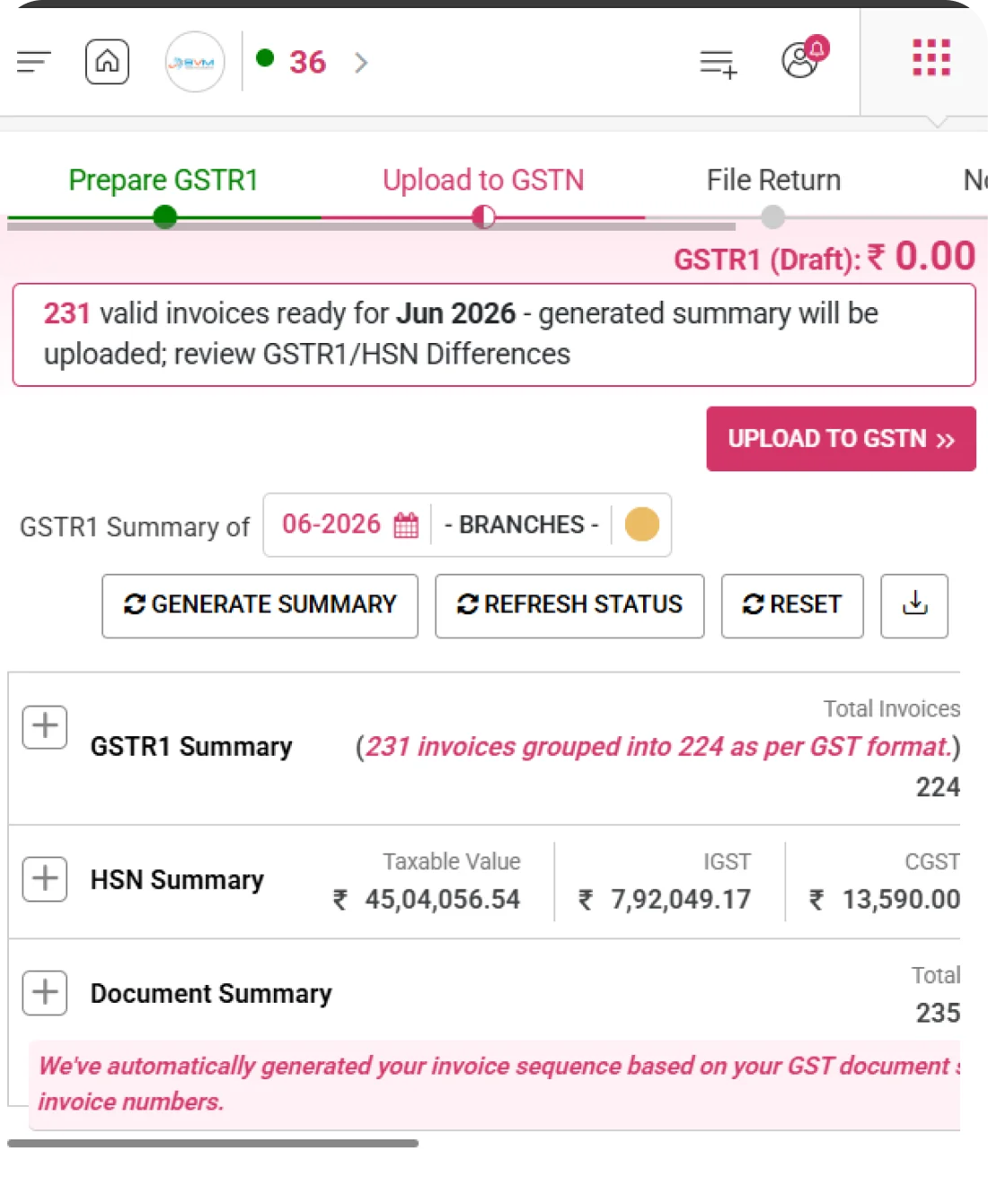
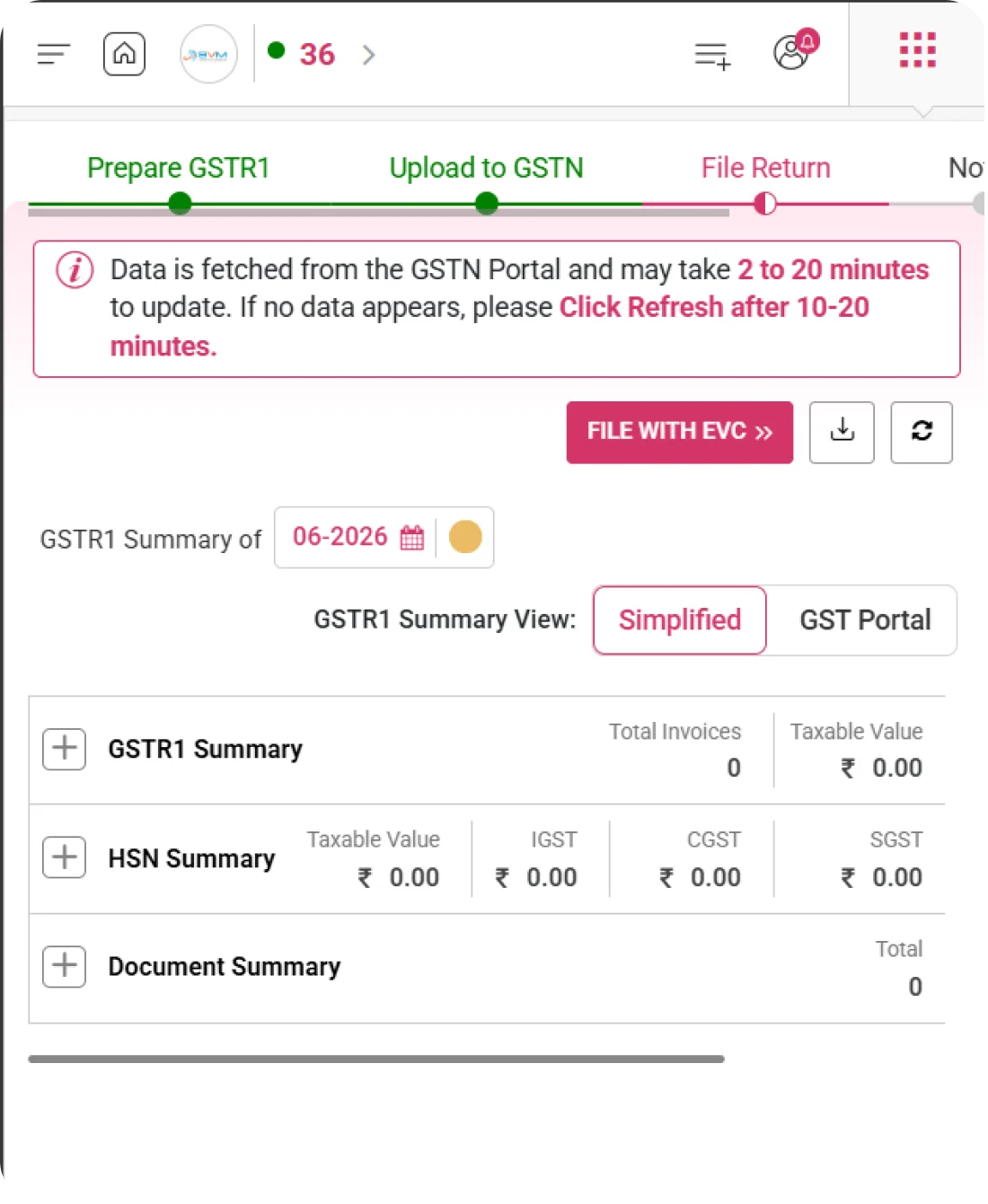
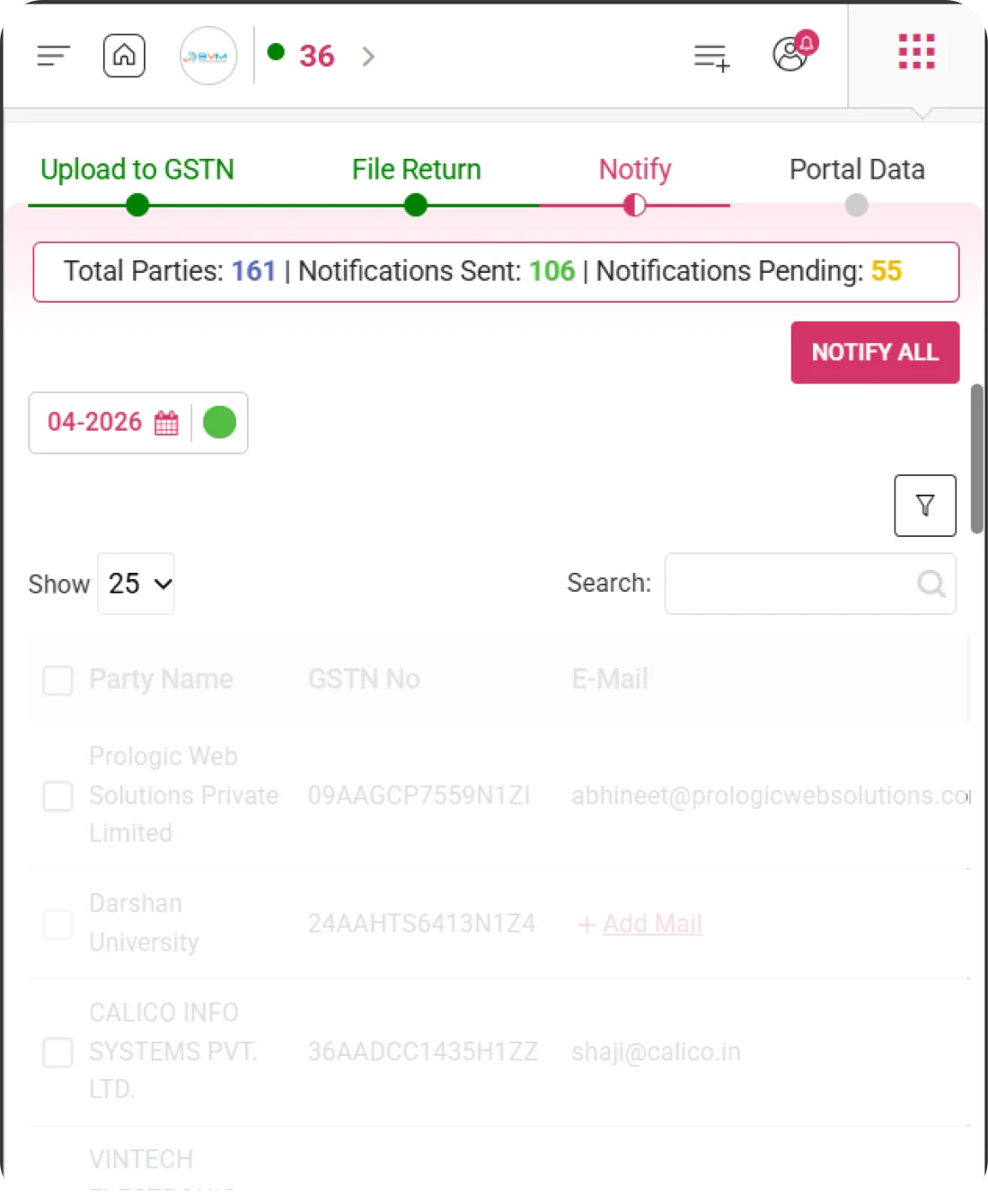
Compare GSTR-1 portal data with your books to spot missing invoices, amounts and ITC eligibility issues before filing. WhiteBooks GSTR-1 Portal Data Reconciliation Software is part of the WhiteBooks platform — a GSP-certified, cloud-first business management suite used by Indian SMBs and mid-market enterprises.

WhiteBooks connects directly to all three government portals — GSTN, e-Invoice, and e-WayBill — letting you download, validate, manage, and reconcile all portal data from one unified workspace.

gstr1-portalData-dashboard
Filing Preference

GST Filing Preference

WhiteBooks lets you define your GST return submission cadence before any data is processed. Choose Monthly Filing for period-by-period invoice uploads or Quarterly Filing for consolidated quarterly submissions — locking in the right mode for your business from the very start.
portalData-filing-preference

Monthly and quarterly filing modes

Monthly Filing lets you upload invoices each calendar month, while Quarterly Filing consolidates submissions across a quarter — giving you the cadence that fits your business size and compliance requirements.

Dedicated preference confirmation modal

A focused modal presents both options with a clear radio selector, so you can review your choice and confirm the filing mode deliberately before any return data is touched.

Updatable filing preference

Your filing preference is not locked permanently — WhiteBooks allows you to revisit and update the setting at any time, adapting to regulatory or business changes without disrupting existing records.
Portal Data Download

Multi-Source Portal Data Download

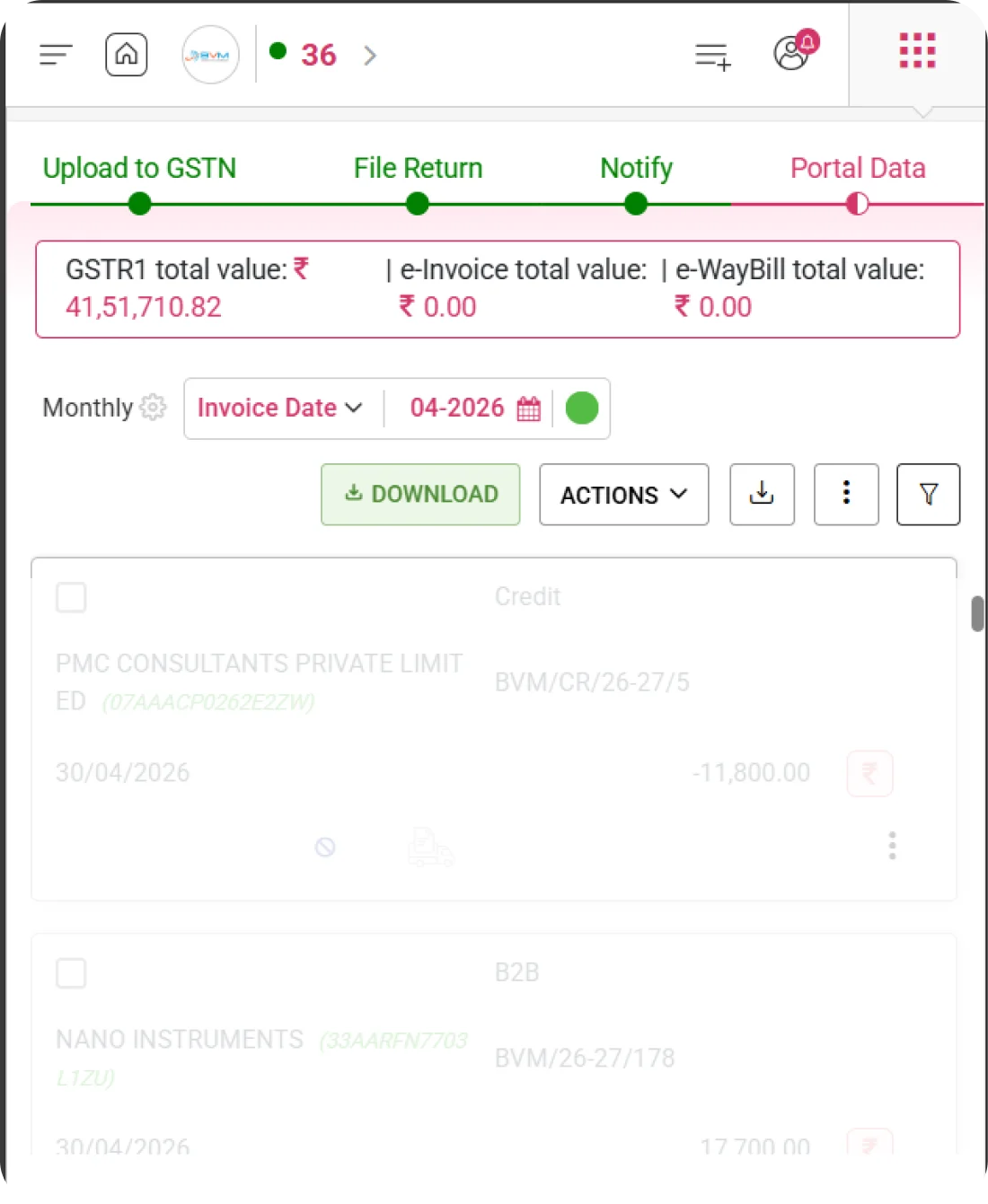
WhiteBooks connects directly to all three government portals — GSTIN, e-Invoice, and e-WayBill — and lets you pull invoice data from each source independently. A live summary bar displays combined totals the moment data is fetched, giving you a full financial picture before diving into individual records.
gstr1-portalData-download

Download from GSTIN, e-Invoice and e-WayBill

Fetch portal data from all three government sources in one place, with each source synced independently to ensure accurate, unmingled records from every portal.

Consolidated total value bar

A persistent summary bar shows the combined GSTR-1, e-Invoice, and e-WayBill invoice values in real time — giving you an instant financial overview the moment portal data is downloaded.

Period-scoped data view

All downloaded data is automatically scoped to the selected filing month, keeping records organised by return period from the moment they arrive and preventing cross-period confusion.
Portal Data Actions

Data Management Actions

WhiteBooks puts you in full control of portal data once it has been downloaded. The Actions menu offers targeted or bulk operations to clear, delete, and export records — so you can correct mistakes, re-download fresh data, or produce audit-ready reports without ever leaving the Portal Data screen.
portalData-actions-dashboard

Clear and clear all

Clear removes specific portal records, while Clear All resets the entire period's data — letting you wipe the slate and re-fetch accurate information whenever a correction is needed.

Delete and delete all

Delete permanently removes individual records, while Delete All eliminates all portal data for the selected period — ideal when a full correction or complete re-upload is required.

Flexible Excel and PDF export

Export portal data in four Excel formats — Item Wise, Invoice Wise, All Details, and Grid Data — or as a PDF download, covering every reporting and audit format your team might need.
GSTR Invoices

GSTR Invoice Listing with Validation

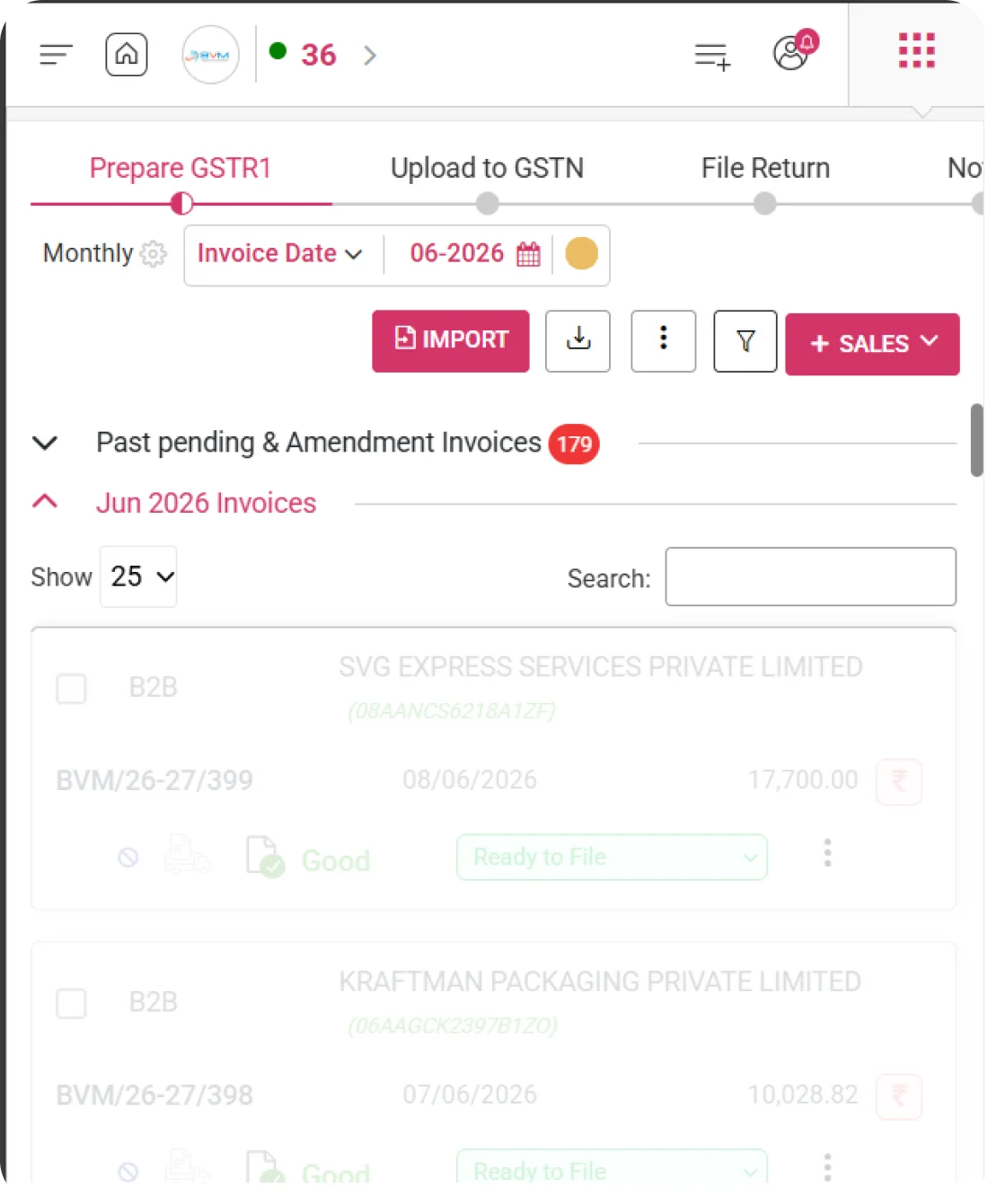
WhiteBooks displays all GSTR portal invoices in a structured, searchable table that goes beyond basic invoice details. Each record is validated against IMS, IRN, and EWB statuses simultaneously — so you can identify compliance gaps across all three portals in a single view without switching screens.
portalData-gstr-invoices

Smart Invoice Discovery

Easily locate invoices using dynamic search capabilities and flexible viewing controls, with key details like type, party information, invoice number, date, value, and payment status always readily accessible.

Built-In Compliance Visibility

WhiteBooks highlights critical validation checkpoints such as IMS, IRN, and EWB directly within your workflow—allowing you to instantly identify and address compliance gaps without extra steps.

Multi-dimensional search filters

Filter invoices by Status, Type, User, Parties, Branches, Cost Center, Reverse Charge, IMS, IRN, Valid Status, and more to zero in on exactly the records that need your attention.
e-Invoice

e-Invoice Listing

WhiteBooks keeps e-Invoice data in its own dedicated section, cleanly separated from GSTR and e-WayBill records. Every electronically generated invoice for the selected period appears in a focused, searchable table — giving you a clean view of e-Invoice compliance without noise from other portal sources.
portalData-e-invoices

e-Invoice Suite

e-Invoice records appear in their own searchable, paginated table — separate from GSTR and e-WayBill data — so you can review e-Invoice compliance in a focused, distraction-free view.

Party and invoice details

Each row shows Type, Party Details, Invoice Number, Date, and Amount — giving you all the identifying information needed to verify and act on individual e-Invoice records quickly.

Per-record action controls

WhiteBooks enables targeted actions on specific e-Invoice entries, allowing you to make accurate updates and corrections without impacting other records, ensuring complete control and efficiency.
e-WayBill

e-WayBill Listing with Validity Tracking

WhiteBooks surfaces all e-WayBill records for the selected period in a dedicated section that puts validity front and centre. Every bill shows its expiry date alongside its status, so your team can act on bills approaching their validity deadline before they create compliance issues at the time of filing.
portalData-e-wayBills

e-Way Bill Suite

Access all essential e-WayBill details—status, type, party information, bill number, date, validity period, and amount—so you can quickly verify and act on each record with confidence.

Validity expiry visibility

Stay ahead of compliance risks with clear visibility into validity timelines, making it easy to identify e-WayBills nearing expiry or already lapsed before they impact filing.

Status and type tracking

Quickly understand the current state of every e-WayBill with clear indicators for status and type, helping you identify which records are active and which require attention—without unnecessary steps.
Recon Summary

Reconciliation Summary

WhiteBooks automatically compares your books against GSTR-1, e-Invoice, and e-WayBill portal data and surfaces every match and mismatch in a structured summary panel. Instead of manually cross-checking records, you get a categorised breakdown of exactly where discrepancies exist — and a full report to resolve them before filing.
portalData-recon-summary

Matched invoice categories

Matched invoices are grouped into Perfect Match, Books + GSTR-1 Only, and GSTR-1 + e-Invoice Only — showing precisely how your books align with each government portal source.

Mismatched invoice categories

Mismatches are flagged under specific categories — Books Only, GSTR-1 Only, Amount Mismatch, e-Invoice Not Generated, e-Way Bill Missing, RCM, POS, GSTIN, Invoice Type, and Rate Mismatch — so every discrepancy is named and countable.

Full reconciliation report

The View Full Report link opens a detailed reconciliation breakdown where each mismatch category can be investigated individually, giving your team a complete audit trail to resolve issues before filing.
Get started with WhiteBooks
WhiteBooks syncs GSTN, e-Invoice, and e-Way Bill data, flags mismatches, and keeps your books filing-ready. Start free today.
No Credit Card Required

All the Pricing you will need in an Accounting Software

WhiteBooks gives you full auditor access control with role-based permissions, activity tracking, and instant access revocation from a single platform.

features-banner
Portal Data Download

Multi-Source Portal Data Download

WhiteBooks connects directly to all three government portals — GSTIN, e-Invoice, and e-WayBill — and lets you pull invoice data from each source independently. A live summary bar displays combined totals the moment data is fetched, giving you a full financial picture before diving into individual records.
notify-invoice-view

Download from GSTIN, e-Invoice and e-WayBill

Fetch portal data from all three government sources in one place, with each source synced independently to ensure accurate, unmingled records from every portal.

Consolidated total value bar

A persistent summary bar shows the combined GSTR-1, e-Invoice, and e-WayBill invoice values in real time — giving you an instant financial overview the moment portal data is downloaded.

Period-scoped data view

All downloaded data is automatically scoped to the selected filing month, keeping records organised by return period from the moment they arrive and preventing cross-period confusion.
Get started with WhiteBooks
WhiteBooks syncs GSTN, e-Invoice, and e-Way Bill data, flags mismatches, and keeps your books filing-ready. Start free today.
No Credit Card Required
Filing Preference

GST Filing Preference

WhiteBooks lets you define your GST return submission cadence before any data is processed. Choose Monthly Filing for period-by-period invoice uploads or Quarterly Filing for consolidated quarterly submissions — locking in the right mode for your business from the very start.
notify-tab-dashboard

Monthly and quarterly filing modes

Monthly Filing lets you upload invoices each calendar month, while Quarterly Filing consolidates submissions across a quarter — giving you the cadence that fits your business size and compliance requirements.

Dedicated preference confirmation modal

A focused modal presents both options with a clear radio selector, so you can review your choice and confirm the filing mode deliberately before any return data is touched.

Updatable filing preference

Your filing preference is not locked permanently — WhiteBooks allows you to revisit and update the setting at any time, adapting to regulatory or business changes without disrupting existing records.
Get started with WhiteBooks
WhiteBooks syncs GSTN, e-Invoice, and e-Way Bill data, flags mismatches, and keeps your books filing-ready. Start free today.
No Credit Card Required
Portal Data Actions

Data Management Actions

WhiteBooks puts you in full control of portal data once it has been downloaded. The Actions menu offers targeted or bulk operations to clear, delete, and export records — so you can correct mistakes, re-download fresh data, or produce audit-ready reports without ever leaving the Portal Data screen.
notify-tab-bultNotify

Clear and clear all

Clear removes specific portal records, while Clear All resets the entire period's data — letting you wipe the slate and re-fetch accurate information whenever a correction is needed.

Delete and delete all

Delete permanently removes individual records, while Delete All eliminates all portal data for the selected period — ideal when a full correction or complete re-upload is required.

Flexible Excel and PDF export

Export portal data in four Excel formats — Item Wise, Invoice Wise, All Details, and Grid Data — or as a PDF download, covering every reporting and audit format your team might need.
Get started with WhiteBooks
WhiteBooks syncs GSTN, e-Invoice, and e-Way Bill data, flags mismatches, and keeps your books filing-ready. Start free today.
No Credit Card Required
GSTR Invoices

GSTR Invoice Listing with Validation

WhiteBooks displays all GSTR portal invoices in a structured, searchable table that goes beyond basic invoice details. Each record is validated against IMS, IRN, and EWB statuses simultaneously — so you can identify compliance gaps across all three portals in a single view without switching screens.
auditor-export

Smart Invoice Discovery

Easily locate invoices using dynamic search capabilities and flexible viewing controls, with key details like type, party information, invoice number, date, value, and payment status always readily accessible.

Built-In Compliance Visibility

WhiteBooks highlights critical validation checkpoints such as IMS, IRN, and EWB directly within your workflow—allowing you to instantly identify and address compliance gaps without extra steps.

Multi-dimensional search filters

Filter invoices by Status, Type, User, Parties, Branches, Cost Center, Reverse Charge, IMS, IRN, Valid Status, and more to zero in on exactly the records that need your attention.
Get started with WhiteBooks
WhiteBooks syncs GSTN, e-Invoice, and e-Way Bill data, flags mismatches, and keeps your books filing-ready. Start free today.
No Credit Card Required
e-Invoice

e-Invoice Listing

WhiteBooks keeps e-Invoice data in its own dedicated section, cleanly separated from GSTR and e-WayBill records. Every electronically generated invoice for the selected period appears in a focused, searchable table — giving you a clean view of e-Invoice compliance without noise from other portal sources.
autoGenerated-filingEmail-notify

e-Invoice Suite

e-Invoice records appear in their own searchable, paginated table — separate from GSTR and e-WayBill data — so you can review e-Invoice compliance in a focused, distraction-free view.

Party and invoice details

Each row shows Type, Party Details, Invoice Number, Date, and Amount — giving you all the identifying information needed to verify and act on individual e-Invoice records quickly.

Per-record action controls

WhiteBooks enables targeted actions on specific e-Invoice entries, allowing you to make accurate updates and corrections without impacting other records, ensuring complete control and efficiency.
Get started with WhiteBooks
WhiteBooks syncs GSTN, e-Invoice, and e-Way Bill data, flags mismatches, and keeps your books filing-ready. Start free today.
No Credit Card Required
e-WayBill

e-WayBill Listing with Validity Tracking

WhiteBooks surfaces all e-WayBill records for the selected period in a dedicated section that puts validity front and centre. Every bill shows its expiry date alongside its status, so your team can act on bills approaching their validity deadline before they create compliance issues at the time of filing.
autoGenerated-filingEmail-notify

e-Way Bill Suite

Access all essential e-WayBill details—status, type, party information, bill number, date, validity period, and amount—so you can quickly verify and act on each record with confidence.

Validity expiry visibility

Stay ahead of compliance risks with clear visibility into validity timelines, making it easy to identify e-WayBills nearing expiry or already lapsed before they impact filing.

Status and type tracking

Quickly understand the current state of every e-WayBill with clear indicators for status and type, helping you identify which records are active and which require attention—without unnecessary steps.
Get started with WhiteBooks
WhiteBooks syncs GSTN, e-Invoice, and e-Way Bill data, flags mismatches, and keeps your books filing-ready. Start free today.
No Credit Card Required
Recon Summary

Reconciliation Summary

WhiteBooks automatically compares your books against GSTR-1, e-Invoice, and e-WayBill portal data and surfaces every match and mismatch in a structured summary panel. Instead of manually cross-checking records, you get a categorised breakdown of exactly where discrepancies exist — and a full report to resolve them before filing.
autoGenerated-filingEmail-notify

Matched invoice categories

Matched invoices are grouped into Perfect Match, Books + GSTR-1 Only, and GSTR-1 + e-Invoice Only — showing precisely how your books align with each government portal source.

Mismatched invoice categories

Mismatches are flagged under specific categories — Books Only, GSTR-1 Only, Amount Mismatch, e-Invoice Not Generated, e-Way Bill Missing, RCM, POS, GSTIN, Invoice Type, and Rate Mismatch — so every discrepancy is named and countable.

Full reconciliation report

The View Full Report link opens a detailed reconciliation breakdown where each mismatch category can be investigated individually, giving your team a complete audit trail to resolve issues before filing.
Get started with WhiteBooks
WhiteBooks syncs GSTN, e-Invoice, and e-Way Bill data, flags mismatches, and keeps your books filing-ready. Start free today.
No Credit Card Required

All the Solutions you will need in an Accounting Software

WhiteBooks gives you full auditor access control with role-based permissions, activity tracking, and instant access revocation from a single platform.

features-banner
Portal Data Download

Multi-Source Portal Data Download

WhiteBooks connects directly to all three government portals — GSTIN, e-Invoice, and e-WayBill — and lets you pull invoice data from each source independently. A live summary bar displays combined totals the moment data is fetched, giving you a full financial picture before diving into individual records.
notify-invoice-view

Download from GSTIN, e-Invoice and e-WayBill

Fetch portal data from all three government sources in one place, with each source synced independently to ensure accurate, unmingled records from every portal.

Consolidated total value bar

A persistent summary bar shows the combined GSTR-1, e-Invoice, and e-WayBill invoice values in real time — giving you an instant financial overview the moment portal data is downloaded.

Period-scoped data view

All downloaded data is automatically scoped to the selected filing month, keeping records organised by return period from the moment they arrive and preventing cross-period confusion.
Get started with WhiteBooks
WhiteBooks syncs GSTN, e-Invoice, and e-Way Bill data, flags mismatches, and keeps your books filing-ready. Start free today.
No Credit Card Required
Filing Preference

GST Filing Preference

WhiteBooks lets you define your GST return submission cadence before any data is processed. Choose Monthly Filing for period-by-period invoice uploads or Quarterly Filing for consolidated quarterly submissions — locking in the right mode for your business from the very start.
notify-tab-dashboard

Monthly and quarterly filing modes

Monthly Filing lets you upload invoices each calendar month, while Quarterly Filing consolidates submissions across a quarter — giving you the cadence that fits your business size and compliance requirements.

Dedicated preference confirmation modal

A focused modal presents both options with a clear radio selector, so you can review your choice and confirm the filing mode deliberately before any return data is touched.

Updatable filing preference

Your filing preference is not locked permanently — WhiteBooks allows you to revisit and update the setting at any time, adapting to regulatory or business changes without disrupting existing records.
Get started with WhiteBooks
WhiteBooks syncs GSTN, e-Invoice, and e-Way Bill data, flags mismatches, and keeps your books filing-ready. Start free today.
No Credit Card Required
Portal Data Actions

Data Management Actions

WhiteBooks puts you in full control of portal data once it has been downloaded. The Actions menu offers targeted or bulk operations to clear, delete, and export records — so you can correct mistakes, re-download fresh data, or produce audit-ready reports without ever leaving the Portal Data screen.
notify-tab-bultNotify

Clear and clear all

Clear removes specific portal records, while Clear All resets the entire period's data — letting you wipe the slate and re-fetch accurate information whenever a correction is needed.

Delete and delete all

Delete permanently removes individual records, while Delete All eliminates all portal data for the selected period — ideal when a full correction or complete re-upload is required.

Flexible Excel and PDF export

Export portal data in four Excel formats — Item Wise, Invoice Wise, All Details, and Grid Data — or as a PDF download, covering every reporting and audit format your team might need.
Get started with WhiteBooks
WhiteBooks syncs GSTN, e-Invoice, and e-Way Bill data, flags mismatches, and keeps your books filing-ready. Start free today.
No Credit Card Required
GSTR Invoices

GSTR Invoice Listing with Validation

WhiteBooks displays all GSTR portal invoices in a structured, searchable table that goes beyond basic invoice details. Each record is validated against IMS, IRN, and EWB statuses simultaneously — so you can identify compliance gaps across all three portals in a single view without switching screens.
auditor-export

Smart Invoice Discovery

Easily locate invoices using dynamic search capabilities and flexible viewing controls, with key details like type, party information, invoice number, date, value, and payment status always readily accessible.

Built-In Compliance Visibility

WhiteBooks highlights critical validation checkpoints such as IMS, IRN, and EWB directly within your workflow—allowing you to instantly identify and address compliance gaps without extra steps.

Multi-dimensional search filters

Filter invoices by Status, Type, User, Parties, Branches, Cost Center, Reverse Charge, IMS, IRN, Valid Status, and more to zero in on exactly the records that need your attention.
Get started with WhiteBooks
WhiteBooks syncs GSTN, e-Invoice, and e-Way Bill data, flags mismatches, and keeps your books filing-ready. Start free today.
No Credit Card Required
e-Invoice

e-Invoice Listing

WhiteBooks keeps e-Invoice data in its own dedicated section, cleanly separated from GSTR and e-WayBill records. Every electronically generated invoice for the selected period appears in a focused, searchable table — giving you a clean view of e-Invoice compliance without noise from other portal sources.
autoGenerated-filingEmail-notify

e-Invoice Suite

e-Invoice records appear in their own searchable, paginated table — separate from GSTR and e-WayBill data — so you can review e-Invoice compliance in a focused, distraction-free view.

Party and invoice details

Each row shows Type, Party Details, Invoice Number, Date, and Amount — giving you all the identifying information needed to verify and act on individual e-Invoice records quickly.

Per-record action controls

WhiteBooks enables targeted actions on specific e-Invoice entries, allowing you to make accurate updates and corrections without impacting other records, ensuring complete control and efficiency.
Get started with WhiteBooks
WhiteBooks syncs GSTN, e-Invoice, and e-Way Bill data, flags mismatches, and keeps your books filing-ready. Start free today.
No Credit Card Required
e-WayBill

e-WayBill Listing with Validity Tracking

WhiteBooks surfaces all e-WayBill records for the selected period in a dedicated section that puts validity front and centre. Every bill shows its expiry date alongside its status, so your team can act on bills approaching their validity deadline before they create compliance issues at the time of filing.
autoGenerated-filingEmail-notify

e-Way Bill Suite

Access all essential e-WayBill details—status, type, party information, bill number, date, validity period, and amount—so you can quickly verify and act on each record with confidence.

Validity expiry visibility

Stay ahead of compliance risks with clear visibility into validity timelines, making it easy to identify e-WayBills nearing expiry or already lapsed before they impact filing.

Status and type tracking

Quickly understand the current state of every e-WayBill with clear indicators for status and type, helping you identify which records are active and which require attention—without unnecessary steps.
Get started with WhiteBooks
WhiteBooks syncs GSTN, e-Invoice, and e-Way Bill data, flags mismatches, and keeps your books filing-ready. Start free today.
No Credit Card Required
Recon Summary

Reconciliation Summary

WhiteBooks automatically compares your books against GSTR-1, e-Invoice, and e-WayBill portal data and surfaces every match and mismatch in a structured summary panel. Instead of manually cross-checking records, you get a categorised breakdown of exactly where discrepancies exist — and a full report to resolve them before filing.
autoGenerated-filingEmail-notify

Matched invoice categories

Matched invoices are grouped into Perfect Match, Books + GSTR-1 Only, and GSTR-1 + e-Invoice Only — showing precisely how your books align with each government portal source.

Mismatched invoice categories

Mismatches are flagged under specific categories — Books Only, GSTR-1 Only, Amount Mismatch, e-Invoice Not Generated, e-Way Bill Missing, RCM, POS, GSTIN, Invoice Type, and Rate Mismatch — so every discrepancy is named and countable.

Full reconciliation report

The View Full Report link opens a detailed reconciliation breakdown where each mismatch category can be investigated individually, giving your team a complete audit trail to resolve issues before filing.
Get started with WhiteBooks
WhiteBooks syncs GSTN, e-Invoice, and e-Way Bill data, flags mismatches, and keeps your books filing-ready. Start free today.
No Credit Card Required

All the Partners you will need in an Accounting Software

WhiteBooks gives you full auditor access control with role-based permissions, activity tracking, and instant access revocation from a single platform.

features-banner
Portal Data Download

Multi-Source Portal Data Download

WhiteBooks connects directly to all three government portals — GSTIN, e-Invoice, and e-WayBill — and lets you pull invoice data from each source independently. A live summary bar displays combined totals the moment data is fetched, giving you a full financial picture before diving into individual records.
notify-invoice-view

Download from GSTIN, e-Invoice and e-WayBill

Fetch portal data from all three government sources in one place, with each source synced independently to ensure accurate, unmingled records from every portal.

Consolidated total value bar

A persistent summary bar shows the combined GSTR-1, e-Invoice, and e-WayBill invoice values in real time — giving you an instant financial overview the moment portal data is downloaded.

Period-scoped data view

All downloaded data is automatically scoped to the selected filing month, keeping records organised by return period from the moment they arrive and preventing cross-period confusion.
Get started with WhiteBooks
WhiteBooks syncs GSTN, e-Invoice, and e-Way Bill data, flags mismatches, and keeps your books filing-ready. Start free today.
No Credit Card Required
Filing Preference

GST Filing Preference

WhiteBooks lets you define your GST return submission cadence before any data is processed. Choose Monthly Filing for period-by-period invoice uploads or Quarterly Filing for consolidated quarterly submissions — locking in the right mode for your business from the very start.
notify-tab-dashboard

Monthly and quarterly filing modes

Monthly Filing lets you upload invoices each calendar month, while Quarterly Filing consolidates submissions across a quarter — giving you the cadence that fits your business size and compliance requirements.

Dedicated preference confirmation modal

A focused modal presents both options with a clear radio selector, so you can review your choice and confirm the filing mode deliberately before any return data is touched.

Updatable filing preference

Your filing preference is not locked permanently — WhiteBooks allows you to revisit and update the setting at any time, adapting to regulatory or business changes without disrupting existing records.
Get started with WhiteBooks
WhiteBooks syncs GSTN, e-Invoice, and e-Way Bill data, flags mismatches, and keeps your books filing-ready. Start free today.
No Credit Card Required
Portal Data Actions

Data Management Actions

WhiteBooks puts you in full control of portal data once it has been downloaded. The Actions menu offers targeted or bulk operations to clear, delete, and export records — so you can correct mistakes, re-download fresh data, or produce audit-ready reports without ever leaving the Portal Data screen.
notify-tab-bultNotify

Clear and clear all

Clear removes specific portal records, while Clear All resets the entire period's data — letting you wipe the slate and re-fetch accurate information whenever a correction is needed.

Delete and delete all

Delete permanently removes individual records, while Delete All eliminates all portal data for the selected period — ideal when a full correction or complete re-upload is required.

Flexible Excel and PDF export

Export portal data in four Excel formats — Item Wise, Invoice Wise, All Details, and Grid Data — or as a PDF download, covering every reporting and audit format your team might need.
Get started with WhiteBooks
WhiteBooks syncs GSTN, e-Invoice, and e-Way Bill data, flags mismatches, and keeps your books filing-ready. Start free today.
No Credit Card Required
GSTR Invoices

GSTR Invoice Listing with Validation

WhiteBooks displays all GSTR portal invoices in a structured, searchable table that goes beyond basic invoice details. Each record is validated against IMS, IRN, and EWB statuses simultaneously — so you can identify compliance gaps across all three portals in a single view without switching screens.
auditor-export

Smart Invoice Discovery

Easily locate invoices using dynamic search capabilities and flexible viewing controls, with key details like type, party information, invoice number, date, value, and payment status always readily accessible.

Built-In Compliance Visibility

WhiteBooks highlights critical validation checkpoints such as IMS, IRN, and EWB directly within your workflow—allowing you to instantly identify and address compliance gaps without extra steps.

Multi-dimensional search filters

Filter invoices by Status, Type, User, Parties, Branches, Cost Center, Reverse Charge, IMS, IRN, Valid Status, and more to zero in on exactly the records that need your attention.
Get started with WhiteBooks
WhiteBooks syncs GSTN, e-Invoice, and e-Way Bill data, flags mismatches, and keeps your books filing-ready. Start free today.
No Credit Card Required
e-Invoice

e-Invoice Listing

WhiteBooks keeps e-Invoice data in its own dedicated section, cleanly separated from GSTR and e-WayBill records. Every electronically generated invoice for the selected period appears in a focused, searchable table — giving you a clean view of e-Invoice compliance without noise from other portal sources.
autoGenerated-filingEmail-notify

e-Invoice Suite

e-Invoice records appear in their own searchable, paginated table — separate from GSTR and e-WayBill data — so you can review e-Invoice compliance in a focused, distraction-free view.

Party and invoice details

Each row shows Type, Party Details, Invoice Number, Date, and Amount — giving you all the identifying information needed to verify and act on individual e-Invoice records quickly.

Per-record action controls

WhiteBooks enables targeted actions on specific e-Invoice entries, allowing you to make accurate updates and corrections without impacting other records, ensuring complete control and efficiency.
Get started with WhiteBooks
WhiteBooks syncs GSTN, e-Invoice, and e-Way Bill data, flags mismatches, and keeps your books filing-ready. Start free today.
No Credit Card Required
e-WayBill

e-WayBill Listing with Validity Tracking

WhiteBooks surfaces all e-WayBill records for the selected period in a dedicated section that puts validity front and centre. Every bill shows its expiry date alongside its status, so your team can act on bills approaching their validity deadline before they create compliance issues at the time of filing.
autoGenerated-filingEmail-notify

e-Way Bill Suite

Access all essential e-WayBill details—status, type, party information, bill number, date, validity period, and amount—so you can quickly verify and act on each record with confidence.

Validity expiry visibility

Stay ahead of compliance risks with clear visibility into validity timelines, making it easy to identify e-WayBills nearing expiry or already lapsed before they impact filing.

Status and type tracking

Quickly understand the current state of every e-WayBill with clear indicators for status and type, helping you identify which records are active and which require attention—without unnecessary steps.
Get started with WhiteBooks
WhiteBooks syncs GSTN, e-Invoice, and e-Way Bill data, flags mismatches, and keeps your books filing-ready. Start free today.
No Credit Card Required
Recon Summary

Reconciliation Summary

WhiteBooks automatically compares your books against GSTR-1, e-Invoice, and e-WayBill portal data and surfaces every match and mismatch in a structured summary panel. Instead of manually cross-checking records, you get a categorised breakdown of exactly where discrepancies exist — and a full report to resolve them before filing.
autoGenerated-filingEmail-notify

Matched invoice categories

Matched invoices are grouped into Perfect Match, Books + GSTR-1 Only, and GSTR-1 + e-Invoice Only — showing precisely how your books align with each government portal source.

Mismatched invoice categories

Mismatches are flagged under specific categories — Books Only, GSTR-1 Only, Amount Mismatch, e-Invoice Not Generated, e-Way Bill Missing, RCM, POS, GSTIN, Invoice Type, and Rate Mismatch — so every discrepancy is named and countable.

Full reconciliation report

The View Full Report link opens a detailed reconciliation breakdown where each mismatch category can be investigated individually, giving your team a complete audit trail to resolve issues before filing.
Get started with WhiteBooks
WhiteBooks syncs GSTN, e-Invoice, and e-Way Bill data, flags mismatches, and keeps your books filing-ready. Start free today.
No Credit Card Required

All the Resources you will need in an Accounting Software

WhiteBooks gives you full auditor access control with role-based permissions, activity tracking, and instant access revocation from a single platform.

features-banner
Portal Data Download

Multi-Source Portal Data Download

WhiteBooks connects directly to all three government portals — GSTIN, e-Invoice, and e-WayBill — and lets you pull invoice data from each source independently. A live summary bar displays combined totals the moment data is fetched, giving you a full financial picture before diving into individual records.
notify-invoice-view

Download from GSTIN, e-Invoice and e-WayBill

Fetch portal data from all three government sources in one place, with each source synced independently to ensure accurate, unmingled records from every portal.

Consolidated total value bar

A persistent summary bar shows the combined GSTR-1, e-Invoice, and e-WayBill invoice values in real time — giving you an instant financial overview the moment portal data is downloaded.

Period-scoped data view

All downloaded data is automatically scoped to the selected filing month, keeping records organised by return period from the moment they arrive and preventing cross-period confusion.
Get started with WhiteBooks
WhiteBooks syncs GSTN, e-Invoice, and e-Way Bill data, flags mismatches, and keeps your books filing-ready. Start free today.
No Credit Card Required
Filing Preference

GST Filing Preference

WhiteBooks lets you define your GST return submission cadence before any data is processed. Choose Monthly Filing for period-by-period invoice uploads or Quarterly Filing for consolidated quarterly submissions — locking in the right mode for your business from the very start.
notify-tab-dashboard

Monthly and quarterly filing modes

Monthly Filing lets you upload invoices each calendar month, while Quarterly Filing consolidates submissions across a quarter — giving you the cadence that fits your business size and compliance requirements.

Dedicated preference confirmation modal

A focused modal presents both options with a clear radio selector, so you can review your choice and confirm the filing mode deliberately before any return data is touched.

Updatable filing preference

Your filing preference is not locked permanently — WhiteBooks allows you to revisit and update the setting at any time, adapting to regulatory or business changes without disrupting existing records.
Get started with WhiteBooks
WhiteBooks syncs GSTN, e-Invoice, and e-Way Bill data, flags mismatches, and keeps your books filing-ready. Start free today.
No Credit Card Required
Portal Data Actions

Data Management Actions

WhiteBooks puts you in full control of portal data once it has been downloaded. The Actions menu offers targeted or bulk operations to clear, delete, and export records — so you can correct mistakes, re-download fresh data, or produce audit-ready reports without ever leaving the Portal Data screen.
notify-tab-bultNotify

Clear and clear all

Clear removes specific portal records, while Clear All resets the entire period's data — letting you wipe the slate and re-fetch accurate information whenever a correction is needed.

Delete and delete all

Delete permanently removes individual records, while Delete All eliminates all portal data for the selected period — ideal when a full correction or complete re-upload is required.

Flexible Excel and PDF export

Export portal data in four Excel formats — Item Wise, Invoice Wise, All Details, and Grid Data — or as a PDF download, covering every reporting and audit format your team might need.
Get started with WhiteBooks
WhiteBooks syncs GSTN, e-Invoice, and e-Way Bill data, flags mismatches, and keeps your books filing-ready. Start free today.
No Credit Card Required
GSTR Invoices

GSTR Invoice Listing with Validation

WhiteBooks displays all GSTR portal invoices in a structured, searchable table that goes beyond basic invoice details. Each record is validated against IMS, IRN, and EWB statuses simultaneously — so you can identify compliance gaps across all three portals in a single view without switching screens.
auditor-export

Smart Invoice Discovery

Easily locate invoices using dynamic search capabilities and flexible viewing controls, with key details like type, party information, invoice number, date, value, and payment status always readily accessible.

Built-In Compliance Visibility

WhiteBooks highlights critical validation checkpoints such as IMS, IRN, and EWB directly within your workflow—allowing you to instantly identify and address compliance gaps without extra steps.

Multi-dimensional search filters

Filter invoices by Status, Type, User, Parties, Branches, Cost Center, Reverse Charge, IMS, IRN, Valid Status, and more to zero in on exactly the records that need your attention.
Get started with WhiteBooks
WhiteBooks syncs GSTN, e-Invoice, and e-Way Bill data, flags mismatches, and keeps your books filing-ready. Start free today.
No Credit Card Required
e-Invoice

e-Invoice Listing

WhiteBooks keeps e-Invoice data in its own dedicated section, cleanly separated from GSTR and e-WayBill records. Every electronically generated invoice for the selected period appears in a focused, searchable table — giving you a clean view of e-Invoice compliance without noise from other portal sources.
autoGenerated-filingEmail-notify

e-Invoice Suite

e-Invoice records appear in their own searchable, paginated table — separate from GSTR and e-WayBill data — so you can review e-Invoice compliance in a focused, distraction-free view.

Party and invoice details

Each row shows Type, Party Details, Invoice Number, Date, and Amount — giving you all the identifying information needed to verify and act on individual e-Invoice records quickly.

Per-record action controls

WhiteBooks enables targeted actions on specific e-Invoice entries, allowing you to make accurate updates and corrections without impacting other records, ensuring complete control and efficiency.
Get started with WhiteBooks
WhiteBooks syncs GSTN, e-Invoice, and e-Way Bill data, flags mismatches, and keeps your books filing-ready. Start free today.
No Credit Card Required
e-WayBill

e-WayBill Listing with Validity Tracking

WhiteBooks surfaces all e-WayBill records for the selected period in a dedicated section that puts validity front and centre. Every bill shows its expiry date alongside its status, so your team can act on bills approaching their validity deadline before they create compliance issues at the time of filing.
autoGenerated-filingEmail-notify

e-Way Bill Suite

Access all essential e-WayBill details—status, type, party information, bill number, date, validity period, and amount—so you can quickly verify and act on each record with confidence.

Validity expiry visibility

Stay ahead of compliance risks with clear visibility into validity timelines, making it easy to identify e-WayBills nearing expiry or already lapsed before they impact filing.

Status and type tracking

Quickly understand the current state of every e-WayBill with clear indicators for status and type, helping you identify which records are active and which require attention—without unnecessary steps.
Get started with WhiteBooks
WhiteBooks syncs GSTN, e-Invoice, and e-Way Bill data, flags mismatches, and keeps your books filing-ready. Start free today.
No Credit Card Required
Recon Summary

Reconciliation Summary

WhiteBooks automatically compares your books against GSTR-1, e-Invoice, and e-WayBill portal data and surfaces every match and mismatch in a structured summary panel. Instead of manually cross-checking records, you get a categorised breakdown of exactly where discrepancies exist — and a full report to resolve them before filing.
autoGenerated-filingEmail-notify

Matched invoice categories

Matched invoices are grouped into Perfect Match, Books + GSTR-1 Only, and GSTR-1 + e-Invoice Only — showing precisely how your books align with each government portal source.

Mismatched invoice categories

Mismatches are flagged under specific categories — Books Only, GSTR-1 Only, Amount Mismatch, e-Invoice Not Generated, e-Way Bill Missing, RCM, POS, GSTIN, Invoice Type, and Rate Mismatch — so every discrepancy is named and countable.

Full reconciliation report

The View Full Report link opens a detailed reconciliation breakdown where each mismatch category can be investigated individually, giving your team a complete audit trail to resolve issues before filing.
Get started with WhiteBooks
WhiteBooks syncs GSTN, e-Invoice, and e-Way Bill data, flags mismatches, and keeps your books filing-ready. Start free today.
No Credit Card Required

Frequently Asked Questions

We have put together some commonly asked questions

WhiteBooks lets businesses define their GST filing mode before any data is processed — choosing Monthly Filing for period-by-period invoice uploads or Quarterly Filing for consolidated quarterly submissions. The preference is confirmed through a dedicated modal and can be updated at any time to adapt to regulatory or business changes without disrupting existing records.

WhiteBooks provides Clear and Clear All to wipe specific or all period records for re-fetching, and Delete and Delete All for permanent removal of individual or full-period data when a complete correction is needed. Portal data can also be exported in four Excel formats — Item Wise, Invoice Wise, All Details, and Grid Data — or as a PDF, covering every reporting and audit format without leaving the Portal Data screen.

WhiteBooks keeps e-Invoice data in its own dedicated section — cleanly separated from GSTR and e-WayBill records — displaying every electronically generated invoice for the selected period in a focused, searchable table. Each row shows Type, Party Details, Invoice Number, Date, and Amount, with per-record action controls allowing targeted corrections without impacting other records.

WhiteBooks automatically compares books against GSTR-1, e-Invoice, and e-WayBill data — grouping matched invoices into Perfect Match, Books + GSTR-1 Only, and GSTR-1 + e-Invoice Only categories. Mismatches are flagged under specific named categories including Books Only, GSTR-1 Only, Amount Mismatch, e-Invoice Not Generated, e-Way Bill Missing, RCM, POS, GSTIN, Invoice Type, and Rate Mismatch — making every discrepancy countable and actionable before filing.

WhiteBooks connects directly to all three government portals — GSTIN, e-Invoice, and e-WayBill — fetching invoice data from each source independently to ensure accurate, unmingled records. A persistent summary bar displays the combined GSTR-1, e-Invoice, and e-WayBill invoice values in real time the moment data is downloaded, with all records automatically scoped to the selected filing month to prevent cross-period confusion.

WhiteBooks displays all GSTR portal invoices in a structured table with each record validated against IMS, IRN, and EWB statuses simultaneously — allowing compliance gaps across all three portals to be identified in a single view without switching screens. Key details like type, party information, invoice number, date, value, and payment status are always readily accessible alongside the compliance indicators.

WhiteBooks surfaces all e-WayBill records in a dedicated section with validity expiry dates prominently displayed alongside status and type — enabling teams to identify bills approaching their deadline or already lapsed before they create compliance issues at the time of filing. Every bill also shows party information, bill number, date, and amount for complete record-level verification without additional navigation.

WhiteBooks provides a View Full Report link within the Recon Summary that opens a detailed reconciliation breakdown where each mismatch category can be investigated individually. This gives finance teams a complete audit trail of every discrepancy — covering amount mismatches, missing e-invoices, e-Way Bill gaps, RCM, POS, GSTIN, invoice type, and rate mismatches — so all issues can be resolved before the return is filed.