Follow us on our LinkedIn page

Expense management and cost tracking with full control

WhiteBooks gives you complete expense control — record categorized costs with GST details, track payment status, analyze spending trends, and export. WhiteBooks Track & Manage Business Expenses runs on India's GSP-certified, cloud-first business management platform used by 25,000+ businesses.

WhiteBooks manages expenses with category tracking, tax details, payment status, analysis, and export ready data for audit and GST compliance.

expenses-dashboard
Add Expenses

Accurate Categorized Expense Capture

WhiteBooks records all operational expenses accurately with category, date, amount, taxes, and payment details. Entries feed directly into accounts, GST input credit, and period-wise reporting for precise financial analysis.
add-expenses

Comprehensive Expense Recording

Each expense is logged with a system-generated expense number, category, transaction date, total value, applicable tax components, payment mode, and supporting remarks, creating a complete, legally referenced record that serves as primary documentary evidence for all business costs.

Category-Level Classification

Expenses are automatically classified into defined business categories such as Travel, Office Supplies, Utilities, Professional Fees, or Repairs. This enables meaningful category-wise expenditure analysis, budget variance tracking, and cost center reporting without any manual post-entry classification.

Instant Books of Accounts Integration

Every recorded expense is simultaneously posted to the relevant ledger accounts, updating the Expense Ledger, Tax Accounts, and Cash/Bank accounts in real time, ensuring the books always reflect the current state of business expenditure without requiring any separate accounting entries.
Expense Register

Central Expense Dashboard

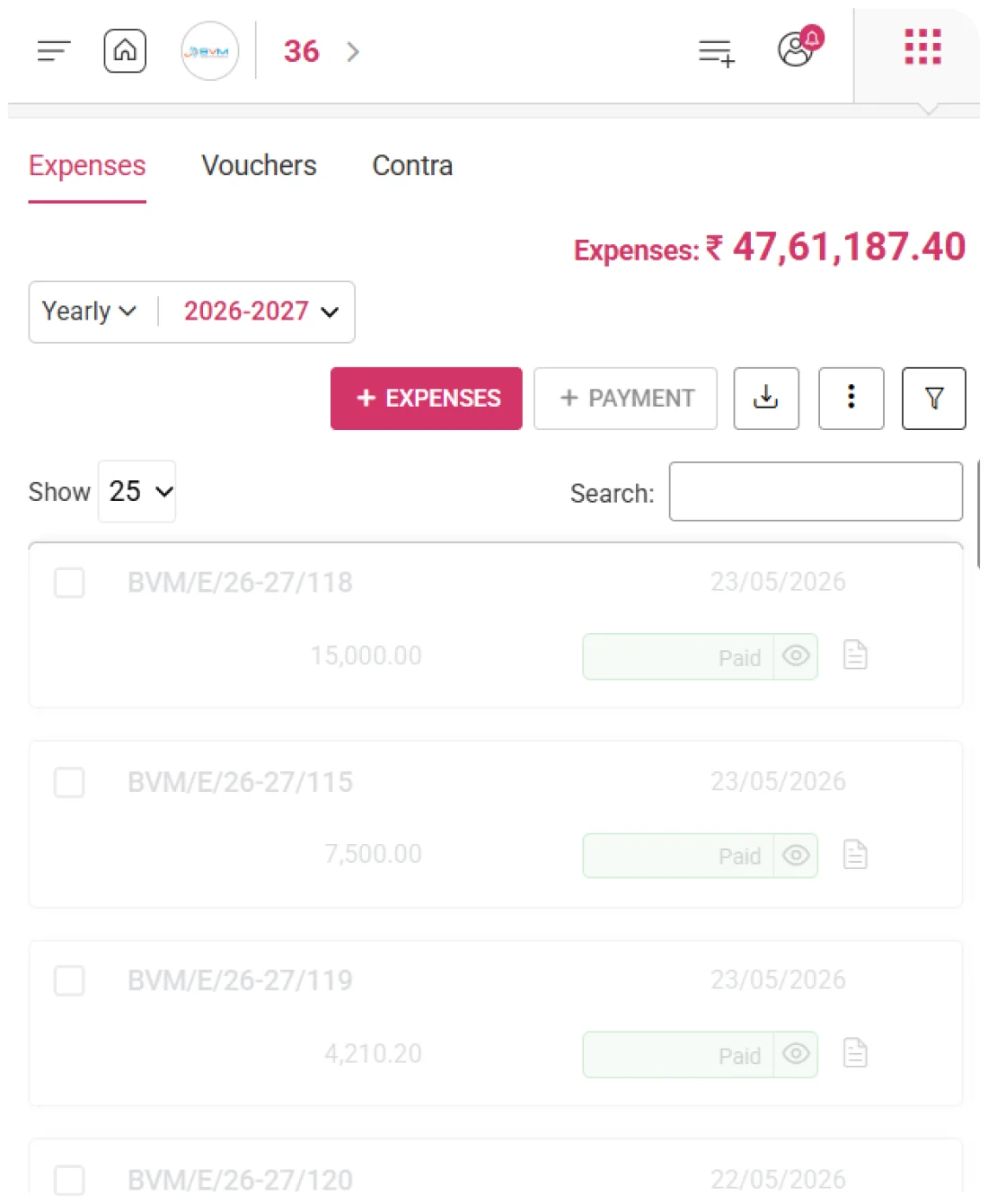
WhiteBooks provides a unified expense register showing all costs with references, categories, dates, amounts, and payment status—enabling finance teams and auditors to manage expenses efficiently.
expenses-register

Complete Expenditure Data at a Glance

Every expense is displayed with its Expense Number, Expense Category, Expense Date, Total Value, and Payment Status in a structured register, giving reviewers all the information needed to assess, act on, or escalate any business cost without opening individual records.

Category-Wise Expense Organization

The Expense Category column organizes each cost entry by its classified business category, allowing finance teams to quickly identify spending patterns, compare category-wise expenditure against budgets, and evaluate whether specific cost categories are tracking within acceptable limits for the active period.

Payment Settlement Status Monitoring

The Payment Status column shows the current settlement state of every recorded expense, distinguishing between fully paid, partially settled, and outstanding obligations. This enables finance teams to manage cash outflows, prioritize urgent payments, and prevent overdue expense liabilities from accumulating unnoticed.
Expense Period Management

Period-Based Expense Tracking

WhiteBooks scopes the entire expense workspace to a selected billing period and frequency, ensuring that all expense records, category summaries, and payment statuses displayed are strictly relevant to the chosen month
expenses-period

Monthly Expense Period Navigation

Users can navigate to any historical or current month to review expenses recorded during that period, enabling retrospective cost audits, budget adherence assessments, and period-wise reconciliation without affecting active financial operations.

Financial Cycle Alignment

The monthly frequency mode ensures that all expense counts, total values, category breakdowns, and payment statuses are calculated strictly within calendar month boundaries, keeping expenditure data aligned with standard monthly reporting, P&L preparation, and budget management cycles.

Historical Period Expense Review

Finance teams can switch between periods to compare category-wise spending trends, identify months with unusual expenditure spikes, and reconcile past expense records against bank statements and payment confirmations, ensuring complete financial accuracy.
Add Payment

Expense Payment & Liability Tracking

WhiteBooks enables finance teams to record payments against every expense entry, capturing the payment date, settled amount, payment mode, and bank account debited. This ensures a complete and accurate expense payment history within the expenses module.
expenses-addPayment

Expense-Level Payment Recording

Payments are recorded directly against individual expense entries, capturing settlement date, amount paid, payment instrument, and bank account debited, providing full traceability of every cash outflow to its corresponding expense obligation.

Partial Settlement & Balance Tracking

WhiteBooks supports partial payments against outstanding expenses, automatically computing and displaying the remaining balance after each settlement. This enables accurate tracking where payments are made in installments or reimbursements are processed progressively.

Real-Time Cash & Bank Ledger Update

Every payment is immediately reflected in the associated cash or bank ledger, updating balances, payment history, and expenditure aging analysis in real time, without the need for manual journal entries or reconciliation against the original expense record.
Expenses Summary

Real-Time Expense & Budget Tracking

WhiteBooks continuously tracks and displays the cumulative value of all expenses recorded within the active period, giving finance directors, business owners, and cost center managers a real-time view of total business expenditure for the selected month.
expenses-summary

Live Period-Wise Total Expenditure

The total of all recorded expenses is calculated and displayed in real time, providing an always-accurate snapshot of cumulative business costs without waiting for period-end reports or separate expenditure analyses.

Budget Adherence & Overspend Early Warning

The cumulative expense value serves as a dynamic indicator for budget compliance, allowing finance teams to quickly identify potential overspend and take corrective action before the period closes.

Instant Recalculation on Every Change

Any addition, modification, or deletion of an expense entry automatically updates the total expenditure, ensuring that the summary always reflects the current state of all business costs for the active period without requiring manual refreshes.
Category Analysis

Category-Wise Expense Insights

WhiteBooks captures all business expenses by category, giving finance teams actionable insights into spending patterns. Category-level visibility allows budget comparisons, identification of high-impact costs, and informed decisions for cost optimization and operational efficiency.
expenses-summary

Structured Category-Wise Cost Attribution

Every expense entry is assigned to a specific business category at the point of recording, ensuring consistent classification, eliminating ambiguity, and removing the need for manual reclassification in traditional accounting systems.

Period-Wise Category Spend Comparison

Finance teams can analyze category-wise expenditure across periods to spot trends, determine growth or reduction in spending, and implement targeted cost management strategies aligned with approved budgets.

High-Impact Cost Category Identification

WhiteBooks highlights the expense categories contributing the highest total value in the active period, allowing management to prioritize cost control and optimization efforts where they will have the greatest financial impact.
Date-Wise Expense Management

Date-Wise Expense Sequencing

WhiteBooks records the exact transaction date for every expense, allowing finance teams to sort and analyze costs chronologically within the active period. Accurate date attribution ensures expenses are recognized in the correct financial period for P&L reporting, GST filing, and budget analysis.
expenses-register

Precise Transaction Date Attribution

Every expense is linked to its actual transaction date, ensuring recognition in the period when the cost was genuinely incurred, rather than when it was entered into the system, supporting compliant accrual-basis financial reporting.

Chronological Expense Sequencing

The expense register can be sorted by date in ascending or descending order, allowing finance teams to quickly review recent expenses, identify the oldest unsettled obligations, or present the register in chronological order for audits and internal reporting.

Period-Accurate Financial Reporting

Accurate transaction date tracking guarantees that each expense is reflected in the correct monthly P&L, corresponding GST return period, and budget cycle, eliminating misattribution errors that can complicate financial reconciliation and audit processes.
Export

Export Expense Data for Analysis & Compliance

WhiteBooks enables export of the full expense dataset for the selected period, supporting category analysis, budgeting, P&L reporting, audits, and period-wise archiving for accurate financial planning and compliance.
expenses-export

Complete Period Expense Data Extraction

All expenses within the active period are extracted in a single operation, producing a structured output that includes every register column such as Expense Number, Expense Category, Expense Date, Total Value, and Payment Status. The output is immediately ready for analysis without additional formatting or manual compilation.

Stakeholder-Ready Cost Analysis Output

The exported dataset is designed for direct use in financial analysis tools, enabling teams to build category-wise expenditure breakdowns, monthly spending trend analyses, budget-versus-actual variance reports, and payment aging summaries for management review, board presentations, and strategic cost management decisions.

Statutory Compliance & Audit Documentation

Downloaded expense records serve as complete documentary evidence of all business costs incurred during the period. This ensures compliance with statutory audit requirements, GST input credit verification, internal compliance reviews, and financial governance assessments, providing verified proof of every expense recorded in WhiteBooks.
Expense Actions

Full Control Over Recorded Expenses

WhiteBooks provides full lifecycle management for expenses, enabling editing, duplication, cancellation, and settlement tracking to ensure accurate, up-to-date records and improved financial control.
expenses-actions

Expense Detail Correction & Modification

Any expense entry can be updated to correct category classification, adjust the transaction date, revise the total value, modify tax components, or change payment details. This ensures every record accurately reflects the actual business expenditure without needing to delete and re-enter the expense.

Recurring expense reuse templates

Existing expense entries can be duplicated and reused as templates for recurring costs with the same category, vendor, or value. This eliminates repetitive data entry for predictable periodic expenses such as rent, utilities, subscriptions, or vendor service charges.

Erroneous Entry Cancellation & Removal

Expense entries recorded in error, whether due to duplication, misclassification, or data entry mistakes, can be cancelled and removed from the register. This maintains a clean, accurate expense record that includes only genuine, verified business costs for the selected period.
Get started with WhiteBooks
Manage your expenses effortlessly with WhiteBooks, from recording and tracking to analyzing and exporting everything in one place.
No Credit Card Required

Accounting pricing — built around what you actually use

WhiteBooks Accounting runs on a custom pricing model. We size the plan to your filing volume, number of GSTINs, integration scope and support tier — not to a fixed SKU. Most teams move from sandbox to production inside a week.

Start Free

Use the sandbox for as long as you need. No credit card. Real schemas, real responses, no usage caps for evaluation.

Talk to Sales

Tell us your filing volume and integrations. We come back with a written quote, SLA and onboarding plan within one business day.

Enterprise Plans

Multi-GSTIN, SSO, dedicated support, on-premise deployment and custom SLAs available for large teams.

Who this Accounting solution is built for

Every Accounting workflow on this page is shaped by feedback from real practitioners — accountants who file every month, integration engineers wiring our APIs into ERPs, and compliance heads accountable to the board for what gets submitted.

Accountants & Bookkeepers

Manage chart of accounts, vouchers, contra entries, bank statements and trial balance for unlimited clients without spreadsheets.

SME Finance Teams

Real-time P&L, balance sheet and cash-flow reports with drill-down to source documents — no month-end scramble.

Auditors & Reviewers

Read-only auditor logins, locked periods, immutable audit trail and one-click export of ledgers + supporting evidence.

Partner with WhiteBooks

WhiteBooks works with CA firms, ERP vendors, system integrators and channel partners across India and the GCC. Pick the track that matches how you serve clients — we will share commercials, training and co-marketing kits.

CA & Practitioner Partners

Onboard your client base, earn margin on every plan and get a co-branded portal to manage filings, due dates and ITC reconciliation.

Integration Partners

ERPs, POS systems and billing platforms — ship native WhiteBooks GST / e-Invoice / e-Way Bill integrations to your customers without building it yourself.

Channel & Resellers

Regional resellers and consultants — earn recurring commissions, get pre-sales support and a sandbox tenant for every prospect demo.

Frequently Asked Questions

We have put together some commonly asked questions

WhiteBooks records all expenses with a system-generated number, category, date, amount, taxes, payment mode, and remarks. Entries are automatically categorized and posted to relevant ledgers in real time, keeping books accurate and up to date without additional accounting entries.

WhiteBooks scopes expenses to a selected month, calculating totals and category breakdowns for accurate P&L and budget tracking, with historical periods accessible for audits and period-wise reconciliation.

WhiteBooks continuously tracks and displays the cumulative value of all expenses in the active period, giving finance teams a real-time view of total monthly expenditure. Running totals update instantly with every addition, modification, or deletion, serving as a dynamic budget compliance indicator to identify potential overspend early.

WhiteBooks links every expense to its actual transaction date, ensuring costs are recognized in the period they were incurred for compliant accrual-based reporting. Expenses can be sorted chronologically for audits, and accurate date attribution ensures correct monthly P&L, GST return, and budget alignment, preventing misattribution errors.

WhiteBooks provides a unified expense register showing each cost’s number, category, date, total value, and payment status. Reviewers can assess, act on, or escalate expenses without opening individual records. Category insights highlight spending patterns and budget comparisons, while payment status tracks settled, partial, and outstanding obligations for effective cash and liability management.

WhiteBooks lets finance teams record payments against each expense, capturing settlement date, amount, payment method, and bank account for full traceability. Partial payments are supported with automatic balance updates, and all payments immediately update ledgers and aging analysis in real time without manual entries.

WhiteBooks assigns every expense to a business category at recording, ensuring consistent classification without manual rework. Teams can analyze category-wise spending, spot trends, and target cost management, with high-value categories highlighted to prioritize impactful optimization efforts.

WhiteBooks lets teams export the full expense dataset for the active period in a structured format, including number, category, date, amount, and payment status—ready for category analysis, budget comparisons, and audit documentation. Lifecycle management allows expenses to be edited, duplicated for recurring costs, or cancelled, keeping the register accurate and verified.

Last updated · View changelog

Quick Answer

Expense management and cost tracking with full control

WhiteBooks Accounting Software is a cloud-based books-and-billing platform covering invoices, purchases, expenses, banking, inventory, payroll and financial reports under one login. It connects to 40+ ERPs including SAP, Oracle, Dynamics and Tally via REST API and is used by 25,000+ Indian businesses with 99.99% uptime and 24×7 Indian support. This feature is part of the Accounting module inside WhiteBooks.

25,000+ businesses served
40+ ERPs integrated
99.99% uptime SLA
24×7 Indian support
By CA Atul GargReviewing Editor — WhiteBooks Accounting Editorial DeskReviewed by the WhiteBooks Editorial Board · Last updated 8 June 2026