Follow us on our LinkedIn page

Seamless GSTR-1 filing with accurate outward supply tracking

WhiteBooks simplifies GSTR-1 filing with GSTN sync, HSN tax breakdowns, section summaries, document tracking, EVC authentication, and JSON export for. WhiteBooks GST Filing Software runs on India's GSP-certified, cloud-first business management platform used by 25,000+ businesses.

WhiteBooks streamlines GSTR 1 filing with GSTN sync, period selection, HSN validation, document tracking, and secure EVC submission.

file-gstr1-dashboard
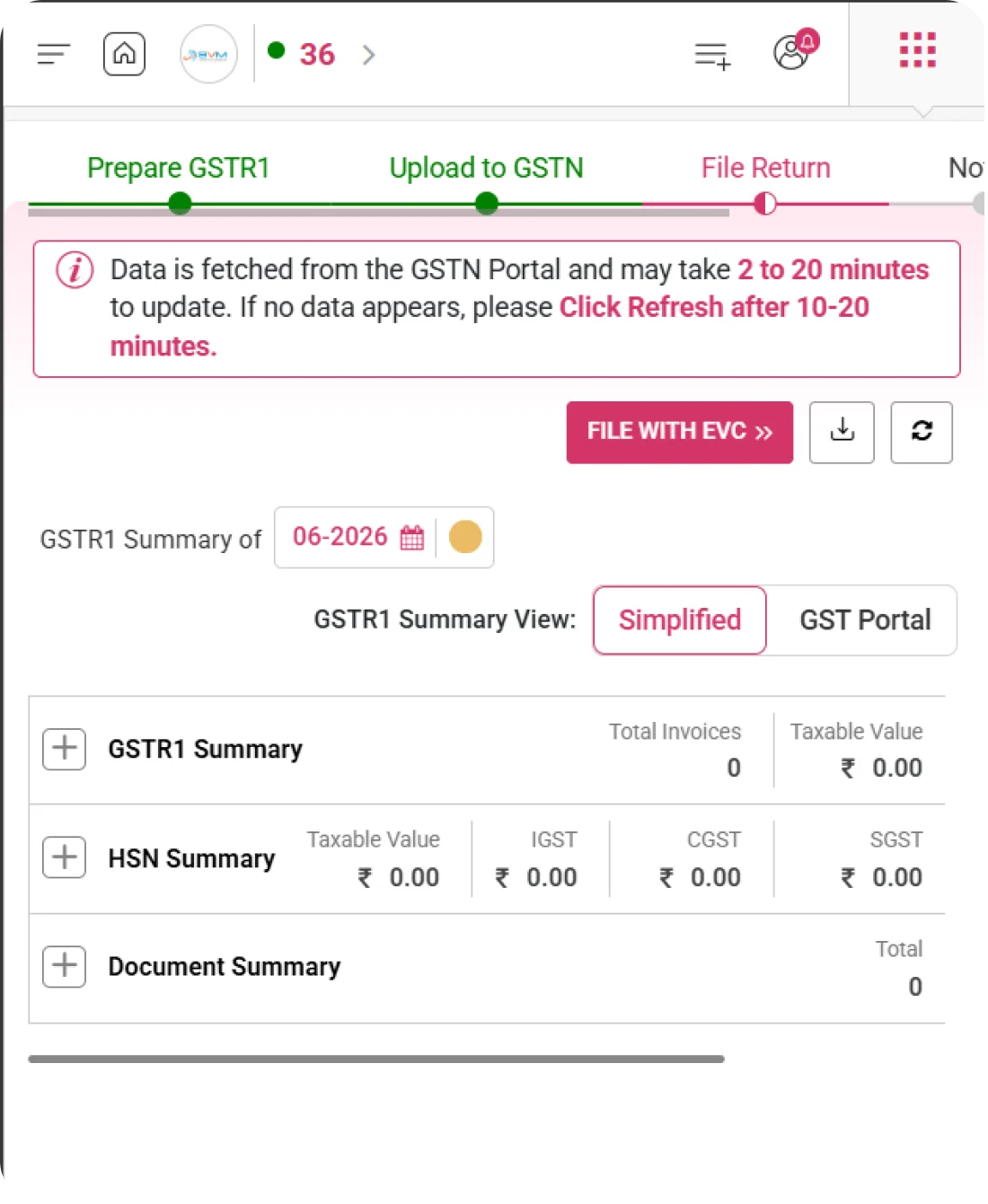
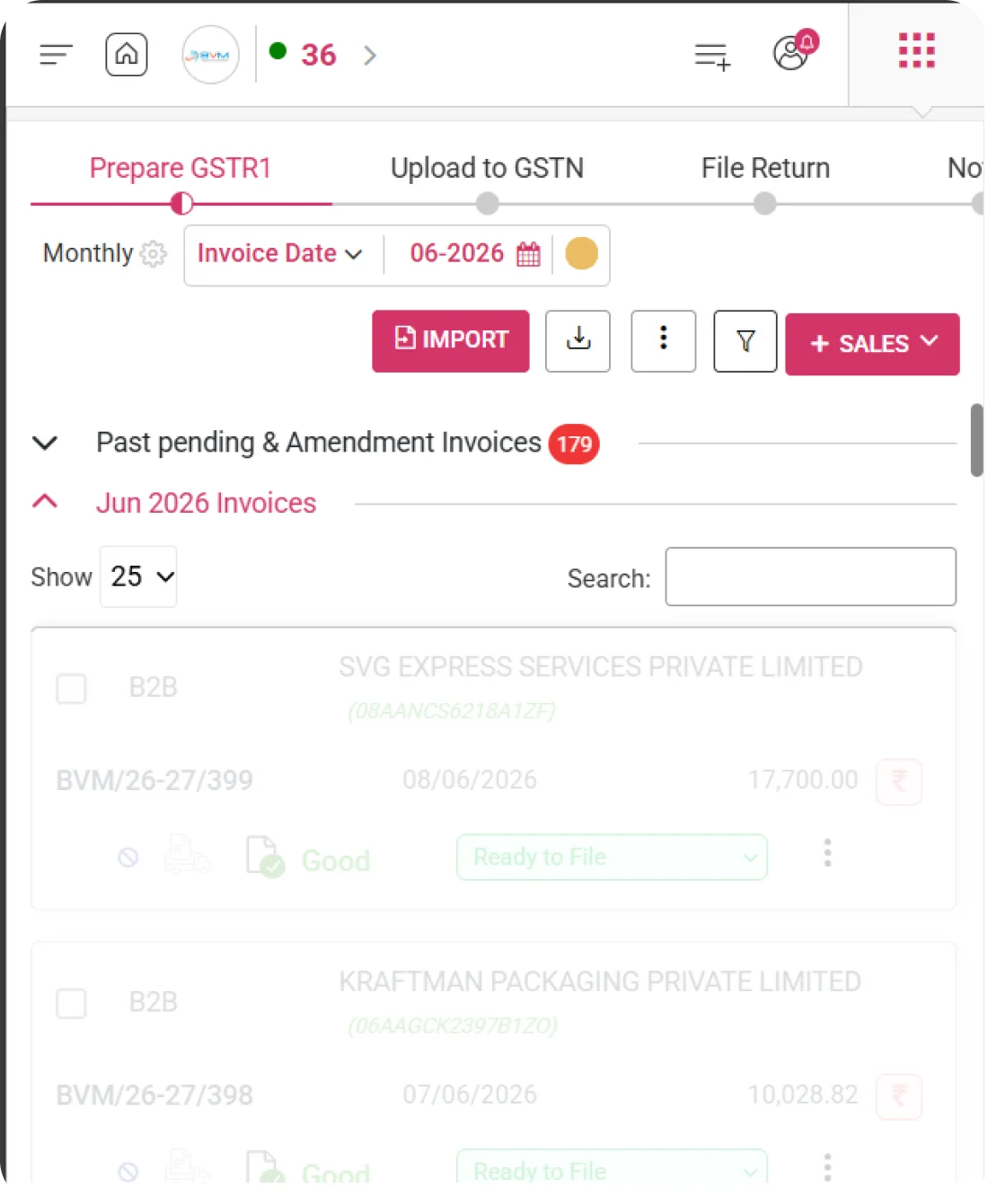
GSTN Data Fetch

Fetch Data Directly from GSTN Portal

Synchronize outward supply data directly from the GSTN portal in WhiteBooks to ensure accuracy and updated records before filing GSTR-1.
gstr1-filing-summary

Auto Data Synchronization

Automatically fetch previously saved or filed return data directly from GSTN. Ensures your system stays updated with the latest portal information without manual intervention.

Draft Data Retrieval

Instantly retrieve return data that was saved earlier but not yet filed. Allows you to continue the filing process without re-entering information.

Mismatch Identification

Compare portal data with system records to detect any differences or inconsistencies. Helps identify gaps quickly and ensures accurate and error-free return filing.
Return Period Selection

Choose the Correct Filing Period Easily

Easily select the appropriate financial year and return period in WhiteBooks to begin precise and error-free GSTR-1 preparation.
gstr1-filing-dateRange

Financial Year Selection

Choose the relevant financial year (FY) for preparing and reviewing your return data. Ensures that all transactions are recorded and reported under the correct accounting period.

Monthly / Quarterly Toggle

Easily switch between monthly filing and QRMP (Quarterly Return Monthly Payment) mode based on your eligibility. Provides flexibility and accurate return preparation as per your filing type.

Filed Period Indicator

Instantly identify periods that are already filed or locked by the system. Prevents accidental modifications and helps maintain compliance with GST regulations.
GSTR-1 Summary View Options

Flexible Summary Viewing Controls

Review GSTR-1 information in multiple formats in WhiteBooks to validate data integrity and prevent errors before submission.
gstr1-filing-summary

Section-Wise View

View summaries table-wise such as B2B, B2C, Exports, and other applicable sections. This allows you to review each category separately for better clarity and verification.

Consolidated View

See the complete outward supply summary on a single screen in a structured format. Provides a quick overview of total values and tax amounts for the selected period.

Detailed Invoice Drill-Down

Click on any section to expand and view invoice-level details instantly. Helps in deeper verification and quick identification of specific transactions when needed.
Section-Wise Expandable Summaries

Expand & Analyze Each GSTR-1 Section

View section-wise expandable summaries for every GSTR-1 table in WhiteBooks, allowing you to drill down into detailed values for accurate verification.
gstr1-filing-expandSummary

Expand/Collapse Controls

Easily toggle sections to expand and view detailed data or collapse them for a cleaner summary view. This improves navigation and allows focused review of specific return tables.

Taxable & Tax Amount Split

Provides a clear separation of taxable value and corresponding GST amounts. Helps in better understanding of tax calculations and quick verification of totals.

Error Highlighting in Sections

Instantly identifies and highlights issues within specific tables or sections. Enables faster corrections by directing attention to the exact area that needs review.
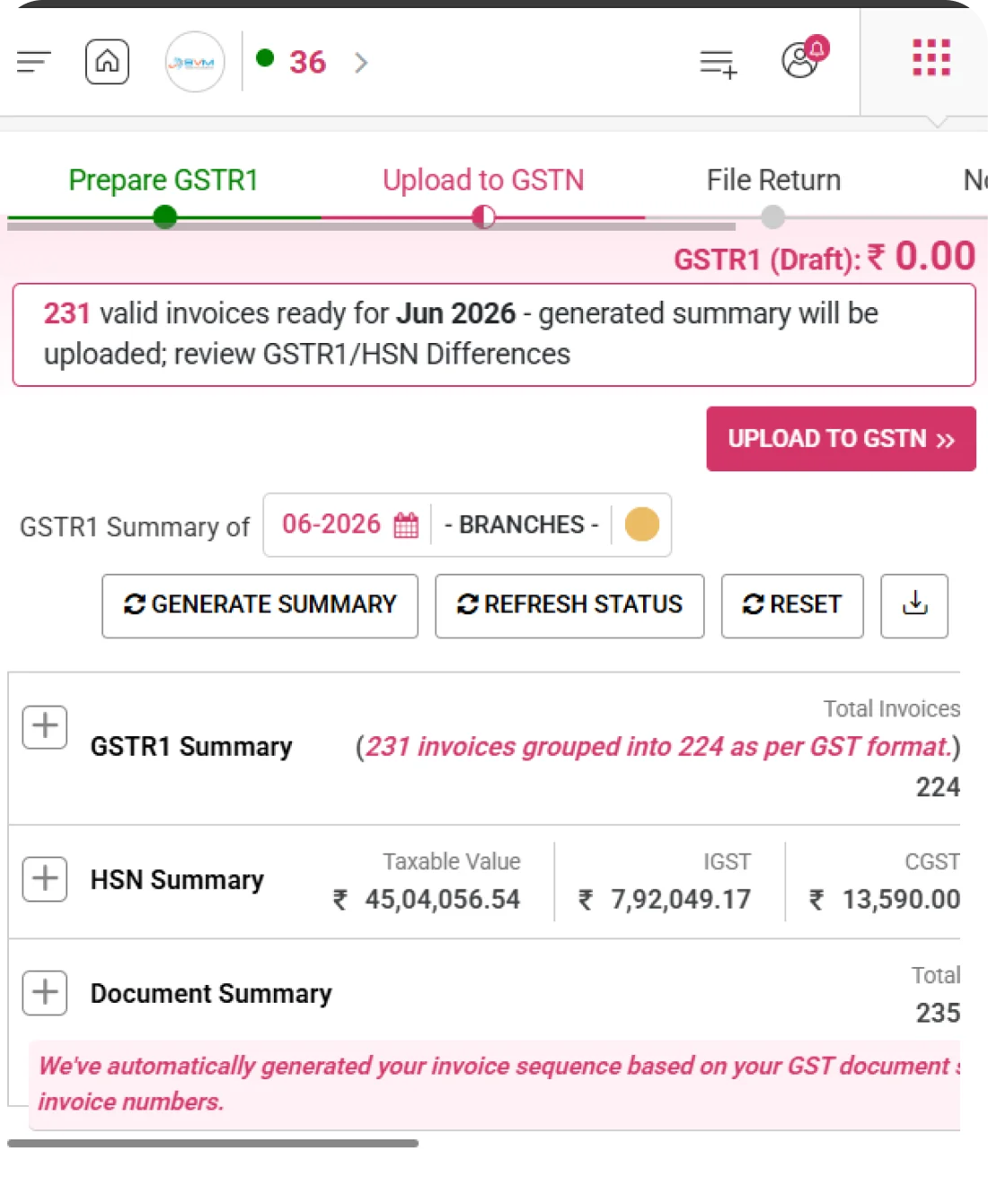
Invoice & Tax Overview Metrics

Quick Snapshot of Invoice & Tax Data

View essential invoice statistics and aggregated tax totals together in one unified metrics panel in WhiteBooks to support accurate review and decision-making.
gstr1-filing-summary

Total Invoice Count

Displays the total number of invoices uploaded for the selected return period. Helps you quickly verify whether all transactions are included before proceeding with filing.

Total Taxable Value

Shows the combined taxable turnover calculated from all eligible invoices. Provides a clear understanding of the overall business volume for the period.

GST Liability Overview

Displays CGST, SGST, and IGST totals separately in a structured format. Offers a clear breakdown of tax liability for accurate reporting and payment planning.
Tax Breakdown in HSN Summary

Detailed Tax Split in HSN Reporting

Examine tax values by HSN classification in WhiteBooks to validate reporting accuracy and adhere to GST compliance standards.
gstr1-filing-HSNtax-breakdown

HSN-Wise Tax Summary

Displays the taxable value grouped under each HSN code for the selected period. Helps in verifying product-wise turnover and ensures accurate HSN reporting.

Rate-Wise GST Split

Shows GST amounts calculated based on applicable tax percentages. Provides clarity on how tax is distributed across different GST rates.

Quantity & UQC Validation

Validates the entered quantity and corresponding Unit Quantity Code (UQC). Ensures correct format and compliance with GST reporting standards.
Document Summary Tracking

Monitor Document Number Series

Monitor invoice number ranges systematically in WhiteBooks to detect missing numbers, duplicates, or inconsistencies in sequence.
gstr1-filing-doc-summary

Series Range Display

Shows the starting and ending invoice numbers for each series used during the selected period. Helps in maintaining clear visibility of document utilization and numbering continuity.

Gap Detection

Identifies any missing invoice numbers within the sequence automatically. Enables quick verification and corrective action to ensure proper compliance and record accuracy.

Cancellation Monitoring

Tracks invoices that have been cancelled within a specific series. Provides transparency in document management and ensures accurate reporting in returns.
File with EVC Option

File GSTR-1 Using EVC Authentication

File your GSTR-1 confidently in WhiteBooks with secure EVC-based authentication for safe and seamless submission.
gstr1-filing-summary

OTP-Based Verification

Authenticate the filing process using a One-Time Password (OTP) sent to the registered mobile number or email. Adds an extra layer of security before final submission.

Secure Filing Process

Ensures that the return is submitted through an authorized and encrypted process. Protects sensitive business data and prevents unauthorized access.

Filing Acknowledgment Receipt

Generate and view the ARN after successful filing of the return. Serves as official confirmation and proof of submission for record keeping and compliance.
Download & Refresh Controls

Download Reports & Refresh Status Instantly

Download return data as needed and refresh portal information in WhiteBooks to view the most recent filing and submission status.
gstr1-filing-export

JSON Download Option

Download a GST-compliant JSON file that is ready for upload to the portal. Ensures proper formatting and smooth submission without validation issues.

Excel/PDF Report Export

Export the return summary in Excel or PDF format for internal review and documentation. Useful for sharing with finance teams, auditors, or management for verification.

Real-Time Status Refresh

Instantly refresh and fetch the latest portal response and upload status. Keeps you updated with accurate filing progress and error notifications.
Get started with WhiteBooks
WhiteBooks streamlines GSTR 1 with GSTN sync, period selection, validations, EVC filing, and export—fully compliant and submission ready.
No Credit Card Required

GST pricing — built around what you actually use

WhiteBooks GST runs on a custom pricing model. We size the plan to your filing volume, number of GSTINs, integration scope and support tier — not to a fixed SKU. Most teams move from sandbox to production inside a week.

Start Free

Use the sandbox for as long as you need. No credit card. Real schemas, real responses, no usage caps for evaluation.

Talk to Sales

Tell us your filing volume and integrations. We come back with a written quote, SLA and onboarding plan within one business day.

Enterprise Plans

Multi-GSTIN, SSO, dedicated support, on-premise deployment and custom SLAs available for large teams.

Who this GST solution is built for

Every GST workflow on this page is shaped by feedback from real practitioners — accountants who file every month, integration engineers wiring our APIs into ERPs, and compliance heads accountable to the board for what gets submitted.

GST Practitioners & CAs

File GSTR-1, GSTR-3B, GSTR-9 for hundreds of clients from a single dashboard with bulk import, reconciliation and one-click filing.

Tax & Finance Teams

Match GSTR-2A/2B against purchase books, raise alerts on mismatches and lock the books only after ITC reconciliation is clean.

Enterprise Compliance Heads

Multi-GSTIN consolidation, role-based access, audit trail and exportable evidence for every filing decision.

Partner with WhiteBooks

WhiteBooks works with CA firms, ERP vendors, system integrators and channel partners across India and the GCC. Pick the track that matches how you serve clients — we will share commercials, training and co-marketing kits.

CA & Practitioner Partners

Onboard your client base, earn margin on every plan and get a co-branded portal to manage filings, due dates and ITC reconciliation.

Integration Partners

ERPs, POS systems and billing platforms — ship native WhiteBooks GST / e-Invoice / e-Way Bill integrations to your customers without building it yourself.

Channel & Resellers

Regional resellers and consultants — earn recurring commissions, get pre-sales support and a sandbox tenant for every prospect demo.

Frequently Asked Questions

We have put together some commonly asked questions

WhiteBooks GSTN Data Fetch automatically synchronizes your outward supply data directly from the GSTN portal, pulling previously saved or filed return data without any manual intervention. It also compares the portal data against your system records to highlight any mismatches or inconsistencies — ensuring your GSTR-1 preparation is always based on the most accurate and up-to-date information.

WhiteBooks GSTR-1 Summary View lets you review return information in three formats — Section-Wise for category-level clarity across B2B, B2C, Exports and other tables, Consolidated for a single-screen total overview, and Detailed Invoice Drill-Down to inspect individual transactions. This flexible multi-format view ensures every data point is verified before you proceed with submission.

WhiteBooks Invoice & Tax Overview Metrics panel shows the Total Invoice Count, Total Taxable Value, and a full GST Liability Overview with CGST, SGST, and IGST broken out separately — all in one unified view. This gives you an instant snapshot of your business volume and tax obligations for the selected period, helping you confirm everything is accounted for before filing.

WhiteBooks Document Summary Tracking displays the start and end invoice number for each series used in the selected period and automatically identifies any missing numbers within the sequence. It also monitors cancelled invoices within each series, giving you full transparency over document utilization — so you can catch and correct numbering inconsistencies before they create compliance issues in your GSTR-1 filing.

WhiteBooks Return Period Selection lets you choose the financial year and toggle between Monthly and QRMP (Quarterly Return Monthly Payment) modes based on your eligibility. A Filed Period Indicator clearly marks periods that are already submitted or locked, preventing accidental modifications. This combination ensures every transaction is reported under the correct period and protects you from filing errors right from the start.

WhiteBooks Section-Wise Expandable Summaries let you toggle each GSTR-1 table open or closed for focused review. Every expanded section shows a clear Taxable & Tax Amount Split for quick verification of totals, and any issues within a specific table are instantly highlighted so you can correct them without having to search through the entire return.

WhiteBooks Tax Breakdown in HSN Summary displays taxable values grouped by each HSN code alongside a Rate-Wise GST Split showing how tax is distributed across different percentages. It also validates the quantity and Unit Quantity Code (UQC) entered for each HSN — ensuring product-wise turnover is accurate, the format is GST-compliant, and your HSN reporting meets portal standards before submission.

Yes. WhiteBooks File with EVC Option authenticates your GSTR-1 submission using an OTP sent to your registered mobile or email, and generates a Filing Acknowledgment Receipt (ARN) as proof of submission. The Download & Refresh Controls module then lets you export the return as a GST-compliant JSON for portal upload, or as Excel and PDF for internal use — plus a Real-Time Status Refresh to track the latest filing and upload status without leaving the platform.

Last updated · View changelog

Quick Answer

Seamless GSTR-1 filing with accurate outward supply tracking

WhiteBooks GST Software is a GSP-licensed cloud platform that prepares and files every GST return — GSTR-1, GSTR-3B, GSTR-9, GSTR-9C, CMP-08 and ITC-04 — with auto-reconciliation against GSTR-2B for accurate ITC claims. Used by 25,000+ businesses and 8,000+ Chartered Accountants across India, it processes 30 Crore+ GST filings per year with 99.99% uptime and 24×7 Indian support. This feature is part of the GST module inside WhiteBooks.

30 Crore+ GST filings / year
25,000+ businesses served
99.99% uptime SLA
24×7 Indian support
By CA Atul GargReviewing Editor — WhiteBooks GST Compliance DeskReviewed by the WhiteBooks Editorial Board · Last updated 8 June 2026