Follow us on our LinkedIn page

Seamless IMS management with complete ITC visibility

WhiteBooks provides IMS management with 2B alerts, ITC tracking, summaries, reconciliation, auto matching, bulk actions, status indicators, and export for. WhiteBooks IMS & GSTR runs on India's GSP-certified, cloud-first business management platform used by 25,000+ businesses.

WhiteBooks automates GSTR 2B reconciliation by matching invoices, flagging mismatches, and ensuring accurate, filing ready ITC every period.

gstr2B-ims-dashbaord
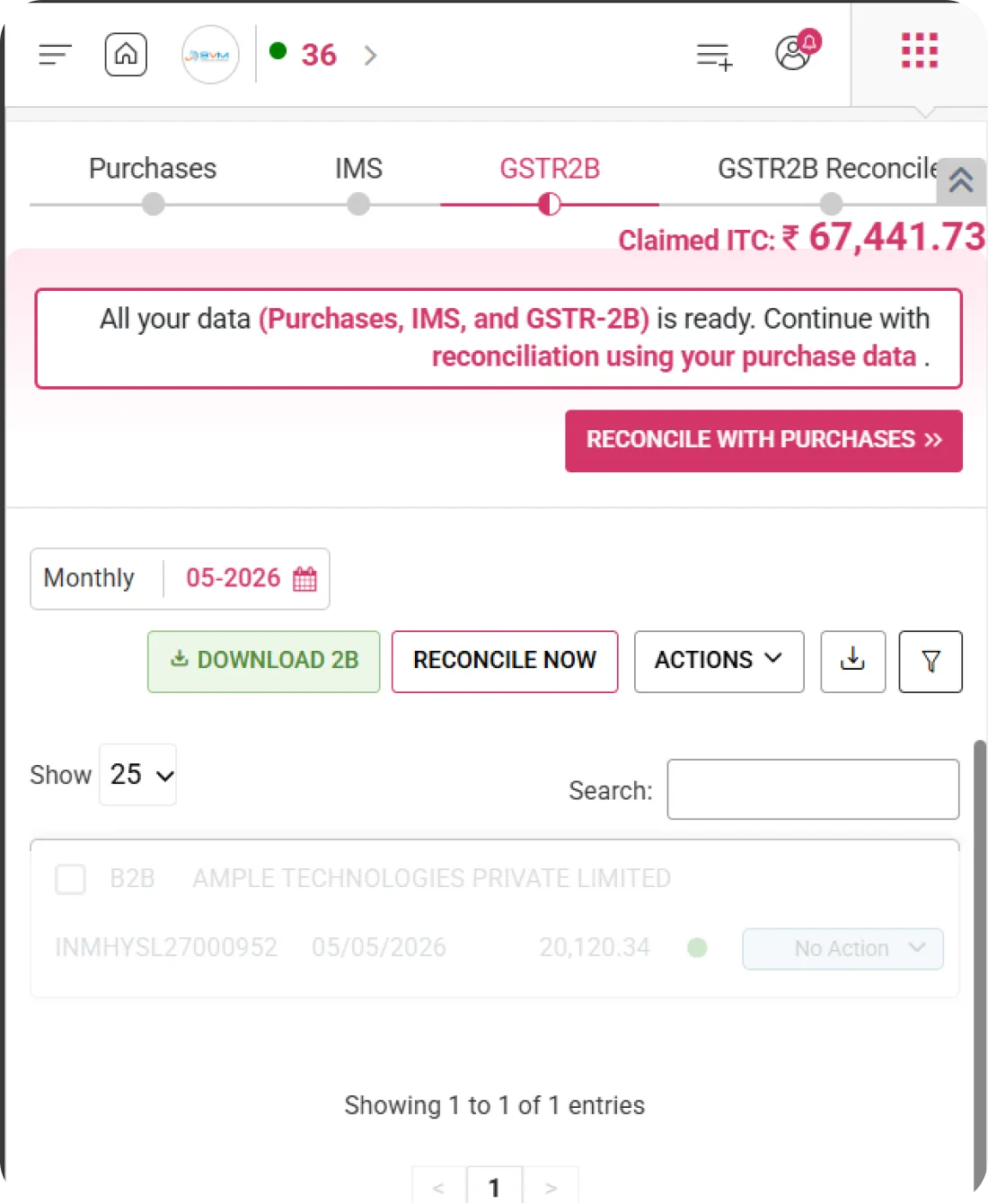
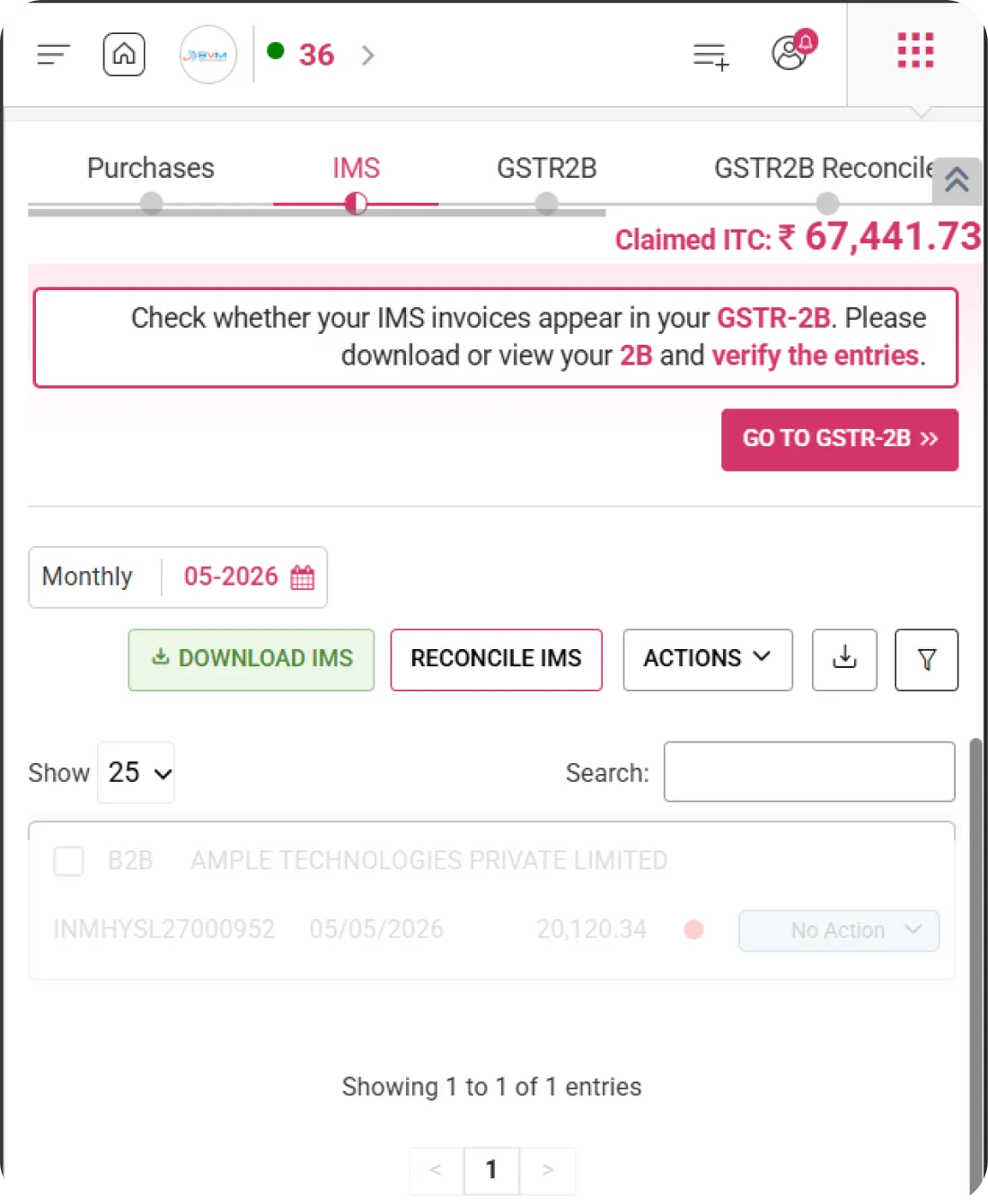
Claimed ITC Display

Real-Time Claimed ITC Amount Display

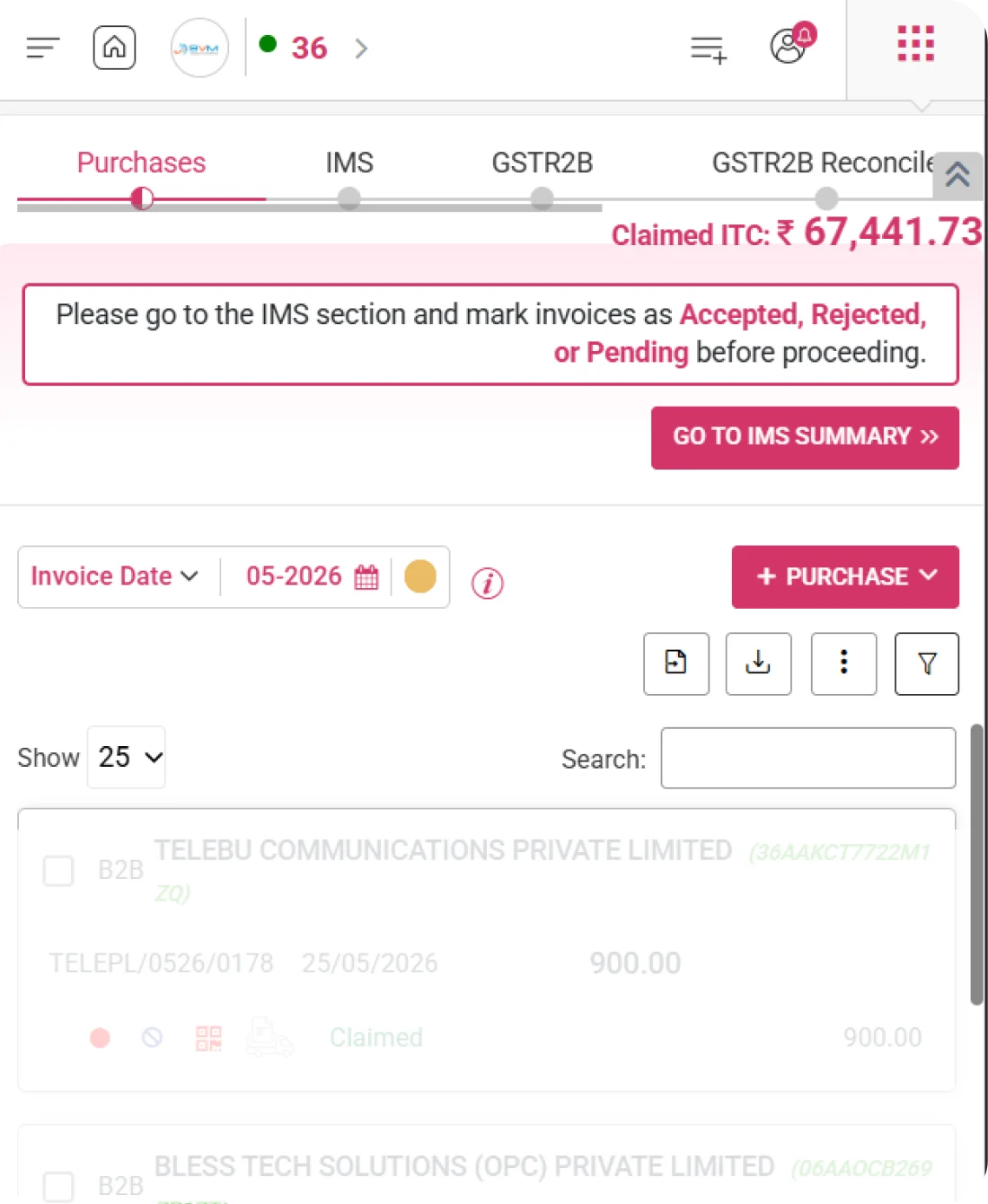
WhiteBooks displays the total Claimed Input Tax Credit (ITC) prominently at the top of the IMS screen for quick reference during reconciliation, providing instant visibility into credit impact while reviewing invoices and ensuring accurate tracking and compliance readiness.
gstr2B-ims-register

Live ITC Value

Displays the total claimed ITC amount for the selected period in real time. Helps you track credit utilization without navigating to separate reports.

Dynamic Update

Automatically updates the ITC total based on IMS actions such as accept, reject, or pending status. Ensures the displayed value always reflects the latest reconciliation outcome.

Period-Specific Display

Shows the ITC amount based on the selected month or transaction period. Prevents confusion by clearly aligning credit values with the chosen reporting cycle.
GSTR-2B Verification Alert

Verify IMS Invoices with GSTR-2B

Our Software prompts users to verify whether IMS invoices are reflected in GSTR-2B before proceeding with reconciliation. This ensures that ITC decisions are based on correctly reported supplier data and reduces compliance risks.
gstr2B-ims-register

Verification Reminder Banner

Displays a clear alert banner reminding users to check invoice entries in GSTR-2B. Helps prevent oversight before taking reconciliation actions.

Entry Confirmation Prompt

Encourages users to validate supplier-reported invoices against portal data. Promotes accurate acceptance or rejection decisions within IMS.

Compliance Check Indicator

Indicates that ITC should be claimed only after proper verification. Ensures better compliance control and minimizes the risk of incorrect credit claims.
IMS Summary Dashboard

Complete IMS Action Summary

WhiteBooks displays summarized IMS invoice counts including Accepted, Rejected, Pending, and No Action in a single dashboard view, providing quick insights into action progress, efficient prioritization, and compliance-ready reconciliation tracking.
ims-summary-gstr2B

Accepted Count

Displays the total number of invoices that have been accepted. Helps track confirmed invoices contributing to ITC eligibility.

Rejected & Pending Count

Shows the number of invoices that are either rejected or still awaiting action. Enables better follow-up and timely decision-making to avoid ITC delays.

No Action Indicator

Highlights invoices where no action has been taken yet. Ensures that no record is overlooked during the reconciliation process.
IMS vs Purchases Reconciliation

IMS and Purchase Register Comparison

WhiteBooks compares IMS invoices with purchase records to identify matched, unmatched, and partially matched entries, ensuring accurate ITC claims, stronger reconciliation control, and compliance-ready reporting before return filing.
imsVsPurchases-reconSummary

Matched Records

Displays invoices that are successfully reconciled between IMS data and the purchase register. Confirms data accuracy and supports confident ITC claims.

Not in Purchases

Highlights IMS invoices that are missing in your purchase register. Enables quick investigation to avoid missing eligible credits or recording discrepancies.

Partially Matched Entries

Shows invoices where values, tax amounts, or other details do not fully match. Helps identify and correct mismatches before proceeding with final reconciliation.
Period Selection

Select Monthly Transaction Period

WhiteBooks allows selection of the applicable month and financial year to review IMS data and perform reconciliation, ensuring invoice comparisons and ITC decisions are aligned with the correct reporting period, enabling accurate tracking and compliance readiness.
gstr2B-ims-dateWise

Monthly Dropdown Selection

Select the required month from a dropdown menu. Allows focused review of invoices belonging to a specific transaction period.

Financial Year Context

Displays and organizes data according to the selected financial year (FY). Helps maintain clarity and proper year-wise compliance tracking.

Period-Based Filtering

Automatically filters invoice records based on the chosen month and FY. Ensures that only relevant data is shown for accurate reconciliation.
Download IMS Data

Download IMS Data for Review

WhiteBooks enables export of IMS invoice data for offline analysis, review, and documentation, supporting accurate record-keeping, reconciliation transparency, and compliance and audit readiness.
gstr2B-ims-export

IMS Data Export

Download the complete list of IMS invoices for the selected period in a single file. Enables easy offline review and data sharing when required.

Structured Format Output

Export data in a well-structured and usable format for analysis. Ensures clarity and compatibility with reporting or accounting tools.

Reconciliation Backup

Maintain a backup of reconciled data for audit reference and compliance tracking. Provides documented proof of actions taken and ITC decisions made.
One-Click IMS Reconciliation

Instant Auto Reconciliation

WhiteBooks automatically reconciles IMS invoices with purchase data in a single action, simplifying the process and ensuring faster, more accurate ITC validation, enhanced efficiency, and compliance readiness.
gstr2B-ims-reconcile

Reconcile IMS Button

Trigger the reconciliation process instantly with a dedicated button. Eliminates manual comparison and speeds up invoice matching.

Smart Matching Logic

Matches invoices intelligently based on key parameters such as GSTIN, invoice value, and invoice date. Ensures precise alignment between IMS and purchase records.

Mismatch Highlighting

Clearly identifies unmatched or partially matched entries after reconciliation. Helps you focus on discrepancies that require correction or review.
Action Management

Manage IMS Invoice Actions

WhiteBooks enables invoice-level actions such as Accept, Reject, or Pending directly from the interface, supporting faster decision-making, improved ITC control, and compliance-ready reconciliation management.
gstr2B-ims-actions

Action Dropdown Controls

Access Accept, Reject, or Pending options easily through a simple dropdown control. Allows quick action without navigating away from the invoice list.

Bulk Action Support

Apply actions to multiple invoices at once to save time. Ideal for handling large volumes of invoices efficiently during reconciliation.

Action Status Tracking

Monitor updated action results in the summary panel instantly. Ensures transparency and keeps you informed about the latest status changes.
Status-Based Indicators

Visual Status Indicators for Easy Tracking

WhiteBooks displays instant invoice reconciliation results and IMS action status through clear visual indicators, enhancing clarity, reducing manual verification effort, and ensuring accurate tracking and compliance readiness.
gstr2B-ims-register

IMS Recon Status Column

Displays reconciliation result for each invoice, such as Matched, Mismatched, or Missing. Helps users quickly understand reconciliation status at a glance.

IMS Action

Shows the selected action for each invoice — Accepted, Rejected, or Pending. Ensures complete visibility of action decisions directly within the listing view.

Color-Coded Labels

Uses distinct color labels to visually differentiate status categories. Enables faster identification and improves overall usability during reconciliation.
Get started with WhiteBooks
WhiteBooks streamlines IMS workflow with invoice reconciliation, instant mismatch alerts, and accurate, filing ready ITC tracking.
No Credit Card Required

GST pricing — built around what you actually use

WhiteBooks GST runs on a custom pricing model. We size the plan to your filing volume, number of GSTINs, integration scope and support tier — not to a fixed SKU. Most teams move from sandbox to production inside a week.

Start Free

Use the sandbox for as long as you need. No credit card. Real schemas, real responses, no usage caps for evaluation.

Talk to Sales

Tell us your filing volume and integrations. We come back with a written quote, SLA and onboarding plan within one business day.

Enterprise Plans

Multi-GSTIN, SSO, dedicated support, on-premise deployment and custom SLAs available for large teams.

Who this GST solution is built for

Every GST workflow on this page is shaped by feedback from real practitioners — accountants who file every month, integration engineers wiring our APIs into ERPs, and compliance heads accountable to the board for what gets submitted.

GST Practitioners & CAs

File GSTR-1, GSTR-3B, GSTR-9 for hundreds of clients from a single dashboard with bulk import, reconciliation and one-click filing.

Tax & Finance Teams

Match GSTR-2A/2B against purchase books, raise alerts on mismatches and lock the books only after ITC reconciliation is clean.

Enterprise Compliance Heads

Multi-GSTIN consolidation, role-based access, audit trail and exportable evidence for every filing decision.

Partner with WhiteBooks

WhiteBooks works with CA firms, ERP vendors, system integrators and channel partners across India and the GCC. Pick the track that matches how you serve clients — we will share commercials, training and co-marketing kits.

CA & Practitioner Partners

Onboard your client base, earn margin on every plan and get a co-branded portal to manage filings, due dates and ITC reconciliation.

Integration Partners

ERPs, POS systems and billing platforms — ship native WhiteBooks GST / e-Invoice / e-Way Bill integrations to your customers without building it yourself.

Channel & Resellers

Regional resellers and consultants — earn recurring commissions, get pre-sales support and a sandbox tenant for every prospect demo.

Frequently Asked Questions

We have put together some commonly asked questions

WhiteBooks features a real-time Claimed ITC Display that shows the total Input Tax Credit claimed for the selected period prominently at the top of the IMS screen — dynamically updating as you accept, reject, or mark invoices as pending. The value is always aligned to the chosen month or transaction period, ensuring instant visibility into credit impact without navigating to separate reports.

WhiteBooks displays a clear GSTR-2B Verification Alert banner that prompts users to confirm whether IMS invoices are reflected in GSTR-2B before proceeding with any reconciliation actions. It includes an entry confirmation prompt to validate supplier-reported invoices against portal data and a compliance check indicator — ensuring ITC is claimed only after proper verification and reducing the risk of incorrect credit claims

WhiteBooks offers a dedicated IMS Summary Dashboard that displays summarized counts of invoices categorized as Accepted, Rejected, Pending, and No Action — all in a single view. Accepted invoice counts track confirmed ITC eligibility, rejected and pending counts enable timely follow-up, and a No Action indicator ensures that no record is overlooked during the reconciliation process.

WhiteBooks provides an IMS vs Purchases Reconciliation module that clearly separates matched records — invoices successfully aligned between IMS and the purchase register — from invoices missing in purchases and partially matched entries where values or tax amounts differ. This structured comparison strengthens reconciliation control and ensures only accurate ITC claims proceed to return filing.

WhiteBooks provides a Period Selection feature with a monthly dropdown for choosing the required return month, financial year context to organize and track data year-wise, and automatic period-based filtering that loads only the relevant invoices for the chosen month and FY — ensuring all ITC decisions and invoice comparisons are precisely aligned with the correct reporting cycle.

WhiteBooks enables users to download the complete IMS invoice list for any selected period in a structured, analysis-ready format — compatible with reporting and accounting tools. The export also serves as a reconciliation backup, providing documented proof of all ITC decisions and actions taken — supporting audit reference and ongoing compliance transparency.

WhiteBooks offers a One-Click IMS Reconciliation feature with a dedicated Reconcile IMS button that triggers instant auto-matching of IMS invoices against purchase data. The smart matching logic compares records based on GSTIN, invoice value, and invoice date for precise alignment — and clearly highlights unmatched or partially matched entries afterward, allowing users to focus only on discrepancies that require correction.

WhiteBooks provides Status-Based Indicators across every invoice record — an IMS Recon Status column showing Matched, Mismatched, or Missing results, an IMS Action column displaying whether each invoice is Accepted, Rejected, or Pending, and distinct color-coded labels to visually differentiate all status categories. This eliminates manual verification effort and enables faster, more accurate decision-making throughout the reconciliation workflow.

Last updated · View changelog

Quick Answer

Seamless IMS management with complete ITC visibility

WhiteBooks GST Software is a GSP-licensed cloud platform that prepares and files every GST return — GSTR-1, GSTR-3B, GSTR-9, GSTR-9C, CMP-08 and ITC-04 — with auto-reconciliation against GSTR-2B for accurate ITC claims. Used by 25,000+ businesses and 8,000+ Chartered Accountants across India, it processes 30 Crore+ GST filings per year with 99.99% uptime and 24×7 Indian support. This feature is part of the GST module inside WhiteBooks.

30 Crore+ GST filings / year
25,000+ businesses served
99.99% uptime SLA
24×7 Indian support
By CA Atul GargReviewing Editor — WhiteBooks GST Compliance DeskReviewed by the WhiteBooks Editorial Board · Last updated 8 June 2026