Follow us on our LinkedIn page

End-to-end control over pending ITC tracking and reconciliation

WhiteBooks provides pending ITC tracking with period wise summaries, alerts, invoice listing, bulk actions, filters, and export for accurate GST compliance. WhiteBooks GST Filing Software runs on India's GSP-certified, cloud-first business management platform used by 25,000+ businesses.

WhiteBooks provides full visibility of unclaimed ITC with alerts, pending summaries, invoice status tracking, bulk actions, and search and export controls for complete control before filing.

gstr2B-pendingITC-dashboard
Overview

Pending ITC Summary for Selected Period

WhiteBooks highlights Input Tax Credit (ITC) that is pending and not yet claimed or included in GSTR-3B for the selected period. This gives users full visibility of outstanding credits, supporting informed decision-making and accurate GST reporting.
gstr2B-pendingITC-register

Total Pending ITC Amount

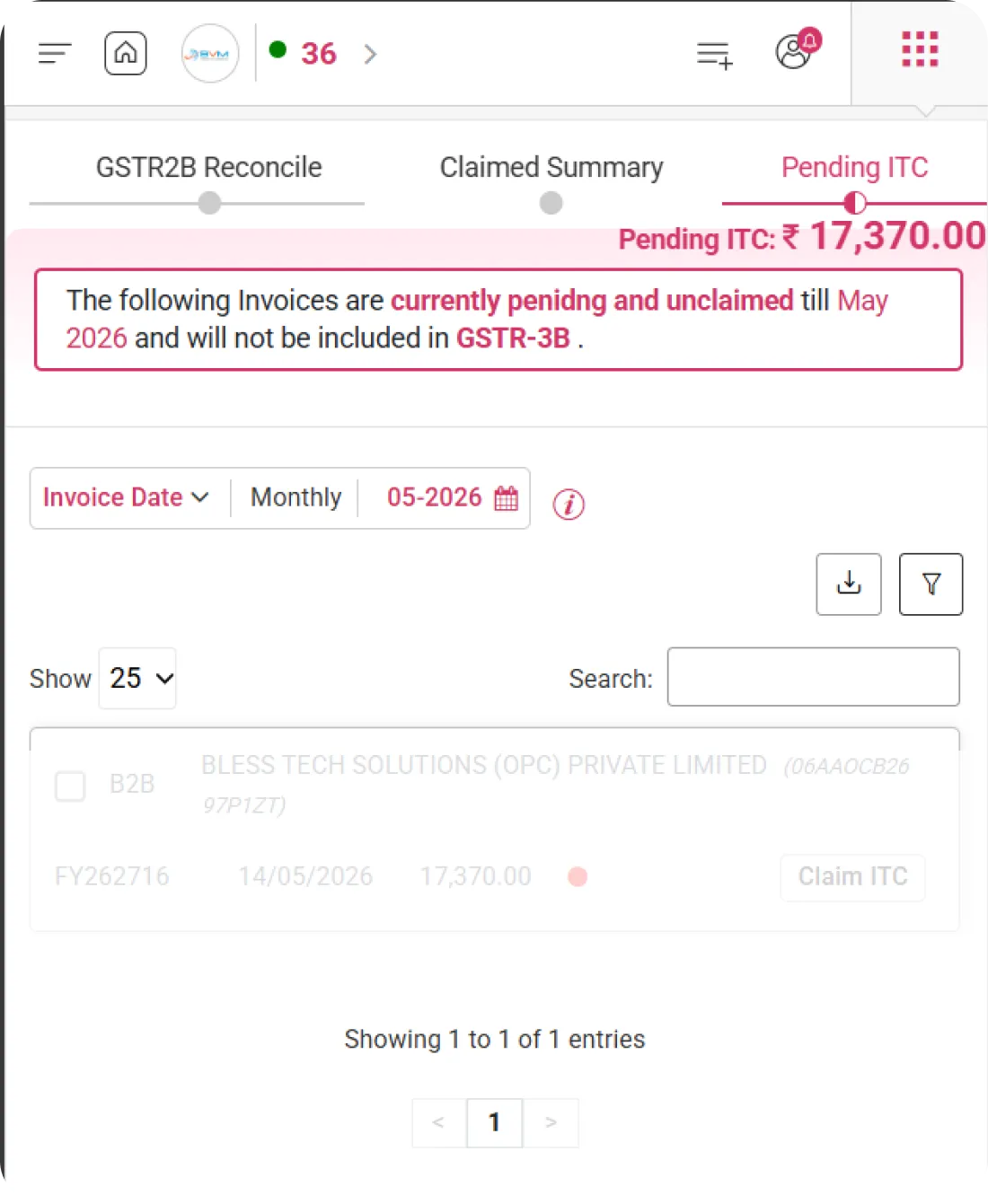
Displays the total ITC currently pending across all invoices for the selected period. The aggregated value is prominently shown, allowing users to quickly understand the unclaimed credit pending action or validation.

Period-Specific Pending Status

Highlights invoices and ITC amounts that remain pending specifically until the selected tax period. This ensures period-wise visibility, helping track which credits are yet to be processed or reconciled.

Exclusion from GSTR-3B

Clearly indicates that pending ITC amounts will not be included in the GSTR-3B filing for the selected period. This helps prevent errors in filing and ensures that only reconciled and verified ITC is reported.
Notification

Pending Invoice Alert Message

WhiteBooks provides a clear, system-generated notification highlighting invoices that are pending and excluded from GSTR-3B filing. This ensures users have complete visibility and can address all outstanding invoices before submission.
gstr2B-pendingITC-register

Current Pending Status

Highlights all invoices that are marked as pending in the system. Users can quickly identify which invoices have not been reconciled or approved for ITC claim.

Period Reference

Specifies the exact tax period to which the pending invoices belong. Ensures clarity about which return period these pending invoices will affect.

Filing Impact Information

Informs users that these pending invoices will not be included in GSTR-3B filing. Helps prevent accidental claims and ensures that only verified and reconciled ITC is submitted.
Transaction Period

Transaction Date & Monthly Filter Controls

WhiteBooks allows users to filter and view pending invoices by transaction date or selected monthly periods. This ensures precise monitoring of unclaimed ITC and enables period-specific reconciliation for accurate reporting.
gstr2B-pendingITC-datewise

Transaction Date Filter

Allows filtering of pending invoices according to their transaction dates. Users can narrow down results to focus on specific invoice dates for detailed review.

Monthly Selector

Provides a toggle to switch between different monthly views. Makes it easy to analyze pending invoices on a month-by-month basis and track outstanding ITC.

Period Picker

Enables selection of a specific return month (e.g., 03-2026) to view pending invoices for that tax period. Ensures alignment with filing cycles and accurate period-based reporting.
Invoice Listing

Detailed Pending Invoice List

WhiteBooks offers a comprehensive view of all invoices marked as pending, including GST details, party information, and available claim actions. This empowers users to efficiently monitor, track, and act on unclaimed ITC.
gstr2B-pendingITC-register

Invoice Information

Displays detailed invoice data including Type, Party Details, Invoice Number, Invoice Date, GST/Tax Amount, Status, and available Actions. Offers a structured table for easy review and tracking.

Red Status Indicator

A visual red dot highlights invoices that are pending. This provides immediate recognition of unclaimed or unresolved entries, helping prioritize action.

Claim ITC Action

Enables users to manually claim ITC for a selected pending invoice. Streamlines the process of updating ITC claims directly from the dashboard without navigating to other modules.
Controls

Download, Actions & Search Controls

WhiteBooks equips users with tools to efficiently manage pending invoices, ensuring accurate tracking, reporting, and ITC claim processing. It streamlines bulk actions while maintaining full visibility and control.
gstr2B-pendingITC-controls

Downloads

Allows users to export pending invoice data in structured formats like Excel or PDF. Supports internal review, audit documentation, and record-keeping before taking further action.

Actions

Provides a grouped set of operations such as Accept, Reject, or Mark Pending for selected invoices. Enables batch processing to save time and improve workflow efficiency.

Search and Filter

Includes powerful search and filter tools to quickly locate pending invoices by GSTIN, invoice number, party, or status. Helps users focus on specific records and reduces manual effort in large datasets.
Bulk Processing

Bulk Selection & ITC Claim Handling

WhiteBooks allows users to select and process multiple invoices in batches, improving efficiency while maintaining full control over ITC claims.
gstr2B-pendingITC-actions

Individual/Multiple invoices selection

Allows selection of individual invoices or multiple invoices at once using checkboxes. Facilitates easier handling of large invoice datasets for bulk actions.

Bulk Action Trigger

Once invoices are selected, users can perform grouped actions such as Accept, Reject, or Mark Pending via the Actions dropdown. Streamlines bulk processing and saves time.

Controlled ITC Claiming

Ensures that only correctly selected invoices are considered for ITC claim. Provides a safeguard to prevent accidental inclusion of wrong or pending entries, maintaining compliance and accuracy.
Get started with WhiteBooks
WhiteBooks keeps pending ITC visible with alerts, bulk claim controls, and verified inclusion in every GSTR 3B filing.
No Credit Card Required

GST pricing — built around what you actually use

WhiteBooks GST runs on a custom pricing model. We size the plan to your filing volume, number of GSTINs, integration scope and support tier — not to a fixed SKU. Most teams move from sandbox to production inside a week.

Start Free

Use the sandbox for as long as you need. No credit card. Real schemas, real responses, no usage caps for evaluation.

Talk to Sales

Tell us your filing volume and integrations. We come back with a written quote, SLA and onboarding plan within one business day.

Enterprise Plans

Multi-GSTIN, SSO, dedicated support, on-premise deployment and custom SLAs available for large teams.

Who this GST solution is built for

Every GST workflow on this page is shaped by feedback from real practitioners — accountants who file every month, integration engineers wiring our APIs into ERPs, and compliance heads accountable to the board for what gets submitted.

GST Practitioners & CAs

File GSTR-1, GSTR-3B, GSTR-9 for hundreds of clients from a single dashboard with bulk import, reconciliation and one-click filing.

Tax & Finance Teams

Match GSTR-2A/2B against purchase books, raise alerts on mismatches and lock the books only after ITC reconciliation is clean.

Enterprise Compliance Heads

Multi-GSTIN consolidation, role-based access, audit trail and exportable evidence for every filing decision.

Partner with WhiteBooks

WhiteBooks works with CA firms, ERP vendors, system integrators and channel partners across India and the GCC. Pick the track that matches how you serve clients — we will share commercials, training and co-marketing kits.

CA & Practitioner Partners

Onboard your client base, earn margin on every plan and get a co-branded portal to manage filings, due dates and ITC reconciliation.

Integration Partners

ERPs, POS systems and billing platforms — ship native WhiteBooks GST / e-Invoice / e-Way Bill integrations to your customers without building it yourself.

Channel & Resellers

Regional resellers and consultants — earn recurring commissions, get pre-sales support and a sandbox tenant for every prospect demo.

Frequently Asked Questions

We have put together some commonly asked questions

WhiteBooks delivers a dedicated Pending ITC Overview that displays the total Input Tax Credit currently unclaimed across all invoices for the selected period — with clear period-wise visibility of outstanding credits and an explicit indication that these pending amounts will not be included in GSTR-3B filing. This ensures only reconciled and verified ITC is reported, preventing accidental errors before submission.

WhiteBooks generates a system-level Pending Invoice Alert that clearly communicates which invoices are currently pending and will not be included in GSTR-3B for the selected return period. It highlights the current pending status, specifies the exact tax period affected, and provides filing impact information — ensuring users are fully aware of any unresolved entries before proceeding with submission.

WhiteBooks provides flexible Transaction Period controls — including a Transaction Date Filter to narrow down invoices by specific dates, a Monthly Selector to toggle between monthly views for period-wise analysis, and a Period Picker to select a specific return month such as 03-2026. This ensures invoice review, ITC tracking, and reconciliation are always aligned with the correct GST filing cycle.

WhiteBooks presents a structured Invoice Listing table that shows comprehensive details for every pending invoice — including invoice type, party details, invoice number, invoice date, GST and tax amounts, current status, and available actions. A visual red status indicator immediately highlights unresolved entries, allowing users to prioritize action without manually scanning through records.

Yes. WhiteBooks provides a Claim ITC Action directly within the Invoice Listing module, enabling users to manually claim Input Tax Credit for any selected pending invoice without navigating to a separate module. This streamlines the ITC claim process — keeping the entire workflow accessible from a single, centralized dashboard view.

WhiteBooks equips users with a comprehensive Controls module that allows export of pending invoice data in structured formats such as Excel or PDF for audit documentation and internal review, grouped action controls to Accept, Reject, or Mark Pending on selected invoices, and powerful search and filter tools to locate records instantly by GSTIN, invoice number, party name, or status — significantly reducing manual effort across large invoice datasets.

WhiteBooks provides a Bulk Processing feature that allows users to select individual invoices or multiple invoices simultaneously using checkboxes, and then apply grouped actions — such as Accept, Reject, or Mark Pending — via the Actions dropdown in a single operation. This batch processing capability saves significant time when handling large volumes of pending ITC records.

WhiteBooks enforces Controlled ITC Claiming during bulk selection — ensuring that only invoices explicitly chosen and reviewed by the user are considered for ITC claim. This built-in safeguard prevents accidental inclusion of wrong or unverified pending entries, maintaining full compliance accuracy and preventing errors that could impact GSTR-3B filing integrity.

Last updated · View changelog

Quick Answer

End-to-end control over pending ITC tracking and reconciliation

WhiteBooks GST Software is a GSP-licensed cloud platform that prepares and files every GST return — GSTR-1, GSTR-3B, GSTR-9, GSTR-9C, CMP-08 and ITC-04 — with auto-reconciliation against GSTR-2B for accurate ITC claims. Used by 25,000+ businesses and 8,000+ Chartered Accountants across India, it processes 30 Crore+ GST filings per year with 99.99% uptime and 24×7 Indian support. This feature is part of the GST module inside WhiteBooks.

30 Crore+ GST filings / year
25,000+ businesses served
99.99% uptime SLA
24×7 Indian support
By CA Atul GargReviewing Editor — WhiteBooks GST Compliance DeskReviewed by the WhiteBooks Editorial Board · Last updated 8 June 2026