Follow us on our LinkedIn page

A fast, reliable invoice import system built for scale and accuracy

WhiteBooks enables bulk invoice import with real time tracking, error reports, import logs, and instant HSN summaries, ensuring fast and accurate data. WhiteBooks GST Bulk Invoice Import Software India is part of the WhiteBooks platform — a GSP-certified, cloud-first business management suite used by Indian SMBs and mid-market enterprises.

WhiteBooks simplifies bulk invoice import with browser upload, real time tracking, instant error fixes, and always updated HSN and GST compliance data.

imports-datahub-dashboard
Import

Import Thousands of Invoices in One Go

WhiteBooks allows businesses to bulk-import thousands of invoices at once, using a selected template to ensure accurate mapping, validation, and automatic registration of all transaction details and HSN summaries.
import-invoices-datahub

Template Selection

Selecting an invoice template before each bulk import ensures data is correctly interpreted for sales, purchase, or other types, eliminating manual mapping and ensuring accurate registration.

File Upload

Invoices can be uploaded via direct file selection or drag-and-drop, allowing finance teams to submit data using their preferred method. This ensures a smooth, efficient import process even during high-volume onboarding.

HSN Summary Update

After each bulk import, WhiteBooks automatically updates the HSN summary. This ensures that HSN-wise transaction data and statutory compliance records remain accurate and current without additional manual steps.
Browser Import

Seamless Bulk Invoice Import in Real Time

WhiteBooks lets finance and data teams import bulk invoices directly from their browser, selecting local files for immediate processing—streamlining uploads without leaving the imports screen.
import-invoices-datahub

Local File Select

Teams can choose invoice data files directly from their local system for immediate submission and processing. No intermediate uploads or external transfers are needed, allowing the entire import to occur within the active WhiteBooks session.

Template Alignment

Template type selection ensures that all browser imports follow the correct invoice field structure. This maintains consistent data mapping accuracy, whether using the browser or standard import workflow.

Additional Details Inclusion

An expandable configuration lets teams include supplementary transaction attributes beyond core invoice fields. Enriched invoice data is captured accurately in transaction records without requiring post-import updates.
Import Notification

Stay Updated on Every Invoice Import

WhiteBooks automatically notifies the user when a bulk invoice import is complete, confirming all invoices are registered and allowing teams to continue post-import tasks without monitoring progress.
imports-datahub

Automated Completion Alerts

The initiating user receives a direct notification when their bulk import is fully processed. This removes the need for manual checks or team-wide monitoring, providing immediate confirmation of successful invoice registration.

Asynchronous Processing

Bulk invoice imports are processed asynchronously, allowing users to work in other modules while high-volume uploads occur in the background. This ensures ongoing transactional and compliance operations are uninterrupted during large imports.

Import Duration Tracking

Every import’s processing duration is recorded in the import history, giving teams insight into time taken for different file sizes and volumes. This helps plan future imports and identify unusually long processing times for investigation.
Import History

Detailed Record of Every Bulk Upload

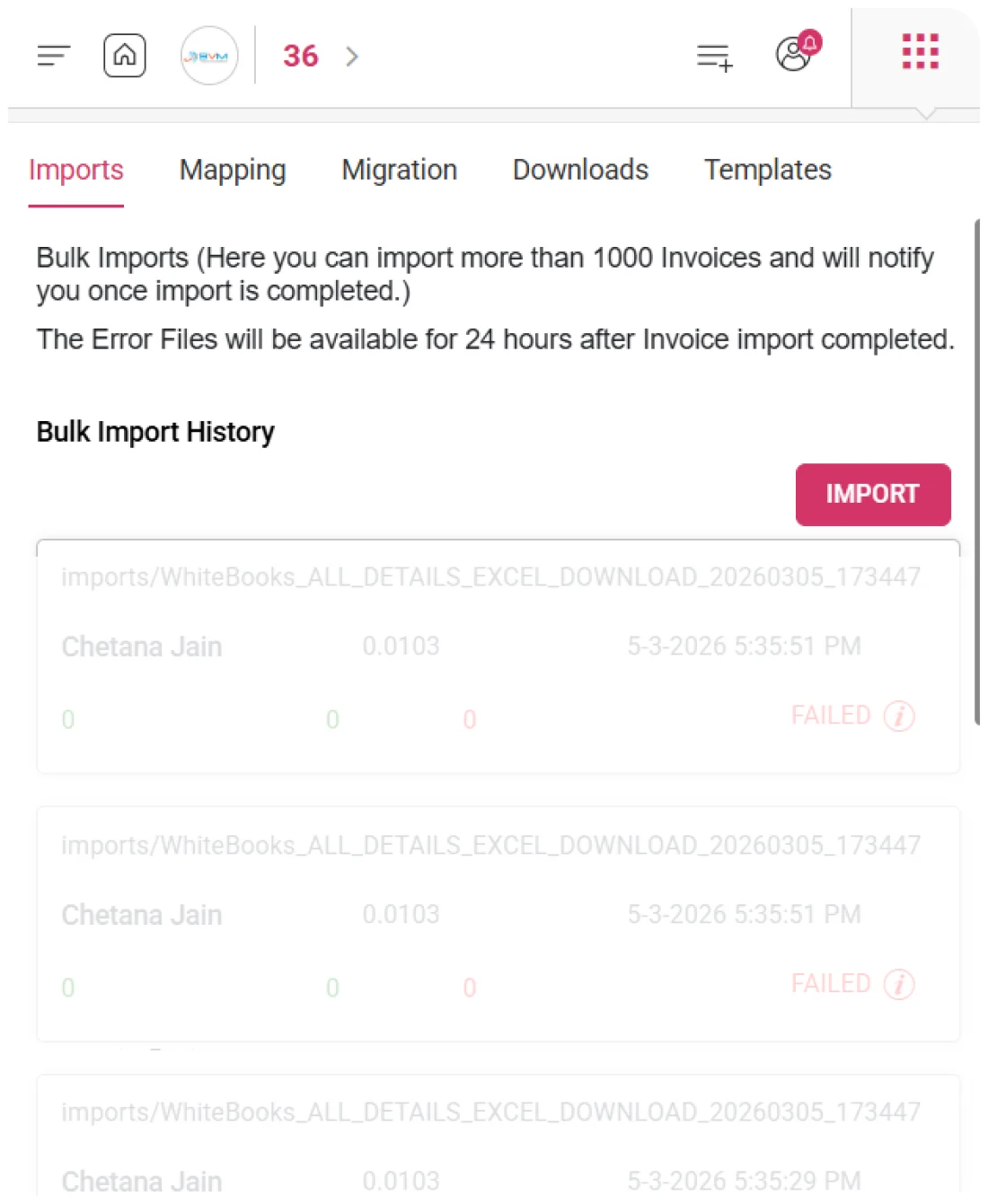
WhiteBooks keeps a permanent bulk import history, recording every import’s details to provide finance and data teams with a fully auditable record for review, troubleshooting, and verification.
imports-datahub

File & User Info

Each import entry records the submitted file name and the user who initiated the operation, ensuring complete traceability and accountability for every bulk data registration in the system.

Record Count

The history register shows total records submitted, successfully imported, and failed for each operation. This enables teams to quickly identify imports with high failure counts that may require correction and re-import.

Import Details

Every entry logs the import date, file size, and processing duration, providing operational context for past imports. Teams can review activity chronologically, analyze performance, and trace transaction data to specific import sessions.
Error File

Immediate Correction for Bulk Import Failures

WhiteBooks keeps error files from each bulk invoice import for 24 hours, allowing teams to review, correct, and re-import failed records without reprocessing the full file.
imports-errorFile-datahub

Failed Record Identification

Each bulk import generates an error file listing failed records, the field or data issues causing the failure, and details needed for correction. Teams can quickly address errors without manually cross-referencing the original submission.

24-Hour Retention Window

Error files are available for 24 hours after import completion, providing a defined timeframe for teams to download, review, and correct failed records, ensuring timely resolution of import issues.

Re-Import of Corrected Records

Corrected records can be re-submitted for import without reprocessing the entire original file, allowing teams to complete bulk data registration efficiently and accurately even when a subset of records initially failed.
Import Status

Bulk Import Progress at a Glance

WhiteBooks tracks and displays the status of every bulk invoice import—pending, in progress, successful, or failed—providing teams with real-time visibility and confidence in data registration.
imports-status-datahub

Successful Import

Imports processed without errors are marked as successfully completed, providing definitive confirmation in the import history register that all invoice data has been fully and accurately registered without manual cross-verification.

Failed Imports

Imports with one or more failed records are flagged, giving teams immediate visibility into operations requiring error file review and corrective re-import, ensuring incomplete registrations are addressed promptly.

Status Overview

A dedicated status column in the import history register allows teams to quickly assess the outcome of every import, review overall bulk data import health, and prioritize operations needing corrective action before error files expire.
Get started with WhiteBooks
We are a self service data analytics platform that helps you create visually rich dashboards and insightful data visualizations in minutes.
No Credit Card Required

All the Pricing you will need in an Accounting Software

WhiteBooks simplifies bulk invoice import with browser upload, real time tracking, instant error fixes, and always updated HSN and GST compliance data.

features-banner
Import

Import Thousands of Invoices in One Go

WhiteBooks allows businesses to bulk-import thousands of invoices at once, using a selected template to ensure accurate mapping, validation, and automatic registration of all transaction details and HSN summaries.

Template Selection

Selecting an invoice template before each bulk import ensures data is correctly interpreted for sales, purchase, or other types, eliminating manual mapping and ensuring accurate registration.

File Upload

Invoices can be uploaded via direct file selection or drag-and-drop, allowing finance teams to submit data using their preferred method. This ensures a smooth, efficient import process even during high-volume onboarding.

HSN Summary Update

After each bulk import, WhiteBooks automatically updates the HSN summary. This ensures that HSN-wise transaction data and statutory compliance records remain accurate and current without additional manual steps.
Import

Import Thousands of Invoices in One Go

WhiteBooks allows businesses to bulk-import thousands of invoices at once, using a selected template to ensure accurate mapping, validation, and automatic registration of all transaction details and HSN summaries.

Template Selection

Selecting an invoice template before each bulk import ensures data is correctly interpreted for sales, purchase, or other types, eliminating manual mapping and ensuring accurate registration.

File Upload

Invoices can be uploaded via direct file selection or drag-and-drop, allowing finance teams to submit data using their preferred method. This ensures a smooth, efficient import process even during high-volume onboarding.

HSN Summary Update

After each bulk import, WhiteBooks automatically updates the HSN summary. This ensures that HSN-wise transaction data and statutory compliance records remain accurate and current without additional manual steps.
Get started with WhiteBooks
We are a self service data analytics platform that helps you create visually rich dashboards and insightful data visualizations in minutes.
No Credit Card Required
Browser Import

Seamless Bulk Invoice Import in Real Time

WhiteBooks lets finance and data teams import bulk invoices directly from their browser, selecting local files for immediate processing—streamlining uploads without leaving the imports screen.

Local File Select

Teams can choose invoice data files directly from their local system for immediate submission and processing. No intermediate uploads or external transfers are needed, allowing the entire import to occur within the active WhiteBooks session.

Template Alignment

Template type selection ensures that all browser imports follow the correct invoice field structure. This maintains consistent data mapping accuracy, whether using the browser or standard import workflow.

Additional Details Inclusion

An expandable configuration lets teams include supplementary transaction attributes beyond core invoice fields. Enriched invoice data is captured accurately in transaction records without requiring post-import updates.
Browser Import

Seamless Bulk Invoice Import in Real Time

WhiteBooks lets finance and data teams import bulk invoices directly from their browser, selecting local files for immediate processing—streamlining uploads without leaving the imports screen.

Local File Select

Teams can choose invoice data files directly from their local system for immediate submission and processing. No intermediate uploads or external transfers are needed, allowing the entire import to occur within the active WhiteBooks session.

Template Alignment

Template type selection ensures that all browser imports follow the correct invoice field structure. This maintains consistent data mapping accuracy, whether using the browser or standard import workflow.

Additional Details Inclusion

An expandable configuration lets teams include supplementary transaction attributes beyond core invoice fields. Enriched invoice data is captured accurately in transaction records without requiring post-import updates.
Get started with WhiteBooks
We are a self service data analytics platform that helps you create visually rich dashboards and insightful data visualizations in minutes.
No Credit Card Required
Import Notification

Stay Updated on Every Invoice Import

WhiteBooks automatically notifies the user when a bulk invoice import is complete, confirming all invoices are registered and allowing teams to continue post-import tasks without monitoring progress.

Automated Completion Alerts

The initiating user receives a direct notification when their bulk import is fully processed. This removes the need for manual checks or team-wide monitoring, providing immediate confirmation of successful invoice registration.

Asynchronous Processing

Bulk invoice imports are processed asynchronously, allowing users to work in other modules while high-volume uploads occur in the background. This ensures ongoing transactional and compliance operations are uninterrupted during large imports.

Import Duration Tracking

Every import’s processing duration is recorded in the import history, giving teams insight into time taken for different file sizes and volumes. This helps plan future imports and identify unusually long processing times for investigation.
Import Notification

Stay Updated on Every Invoice Import

WhiteBooks automatically notifies the user when a bulk invoice import is complete, confirming all invoices are registered and allowing teams to continue post-import tasks without monitoring progress.

Automated Completion Alerts

The initiating user receives a direct notification when their bulk import is fully processed. This removes the need for manual checks or team-wide monitoring, providing immediate confirmation of successful invoice registration.

Asynchronous Processing

Bulk invoice imports are processed asynchronously, allowing users to work in other modules while high-volume uploads occur in the background. This ensures ongoing transactional and compliance operations are uninterrupted during large imports.

Import Duration Tracking

Every import’s processing duration is recorded in the import history, giving teams insight into time taken for different file sizes and volumes. This helps plan future imports and identify unusually long processing times for investigation.
Get started with WhiteBooks
We are a self service data analytics platform that helps you create visually rich dashboards and insightful data visualizations in minutes.
No Credit Card Required
Import History

Detailed Record of Every Bulk Upload

WhiteBooks keeps a permanent bulk import history, recording every import’s details to provide finance and data teams with a fully auditable record for review, troubleshooting, and verification.

File & User Info

Each import entry records the submitted file name and the user who initiated the operation, ensuring complete traceability and accountability for every bulk data registration in the system.

Record Count

The history register shows total records submitted, successfully imported, and failed for each operation. This enables teams to quickly identify imports with high failure counts that may require correction and re-import.

Import Details

Every entry logs the import date, file size, and processing duration, providing operational context for past imports. Teams can review activity chronologically, analyze performance, and trace transaction data to specific import sessions.
Import History

Detailed Record of Every Bulk Upload

WhiteBooks keeps a permanent bulk import history, recording every import’s details to provide finance and data teams with a fully auditable record for review, troubleshooting, and verification.

File & User Info

Each import entry records the submitted file name and the user who initiated the operation, ensuring complete traceability and accountability for every bulk data registration in the system.

Record Count

The history register shows total records submitted, successfully imported, and failed for each operation. This enables teams to quickly identify imports with high failure counts that may require correction and re-import.

Import Details

Every entry logs the import date, file size, and processing duration, providing operational context for past imports. Teams can review activity chronologically, analyze performance, and trace transaction data to specific import sessions.
Get started with WhiteBooks
We are a self service data analytics platform that helps you create visually rich dashboards and insightful data visualizations in minutes.
No Credit Card Required
Error File

Immediate Correction for Bulk Import Failures

WhiteBooks keeps error files from each bulk invoice import for 24 hours, allowing teams to review, correct, and re-import failed records without reprocessing the full file.

Failed Record Identification

Each bulk import generates an error file listing failed records, the field or data issues causing the failure, and details needed for correction. Teams can quickly address errors without manually cross-referencing the original submission.

24-Hour Retention Window

Error files are available for 24 hours after import completion, providing a defined timeframe for teams to download, review, and correct failed records, ensuring timely resolution of import issues.

Re-Import of Corrected Records

Corrected records can be re-submitted for import without reprocessing the entire original file, allowing teams to complete bulk data registration efficiently and accurately even when a subset of records initially failed.
Error File

Immediate Correction for Bulk Import Failures

WhiteBooks keeps error files from each bulk invoice import for 24 hours, allowing teams to review, correct, and re-import failed records without reprocessing the full file.

Failed Record Identification

Each bulk import generates an error file listing failed records, the field or data issues causing the failure, and details needed for correction. Teams can quickly address errors without manually cross-referencing the original submission.

24-Hour Retention Window

Error files are available for 24 hours after import completion, providing a defined timeframe for teams to download, review, and correct failed records, ensuring timely resolution of import issues.

Re-Import of Corrected Records

Corrected records can be re-submitted for import without reprocessing the entire original file, allowing teams to complete bulk data registration efficiently and accurately even when a subset of records initially failed.
Get started with WhiteBooks
We are a self service data analytics platform that helps you create visually rich dashboards and insightful data visualizations in minutes.
No Credit Card Required
Import Status

Bulk Import Progress at a Glance

WhiteBooks tracks and displays the status of every bulk invoice import—pending, in progress, successful, or failed—providing teams with real-time visibility and confidence in data registration.

Successful Import

Imports processed without errors are marked as successfully completed, providing definitive confirmation in the import history register that all invoice data has been fully and accurately registered without manual cross-verification.

Failed Imports

Imports with one or more failed records are flagged, giving teams immediate visibility into operations requiring error file review and corrective re-import, ensuring incomplete registrations are addressed promptly.

Status Overview

A dedicated status column in the import history register allows teams to quickly assess the outcome of every import, review overall bulk data import health, and prioritize operations needing corrective action before error files expire.
Import Status

Bulk Import Progress at a Glance

WhiteBooks tracks and displays the status of every bulk invoice import—pending, in progress, successful, or failed—providing teams with real-time visibility and confidence in data registration.

Successful Import

Imports processed without errors are marked as successfully completed, providing definitive confirmation in the import history register that all invoice data has been fully and accurately registered without manual cross-verification.

Failed Imports

Imports with one or more failed records are flagged, giving teams immediate visibility into operations requiring error file review and corrective re-import, ensuring incomplete registrations are addressed promptly.

Status Overview

A dedicated status column in the import history register allows teams to quickly assess the outcome of every import, review overall bulk data import health, and prioritize operations needing corrective action before error files expire.
Get started with WhiteBooks
We are a self service data analytics platform that helps you create visually rich dashboards and insightful data visualizations in minutes.
No Credit Card Required

All the Solutions you will need in an Accounting Software

WhiteBooks simplifies bulk invoice import with browser upload, real time tracking, instant error fixes, and always updated HSN and GST compliance data.

features-banner
Import

Import Thousands of Invoices in One Go

WhiteBooks allows businesses to bulk-import thousands of invoices at once, using a selected template to ensure accurate mapping, validation, and automatic registration of all transaction details and HSN summaries.

Template Selection

Selecting an invoice template before each bulk import ensures data is correctly interpreted for sales, purchase, or other types, eliminating manual mapping and ensuring accurate registration.

File Upload

Invoices can be uploaded via direct file selection or drag-and-drop, allowing finance teams to submit data using their preferred method. This ensures a smooth, efficient import process even during high-volume onboarding.

HSN Summary Update

After each bulk import, WhiteBooks automatically updates the HSN summary. This ensures that HSN-wise transaction data and statutory compliance records remain accurate and current without additional manual steps.
Import

Import Thousands of Invoices in One Go

WhiteBooks allows businesses to bulk-import thousands of invoices at once, using a selected template to ensure accurate mapping, validation, and automatic registration of all transaction details and HSN summaries.

Template Selection

Selecting an invoice template before each bulk import ensures data is correctly interpreted for sales, purchase, or other types, eliminating manual mapping and ensuring accurate registration.

File Upload

Invoices can be uploaded via direct file selection or drag-and-drop, allowing finance teams to submit data using their preferred method. This ensures a smooth, efficient import process even during high-volume onboarding.

HSN Summary Update

After each bulk import, WhiteBooks automatically updates the HSN summary. This ensures that HSN-wise transaction data and statutory compliance records remain accurate and current without additional manual steps.
Get started with WhiteBooks
We are a self service data analytics platform that helps you create visually rich dashboards and insightful data visualizations in minutes.
No Credit Card Required
Browser Import

Seamless Bulk Invoice Import in Real Time

WhiteBooks lets finance and data teams import bulk invoices directly from their browser, selecting local files for immediate processing—streamlining uploads without leaving the imports screen.

Local File Select

Teams can choose invoice data files directly from their local system for immediate submission and processing. No intermediate uploads or external transfers are needed, allowing the entire import to occur within the active WhiteBooks session.

Template Alignment

Template type selection ensures that all browser imports follow the correct invoice field structure. This maintains consistent data mapping accuracy, whether using the browser or standard import workflow.

Additional Details Inclusion

An expandable configuration lets teams include supplementary transaction attributes beyond core invoice fields. Enriched invoice data is captured accurately in transaction records without requiring post-import updates.
Browser Import

Seamless Bulk Invoice Import in Real Time

WhiteBooks lets finance and data teams import bulk invoices directly from their browser, selecting local files for immediate processing—streamlining uploads without leaving the imports screen.

Local File Select

Teams can choose invoice data files directly from their local system for immediate submission and processing. No intermediate uploads or external transfers are needed, allowing the entire import to occur within the active WhiteBooks session.

Template Alignment

Template type selection ensures that all browser imports follow the correct invoice field structure. This maintains consistent data mapping accuracy, whether using the browser or standard import workflow.

Additional Details Inclusion

An expandable configuration lets teams include supplementary transaction attributes beyond core invoice fields. Enriched invoice data is captured accurately in transaction records without requiring post-import updates.
Get started with WhiteBooks
We are a self service data analytics platform that helps you create visually rich dashboards and insightful data visualizations in minutes.
No Credit Card Required
Import Notification

Stay Updated on Every Invoice Import

WhiteBooks automatically notifies the user when a bulk invoice import is complete, confirming all invoices are registered and allowing teams to continue post-import tasks without monitoring progress.

Automated Completion Alerts

The initiating user receives a direct notification when their bulk import is fully processed. This removes the need for manual checks or team-wide monitoring, providing immediate confirmation of successful invoice registration.

Asynchronous Processing

Bulk invoice imports are processed asynchronously, allowing users to work in other modules while high-volume uploads occur in the background. This ensures ongoing transactional and compliance operations are uninterrupted during large imports.

Import Duration Tracking

Every import’s processing duration is recorded in the import history, giving teams insight into time taken for different file sizes and volumes. This helps plan future imports and identify unusually long processing times for investigation.
Import Notification

Stay Updated on Every Invoice Import

WhiteBooks automatically notifies the user when a bulk invoice import is complete, confirming all invoices are registered and allowing teams to continue post-import tasks without monitoring progress.

Automated Completion Alerts

The initiating user receives a direct notification when their bulk import is fully processed. This removes the need for manual checks or team-wide monitoring, providing immediate confirmation of successful invoice registration.

Asynchronous Processing

Bulk invoice imports are processed asynchronously, allowing users to work in other modules while high-volume uploads occur in the background. This ensures ongoing transactional and compliance operations are uninterrupted during large imports.

Import Duration Tracking

Every import’s processing duration is recorded in the import history, giving teams insight into time taken for different file sizes and volumes. This helps plan future imports and identify unusually long processing times for investigation.
Get started with WhiteBooks
We are a self service data analytics platform that helps you create visually rich dashboards and insightful data visualizations in minutes.
No Credit Card Required
Import History

Detailed Record of Every Bulk Upload

WhiteBooks keeps a permanent bulk import history, recording every import’s details to provide finance and data teams with a fully auditable record for review, troubleshooting, and verification.

File & User Info

Each import entry records the submitted file name and the user who initiated the operation, ensuring complete traceability and accountability for every bulk data registration in the system.

Record Count

The history register shows total records submitted, successfully imported, and failed for each operation. This enables teams to quickly identify imports with high failure counts that may require correction and re-import.

Import Details

Every entry logs the import date, file size, and processing duration, providing operational context for past imports. Teams can review activity chronologically, analyze performance, and trace transaction data to specific import sessions.
Import History

Detailed Record of Every Bulk Upload

WhiteBooks keeps a permanent bulk import history, recording every import’s details to provide finance and data teams with a fully auditable record for review, troubleshooting, and verification.

File & User Info

Each import entry records the submitted file name and the user who initiated the operation, ensuring complete traceability and accountability for every bulk data registration in the system.

Record Count

The history register shows total records submitted, successfully imported, and failed for each operation. This enables teams to quickly identify imports with high failure counts that may require correction and re-import.

Import Details

Every entry logs the import date, file size, and processing duration, providing operational context for past imports. Teams can review activity chronologically, analyze performance, and trace transaction data to specific import sessions.
Get started with WhiteBooks
We are a self service data analytics platform that helps you create visually rich dashboards and insightful data visualizations in minutes.
No Credit Card Required
Error File

Immediate Correction for Bulk Import Failures

WhiteBooks keeps error files from each bulk invoice import for 24 hours, allowing teams to review, correct, and re-import failed records without reprocessing the full file.

Failed Record Identification

Each bulk import generates an error file listing failed records, the field or data issues causing the failure, and details needed for correction. Teams can quickly address errors without manually cross-referencing the original submission.

24-Hour Retention Window

Error files are available for 24 hours after import completion, providing a defined timeframe for teams to download, review, and correct failed records, ensuring timely resolution of import issues.

Re-Import of Corrected Records

Corrected records can be re-submitted for import without reprocessing the entire original file, allowing teams to complete bulk data registration efficiently and accurately even when a subset of records initially failed.
Error File

Immediate Correction for Bulk Import Failures

WhiteBooks keeps error files from each bulk invoice import for 24 hours, allowing teams to review, correct, and re-import failed records without reprocessing the full file.

Failed Record Identification

Each bulk import generates an error file listing failed records, the field or data issues causing the failure, and details needed for correction. Teams can quickly address errors without manually cross-referencing the original submission.

24-Hour Retention Window

Error files are available for 24 hours after import completion, providing a defined timeframe for teams to download, review, and correct failed records, ensuring timely resolution of import issues.

Re-Import of Corrected Records

Corrected records can be re-submitted for import without reprocessing the entire original file, allowing teams to complete bulk data registration efficiently and accurately even when a subset of records initially failed.
Get started with WhiteBooks
We are a self service data analytics platform that helps you create visually rich dashboards and insightful data visualizations in minutes.
No Credit Card Required
Import Status

Bulk Import Progress at a Glance

WhiteBooks tracks and displays the status of every bulk invoice import—pending, in progress, successful, or failed—providing teams with real-time visibility and confidence in data registration.

Successful Import

Imports processed without errors are marked as successfully completed, providing definitive confirmation in the import history register that all invoice data has been fully and accurately registered without manual cross-verification.

Failed Imports

Imports with one or more failed records are flagged, giving teams immediate visibility into operations requiring error file review and corrective re-import, ensuring incomplete registrations are addressed promptly.

Status Overview

A dedicated status column in the import history register allows teams to quickly assess the outcome of every import, review overall bulk data import health, and prioritize operations needing corrective action before error files expire.
Import Status

Bulk Import Progress at a Glance

WhiteBooks tracks and displays the status of every bulk invoice import—pending, in progress, successful, or failed—providing teams with real-time visibility and confidence in data registration.

Successful Import

Imports processed without errors are marked as successfully completed, providing definitive confirmation in the import history register that all invoice data has been fully and accurately registered without manual cross-verification.

Failed Imports

Imports with one or more failed records are flagged, giving teams immediate visibility into operations requiring error file review and corrective re-import, ensuring incomplete registrations are addressed promptly.

Status Overview

A dedicated status column in the import history register allows teams to quickly assess the outcome of every import, review overall bulk data import health, and prioritize operations needing corrective action before error files expire.
Get started with WhiteBooks
We are a self service data analytics platform that helps you create visually rich dashboards and insightful data visualizations in minutes.
No Credit Card Required

All the Partners you will need in an Accounting Software

WhiteBooks simplifies bulk invoice import with browser upload, real time tracking, instant error fixes, and always updated HSN and GST compliance data.

features-banner
Import

Import Thousands of Invoices in One Go

WhiteBooks allows businesses to bulk-import thousands of invoices at once, using a selected template to ensure accurate mapping, validation, and automatic registration of all transaction details and HSN summaries.

Template Selection

Selecting an invoice template before each bulk import ensures data is correctly interpreted for sales, purchase, or other types, eliminating manual mapping and ensuring accurate registration.

File Upload

Invoices can be uploaded via direct file selection or drag-and-drop, allowing finance teams to submit data using their preferred method. This ensures a smooth, efficient import process even during high-volume onboarding.

HSN Summary Update

After each bulk import, WhiteBooks automatically updates the HSN summary. This ensures that HSN-wise transaction data and statutory compliance records remain accurate and current without additional manual steps.
Import

Import Thousands of Invoices in One Go

WhiteBooks allows businesses to bulk-import thousands of invoices at once, using a selected template to ensure accurate mapping, validation, and automatic registration of all transaction details and HSN summaries.

Template Selection

Selecting an invoice template before each bulk import ensures data is correctly interpreted for sales, purchase, or other types, eliminating manual mapping and ensuring accurate registration.

File Upload

Invoices can be uploaded via direct file selection or drag-and-drop, allowing finance teams to submit data using their preferred method. This ensures a smooth, efficient import process even during high-volume onboarding.

HSN Summary Update

After each bulk import, WhiteBooks automatically updates the HSN summary. This ensures that HSN-wise transaction data and statutory compliance records remain accurate and current without additional manual steps.
Get started with WhiteBooks
We are a self service data analytics platform that helps you create visually rich dashboards and insightful data visualizations in minutes.
No Credit Card Required
Browser Import

Seamless Bulk Invoice Import in Real Time

WhiteBooks lets finance and data teams import bulk invoices directly from their browser, selecting local files for immediate processing—streamlining uploads without leaving the imports screen.

Local File Select

Teams can choose invoice data files directly from their local system for immediate submission and processing. No intermediate uploads or external transfers are needed, allowing the entire import to occur within the active WhiteBooks session.

Template Alignment

Template type selection ensures that all browser imports follow the correct invoice field structure. This maintains consistent data mapping accuracy, whether using the browser or standard import workflow.

Additional Details Inclusion

An expandable configuration lets teams include supplementary transaction attributes beyond core invoice fields. Enriched invoice data is captured accurately in transaction records without requiring post-import updates.
Browser Import

Seamless Bulk Invoice Import in Real Time

WhiteBooks lets finance and data teams import bulk invoices directly from their browser, selecting local files for immediate processing—streamlining uploads without leaving the imports screen.

Local File Select

Teams can choose invoice data files directly from their local system for immediate submission and processing. No intermediate uploads or external transfers are needed, allowing the entire import to occur within the active WhiteBooks session.

Template Alignment

Template type selection ensures that all browser imports follow the correct invoice field structure. This maintains consistent data mapping accuracy, whether using the browser or standard import workflow.

Additional Details Inclusion

An expandable configuration lets teams include supplementary transaction attributes beyond core invoice fields. Enriched invoice data is captured accurately in transaction records without requiring post-import updates.
Get started with WhiteBooks
We are a self service data analytics platform that helps you create visually rich dashboards and insightful data visualizations in minutes.
No Credit Card Required
Import Notification

Stay Updated on Every Invoice Import

WhiteBooks automatically notifies the user when a bulk invoice import is complete, confirming all invoices are registered and allowing teams to continue post-import tasks without monitoring progress.

Automated Completion Alerts

The initiating user receives a direct notification when their bulk import is fully processed. This removes the need for manual checks or team-wide monitoring, providing immediate confirmation of successful invoice registration.

Asynchronous Processing

Bulk invoice imports are processed asynchronously, allowing users to work in other modules while high-volume uploads occur in the background. This ensures ongoing transactional and compliance operations are uninterrupted during large imports.

Import Duration Tracking

Every import’s processing duration is recorded in the import history, giving teams insight into time taken for different file sizes and volumes. This helps plan future imports and identify unusually long processing times for investigation.
Import Notification

Stay Updated on Every Invoice Import

WhiteBooks automatically notifies the user when a bulk invoice import is complete, confirming all invoices are registered and allowing teams to continue post-import tasks without monitoring progress.

Automated Completion Alerts

The initiating user receives a direct notification when their bulk import is fully processed. This removes the need for manual checks or team-wide monitoring, providing immediate confirmation of successful invoice registration.

Asynchronous Processing

Bulk invoice imports are processed asynchronously, allowing users to work in other modules while high-volume uploads occur in the background. This ensures ongoing transactional and compliance operations are uninterrupted during large imports.

Import Duration Tracking

Every import’s processing duration is recorded in the import history, giving teams insight into time taken for different file sizes and volumes. This helps plan future imports and identify unusually long processing times for investigation.
Get started with WhiteBooks
We are a self service data analytics platform that helps you create visually rich dashboards and insightful data visualizations in minutes.
No Credit Card Required
Import History

Detailed Record of Every Bulk Upload

WhiteBooks keeps a permanent bulk import history, recording every import’s details to provide finance and data teams with a fully auditable record for review, troubleshooting, and verification.

File & User Info

Each import entry records the submitted file name and the user who initiated the operation, ensuring complete traceability and accountability for every bulk data registration in the system.

Record Count

The history register shows total records submitted, successfully imported, and failed for each operation. This enables teams to quickly identify imports with high failure counts that may require correction and re-import.

Import Details

Every entry logs the import date, file size, and processing duration, providing operational context for past imports. Teams can review activity chronologically, analyze performance, and trace transaction data to specific import sessions.
Import History

Detailed Record of Every Bulk Upload

WhiteBooks keeps a permanent bulk import history, recording every import’s details to provide finance and data teams with a fully auditable record for review, troubleshooting, and verification.

File & User Info

Each import entry records the submitted file name and the user who initiated the operation, ensuring complete traceability and accountability for every bulk data registration in the system.

Record Count

The history register shows total records submitted, successfully imported, and failed for each operation. This enables teams to quickly identify imports with high failure counts that may require correction and re-import.

Import Details

Every entry logs the import date, file size, and processing duration, providing operational context for past imports. Teams can review activity chronologically, analyze performance, and trace transaction data to specific import sessions.
Get started with WhiteBooks
We are a self service data analytics platform that helps you create visually rich dashboards and insightful data visualizations in minutes.
No Credit Card Required
Error File

Immediate Correction for Bulk Import Failures

WhiteBooks keeps error files from each bulk invoice import for 24 hours, allowing teams to review, correct, and re-import failed records without reprocessing the full file.

Failed Record Identification

Each bulk import generates an error file listing failed records, the field or data issues causing the failure, and details needed for correction. Teams can quickly address errors without manually cross-referencing the original submission.

24-Hour Retention Window

Error files are available for 24 hours after import completion, providing a defined timeframe for teams to download, review, and correct failed records, ensuring timely resolution of import issues.

Re-Import of Corrected Records

Corrected records can be re-submitted for import without reprocessing the entire original file, allowing teams to complete bulk data registration efficiently and accurately even when a subset of records initially failed.
Error File

Immediate Correction for Bulk Import Failures

WhiteBooks keeps error files from each bulk invoice import for 24 hours, allowing teams to review, correct, and re-import failed records without reprocessing the full file.

Failed Record Identification

Each bulk import generates an error file listing failed records, the field or data issues causing the failure, and details needed for correction. Teams can quickly address errors without manually cross-referencing the original submission.

24-Hour Retention Window

Error files are available for 24 hours after import completion, providing a defined timeframe for teams to download, review, and correct failed records, ensuring timely resolution of import issues.

Re-Import of Corrected Records

Corrected records can be re-submitted for import without reprocessing the entire original file, allowing teams to complete bulk data registration efficiently and accurately even when a subset of records initially failed.
Get started with WhiteBooks
We are a self service data analytics platform that helps you create visually rich dashboards and insightful data visualizations in minutes.
No Credit Card Required
Import Status

Bulk Import Progress at a Glance

WhiteBooks tracks and displays the status of every bulk invoice import—pending, in progress, successful, or failed—providing teams with real-time visibility and confidence in data registration.

Successful Import

Imports processed without errors are marked as successfully completed, providing definitive confirmation in the import history register that all invoice data has been fully and accurately registered without manual cross-verification.

Failed Imports

Imports with one or more failed records are flagged, giving teams immediate visibility into operations requiring error file review and corrective re-import, ensuring incomplete registrations are addressed promptly.

Status Overview

A dedicated status column in the import history register allows teams to quickly assess the outcome of every import, review overall bulk data import health, and prioritize operations needing corrective action before error files expire.
Import Status

Bulk Import Progress at a Glance

WhiteBooks tracks and displays the status of every bulk invoice import—pending, in progress, successful, or failed—providing teams with real-time visibility and confidence in data registration.

Successful Import

Imports processed without errors are marked as successfully completed, providing definitive confirmation in the import history register that all invoice data has been fully and accurately registered without manual cross-verification.

Failed Imports

Imports with one or more failed records are flagged, giving teams immediate visibility into operations requiring error file review and corrective re-import, ensuring incomplete registrations are addressed promptly.

Status Overview

A dedicated status column in the import history register allows teams to quickly assess the outcome of every import, review overall bulk data import health, and prioritize operations needing corrective action before error files expire.
Get started with WhiteBooks
We are a self service data analytics platform that helps you create visually rich dashboards and insightful data visualizations in minutes.
No Credit Card Required

All the Resources you will need in an Accounting Software

WhiteBooks simplifies bulk invoice import with browser upload, real time tracking, instant error fixes, and always updated HSN and GST compliance data.

features-banner
Import

Import Thousands of Invoices in One Go

WhiteBooks allows businesses to bulk-import thousands of invoices at once, using a selected template to ensure accurate mapping, validation, and automatic registration of all transaction details and HSN summaries.

Template Selection

Selecting an invoice template before each bulk import ensures data is correctly interpreted for sales, purchase, or other types, eliminating manual mapping and ensuring accurate registration.

File Upload

Invoices can be uploaded via direct file selection or drag-and-drop, allowing finance teams to submit data using their preferred method. This ensures a smooth, efficient import process even during high-volume onboarding.

HSN Summary Update

After each bulk import, WhiteBooks automatically updates the HSN summary. This ensures that HSN-wise transaction data and statutory compliance records remain accurate and current without additional manual steps.
Import

Import Thousands of Invoices in One Go

WhiteBooks allows businesses to bulk-import thousands of invoices at once, using a selected template to ensure accurate mapping, validation, and automatic registration of all transaction details and HSN summaries.

Template Selection

Selecting an invoice template before each bulk import ensures data is correctly interpreted for sales, purchase, or other types, eliminating manual mapping and ensuring accurate registration.

File Upload

Invoices can be uploaded via direct file selection or drag-and-drop, allowing finance teams to submit data using their preferred method. This ensures a smooth, efficient import process even during high-volume onboarding.

HSN Summary Update

After each bulk import, WhiteBooks automatically updates the HSN summary. This ensures that HSN-wise transaction data and statutory compliance records remain accurate and current without additional manual steps.
Get started with WhiteBooks
We are a self service data analytics platform that helps you create visually rich dashboards and insightful data visualizations in minutes.
No Credit Card Required
Browser Import

Seamless Bulk Invoice Import in Real Time

WhiteBooks lets finance and data teams import bulk invoices directly from their browser, selecting local files for immediate processing—streamlining uploads without leaving the imports screen.

Local File Select

Teams can choose invoice data files directly from their local system for immediate submission and processing. No intermediate uploads or external transfers are needed, allowing the entire import to occur within the active WhiteBooks session.

Template Alignment

Template type selection ensures that all browser imports follow the correct invoice field structure. This maintains consistent data mapping accuracy, whether using the browser or standard import workflow.

Additional Details Inclusion

An expandable configuration lets teams include supplementary transaction attributes beyond core invoice fields. Enriched invoice data is captured accurately in transaction records without requiring post-import updates.
Browser Import

Seamless Bulk Invoice Import in Real Time

WhiteBooks lets finance and data teams import bulk invoices directly from their browser, selecting local files for immediate processing—streamlining uploads without leaving the imports screen.

Local File Select

Teams can choose invoice data files directly from their local system for immediate submission and processing. No intermediate uploads or external transfers are needed, allowing the entire import to occur within the active WhiteBooks session.

Template Alignment

Template type selection ensures that all browser imports follow the correct invoice field structure. This maintains consistent data mapping accuracy, whether using the browser or standard import workflow.

Additional Details Inclusion

An expandable configuration lets teams include supplementary transaction attributes beyond core invoice fields. Enriched invoice data is captured accurately in transaction records without requiring post-import updates.
Get started with WhiteBooks
We are a self service data analytics platform that helps you create visually rich dashboards and insightful data visualizations in minutes.
No Credit Card Required
Import Notification

Stay Updated on Every Invoice Import

WhiteBooks automatically notifies the user when a bulk invoice import is complete, confirming all invoices are registered and allowing teams to continue post-import tasks without monitoring progress.

Automated Completion Alerts

The initiating user receives a direct notification when their bulk import is fully processed. This removes the need for manual checks or team-wide monitoring, providing immediate confirmation of successful invoice registration.

Asynchronous Processing

Bulk invoice imports are processed asynchronously, allowing users to work in other modules while high-volume uploads occur in the background. This ensures ongoing transactional and compliance operations are uninterrupted during large imports.

Import Duration Tracking

Every import’s processing duration is recorded in the import history, giving teams insight into time taken for different file sizes and volumes. This helps plan future imports and identify unusually long processing times for investigation.
Import Notification

Stay Updated on Every Invoice Import

WhiteBooks automatically notifies the user when a bulk invoice import is complete, confirming all invoices are registered and allowing teams to continue post-import tasks without monitoring progress.

Automated Completion Alerts

The initiating user receives a direct notification when their bulk import is fully processed. This removes the need for manual checks or team-wide monitoring, providing immediate confirmation of successful invoice registration.

Asynchronous Processing

Bulk invoice imports are processed asynchronously, allowing users to work in other modules while high-volume uploads occur in the background. This ensures ongoing transactional and compliance operations are uninterrupted during large imports.

Import Duration Tracking

Every import’s processing duration is recorded in the import history, giving teams insight into time taken for different file sizes and volumes. This helps plan future imports and identify unusually long processing times for investigation.
Get started with WhiteBooks
We are a self service data analytics platform that helps you create visually rich dashboards and insightful data visualizations in minutes.
No Credit Card Required
Import History

Detailed Record of Every Bulk Upload

WhiteBooks keeps a permanent bulk import history, recording every import’s details to provide finance and data teams with a fully auditable record for review, troubleshooting, and verification.

File & User Info

Each import entry records the submitted file name and the user who initiated the operation, ensuring complete traceability and accountability for every bulk data registration in the system.

Record Count

The history register shows total records submitted, successfully imported, and failed for each operation. This enables teams to quickly identify imports with high failure counts that may require correction and re-import.

Import Details

Every entry logs the import date, file size, and processing duration, providing operational context for past imports. Teams can review activity chronologically, analyze performance, and trace transaction data to specific import sessions.
Import History

Detailed Record of Every Bulk Upload

WhiteBooks keeps a permanent bulk import history, recording every import’s details to provide finance and data teams with a fully auditable record for review, troubleshooting, and verification.

File & User Info

Each import entry records the submitted file name and the user who initiated the operation, ensuring complete traceability and accountability for every bulk data registration in the system.

Record Count

The history register shows total records submitted, successfully imported, and failed for each operation. This enables teams to quickly identify imports with high failure counts that may require correction and re-import.

Import Details

Every entry logs the import date, file size, and processing duration, providing operational context for past imports. Teams can review activity chronologically, analyze performance, and trace transaction data to specific import sessions.
Get started with WhiteBooks
We are a self service data analytics platform that helps you create visually rich dashboards and insightful data visualizations in minutes.
No Credit Card Required
Error File

Immediate Correction for Bulk Import Failures

WhiteBooks keeps error files from each bulk invoice import for 24 hours, allowing teams to review, correct, and re-import failed records without reprocessing the full file.

Failed Record Identification

Each bulk import generates an error file listing failed records, the field or data issues causing the failure, and details needed for correction. Teams can quickly address errors without manually cross-referencing the original submission.

24-Hour Retention Window

Error files are available for 24 hours after import completion, providing a defined timeframe for teams to download, review, and correct failed records, ensuring timely resolution of import issues.

Re-Import of Corrected Records

Corrected records can be re-submitted for import without reprocessing the entire original file, allowing teams to complete bulk data registration efficiently and accurately even when a subset of records initially failed.
Error File

Immediate Correction for Bulk Import Failures

WhiteBooks keeps error files from each bulk invoice import for 24 hours, allowing teams to review, correct, and re-import failed records without reprocessing the full file.

Failed Record Identification

Each bulk import generates an error file listing failed records, the field or data issues causing the failure, and details needed for correction. Teams can quickly address errors without manually cross-referencing the original submission.

24-Hour Retention Window

Error files are available for 24 hours after import completion, providing a defined timeframe for teams to download, review, and correct failed records, ensuring timely resolution of import issues.

Re-Import of Corrected Records

Corrected records can be re-submitted for import without reprocessing the entire original file, allowing teams to complete bulk data registration efficiently and accurately even when a subset of records initially failed.
Get started with WhiteBooks
We are a self service data analytics platform that helps you create visually rich dashboards and insightful data visualizations in minutes.
No Credit Card Required
Import Status

Bulk Import Progress at a Glance

WhiteBooks tracks and displays the status of every bulk invoice import—pending, in progress, successful, or failed—providing teams with real-time visibility and confidence in data registration.

Successful Import

Imports processed without errors are marked as successfully completed, providing definitive confirmation in the import history register that all invoice data has been fully and accurately registered without manual cross-verification.

Failed Imports

Imports with one or more failed records are flagged, giving teams immediate visibility into operations requiring error file review and corrective re-import, ensuring incomplete registrations are addressed promptly.

Status Overview

A dedicated status column in the import history register allows teams to quickly assess the outcome of every import, review overall bulk data import health, and prioritize operations needing corrective action before error files expire.
Import Status

Bulk Import Progress at a Glance

WhiteBooks tracks and displays the status of every bulk invoice import—pending, in progress, successful, or failed—providing teams with real-time visibility and confidence in data registration.

Successful Import

Imports processed without errors are marked as successfully completed, providing definitive confirmation in the import history register that all invoice data has been fully and accurately registered without manual cross-verification.

Failed Imports

Imports with one or more failed records are flagged, giving teams immediate visibility into operations requiring error file review and corrective re-import, ensuring incomplete registrations are addressed promptly.

Status Overview

A dedicated status column in the import history register allows teams to quickly assess the outcome of every import, review overall bulk data import health, and prioritize operations needing corrective action before error files expire.
Get started with WhiteBooks
We are a self service data analytics platform that helps you create visually rich dashboards and insightful data visualizations in minutes.
No Credit Card Required

Frequently Asked Questions

We have put together some commonly asked questions

WhiteBooks allows businesses to bulk-import thousands of invoices at once by selecting a template before each operation, ensuring data is correctly interpreted for sales, purchase, or other invoice types. Invoices can be submitted via direct file selection or drag-and-drop, and after every successful import, the HSN summary is automatically updated — keeping all HSN-wise transaction data and statutory compliance records accurate without additional manual steps.

WhiteBooks sends a direct notification to the initiating user as soon as a bulk import is fully processed, removing the need for manual progress monitoring and providing immediate confirmation of successful invoice registration. Imports are processed asynchronously, allowing users to continue working in other modules while high-volume uploads run in the background — ensuring ongoing transactional and compliance operations remain completely uninterrupted.

WhiteBooks generates an error file after every bulk import, listing each failed record along with the specific field or data issue causing the failure — enabling teams to address errors without manually cross-referencing the original submission. Error files are retained for 24 hours, and corrected records can be re-submitted independently without reprocessing the entire original file, ensuring complete and accurate bulk data registration even when a subset of records initially failed.

WhiteBooks tracks every bulk invoice import through a dedicated status column in the import history register, displaying each operation as pending, in progress, successful, or failed — giving teams real-time visibility and confidence in data registration. Imports processed without errors are marked as fully complete, while imports with failed records are immediately flagged, enabling teams to prioritize corrective action and download error files before the 24-hour retention window expires.

WhiteBooks lets finance and data teams import bulk invoices directly from their browser by selecting local files for immediate processing — with no intermediate uploads or external transfers required, keeping the entire import within the active session. Template type selection ensures all browser imports follow the correct invoice field structure, while an expandable configuration allows teams to include supplementary transaction attributes beyond core invoice fields, capturing enriched data accurately without requiring post-import updates.

WhiteBooks keeps a permanent import history that records the submitted file name, the user who initiated each operation, import date, file size, and processing duration — providing complete traceability and operational context for every bulk data registration. The history register also displays total records submitted, successfully imported, and failed per operation, enabling teams to quickly identify imports with high failure counts, analyze performance chronologically, and trace transaction data back to specific import sessions.

WhiteBooks requires template selection before every bulk import — ensuring data is correctly interpreted for sales, purchase, or other invoice types and eliminating manual field mapping entirely. This template alignment applies consistently across both standard and browser-based import workflows, maintaining uniform data mapping accuracy regardless of the submission method used, and ensuring all invoice records are registered with the correct structure from the point of upload.

WhiteBooks records the processing duration of every bulk import in the import history register, giving teams insight into the time taken for different file sizes and volumes across all past operations. This duration data helps teams plan future imports more effectively, benchmark expected processing times against actual performance, and identify unusually long processing sessions that may warrant investigation for data quality or system-level issues.