


Accurate and Structured Migration from Tally to WhiteBooks
Tally Migration
Streamlined Tally Migration with JSON Files
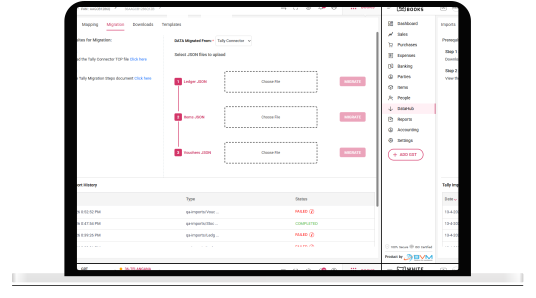
WhiteBooks enables structured Tally data migration through the DataHub Migration module, allowing businesses to transfer ledgers, items, and vouchers using a sequential JSON-based process for accurate and complete data registration.
Tally Data Source
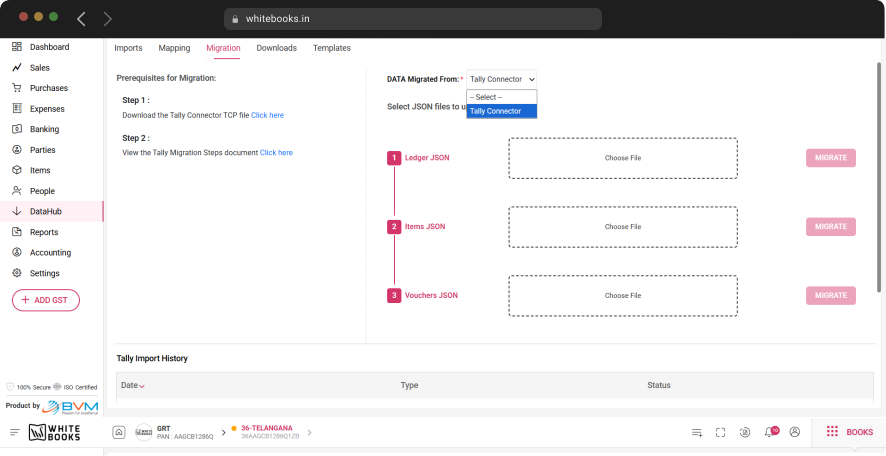
WhiteBooks uses the Tally Connector as the designated migration source, ensuring all data originates from a verified Tally extraction process. This eliminates risks from manual data preparation and preserves the accuracy and integrity of accounting records during migration.
Sequential Migration Flow
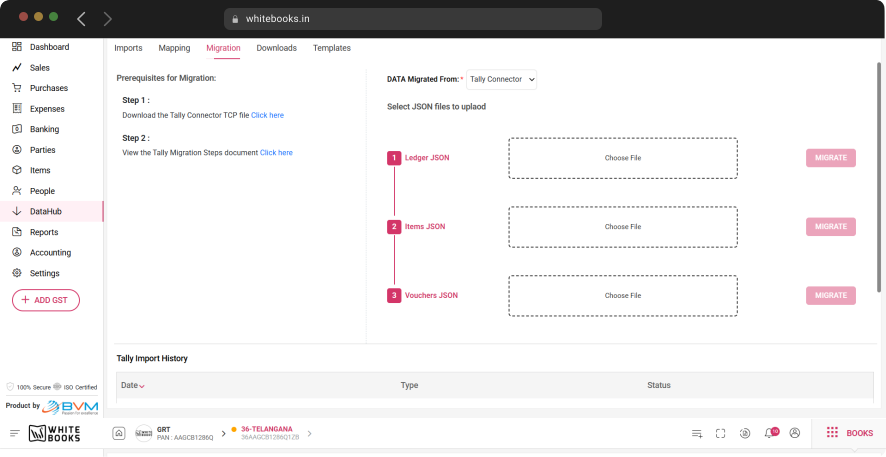
Migration follows a defined sequence—Ledger, Items, then Vouchers—ensuring proper dependency handling. This guarantees that master records are established first, enabling accurate linking of items and transactions during data registration.
Migration Execution Control
Each JSON file can be migrated independently, allowing teams to validate data at every stage before proceeding. This controlled approach minimizes errors and prevents issues from propagating across dependent data categories.
Tally Connector TCP File
Start with Tally Connector for Seamless Migration
WhiteBooks provides direct access to the Tally Connector TCP file within the Migration module, making it the essential prerequisite for Tally data migration. It enables structured JSON extraction and ensures accurate, complete data submission.
Direct TCP Access
Access the Tally Connector TCP file directly within the Migration module, allowing businesses to download it instantly at the point of need. This eliminates dependency on external sources or support, ensuring a smooth and uninterrupted migration setup process.
JSON Extraction Setup
The TCP file enables Tally to generate structured Ledger, Items, and Vouchers JSON files required for migration. This ensures data is extracted in the correct format and structure, supporting accurate processing and reliable registration in WhiteBooks.
Prerequisite Awareness
Clearly defined as a mandatory step, ensuring businesses install and use the TCP file before initiating migration. This prevents incomplete submissions, reduces errors, and ensures a smooth, successful data migration process.
Tally Migration Guide
Complete Guide to Tally Data Migration
WhiteBooks provides direct access to the Tally Migration Steps document within the Migration module, offering a complete procedural guide for accurate and error-free Tally-to-WhiteBooks data migration.
Complete Migration Coverage
The document outlines every step—from connector installation and JSON extraction to sequential file upload and completion—ensuring businesses can execute the entire migration process correctly without errors or guesswork.
Contextual Guidance Access
Accessible directly within the Migration module, the document provides guidance exactly when needed, eliminating reliance on external resources and keeping the workflow uninterrupted.
Migration Reference Guide
The guide explains the correct migration sequence and data dependencies, helping teams understand the order of Ledger, Items, and Vouchers to ensure accurate and consistent data registration.
Ledger JSON
Import Tally Ledgers into Party & Account Data
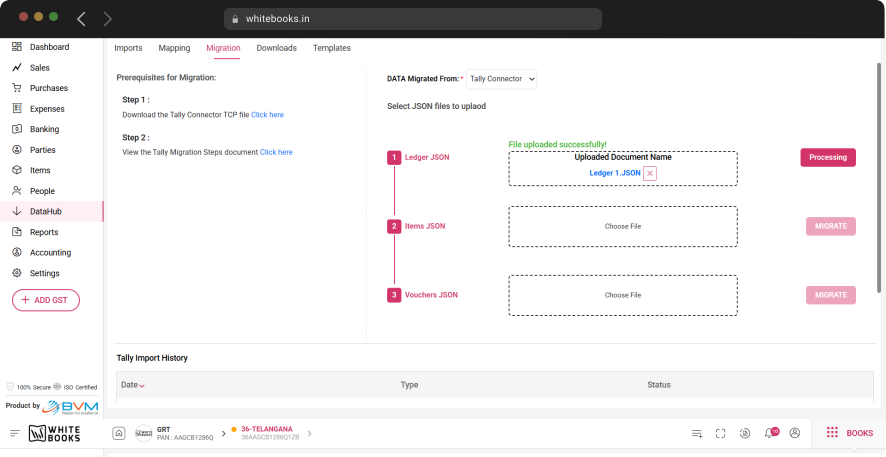
WhiteBooks processes the Ledger JSON as the foundation of Tally migration, creating all party and account master records required for accurate item and transaction data registration.
Party Master Population
All customer and vendor records are created from Tally ledger data, ensuring every party is registered before transaction migration begins. This guarantees that all voucher entries reference valid party masters, preventing orphaned transactions and ensuring continuity of historical data.
Account Master Population
WhiteBooks GST Software is designed to manage multiple clients / GSTINs / Businesses in one place, a One-time effort of adding your client and managing all at one place and avoiding OTP generation all the time. While adding your client, you can validate your client details, GSTIN Number, and GST user name.
Migration Foundation Setup
Ledger migration must be completed before Items and Vouchers, establishing all required dependencies in advance. This ensures smooth downstream processing, avoids migration failures, and guarantees that all item and transaction records are correctly linked to verified masters.
Items JSON
Seamless Item Migration to Product & Service Data
WhiteBooks processes the Items JSON as the second stage of Tally migration, establishing all product and service masters required for accurate and complete voucher data registration, ensuring every transaction references verified item records.
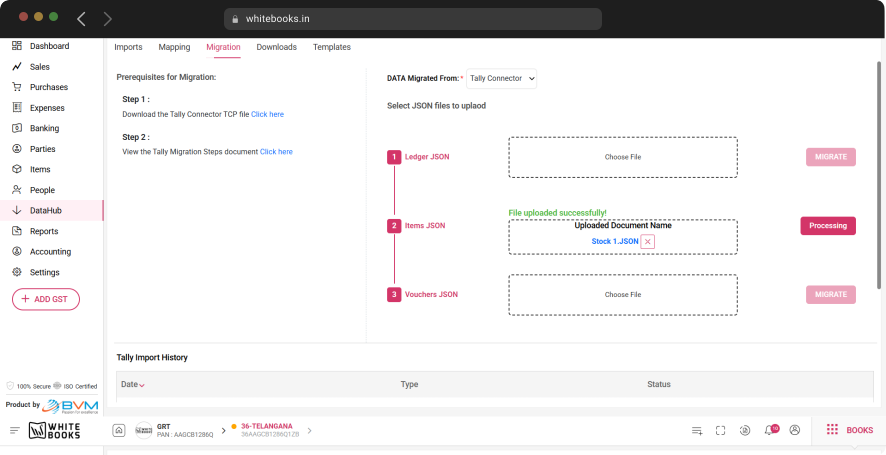
Complete Item Migration
All product and service items are migrated from Tally into the WhiteBooks item register, including names, codes, units, tax rates, and pricing. This ensures every item in the transaction history is available as a verified master before voucher processing begins.
Item Profile Completeness
Each item is migrated with its full set of attributes, ensuring voucher line items reference complete and accurate data. This prevents inconsistencies or missing details in transaction records during voucher migration.
Voucher Migration Foundation
Items migration is completed after Ledger and before Vouchers, ensuring all item masters are in place. This maintains proper data dependencies and guarantees accurate linking of items in every migrated transaction.
Vouchers JSON
Migrate Tally Transactions to WhiteBooks Records
WhiteBooks processes the Vouchers JSON as the final stage of Tally migration, transferring the complete transaction history into WhiteBooks with accurate party, item, and account references.
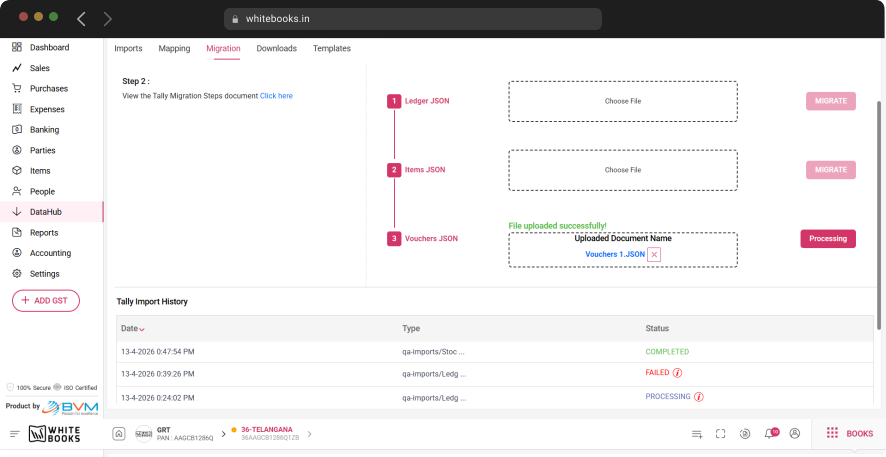
Transaction History Migration
All transaction types—sales invoices, purchase bills, payments, receipts, and journal entries—are migrated from Tally into WhiteBooks. This ensures the entire historical dataset is available instantly, eliminating the need for manual re-entry and preserving continuity of financial records.
Master Reference Linking
Every transaction is mapped against verified party, item, and account masters created in earlier stages. This ensures accurate relationships between records, prevents unresolved references, and maintains full consistency across all migrated data.
Final Migration Completion
Vouchers migration marks the successful completion of the transition, confirming that all masters and transactions are fully established. Businesses can immediately begin operations in WhiteBooks with a complete, reliable, and fully connected accounting dataset.
Tally Import History
View Tally Import History at a Glance
WhiteBooks maintains a Tally import history register within the Migration module, providing a complete, auditable record of all migration operations with date, type, and status details for accurate tracking and verification.
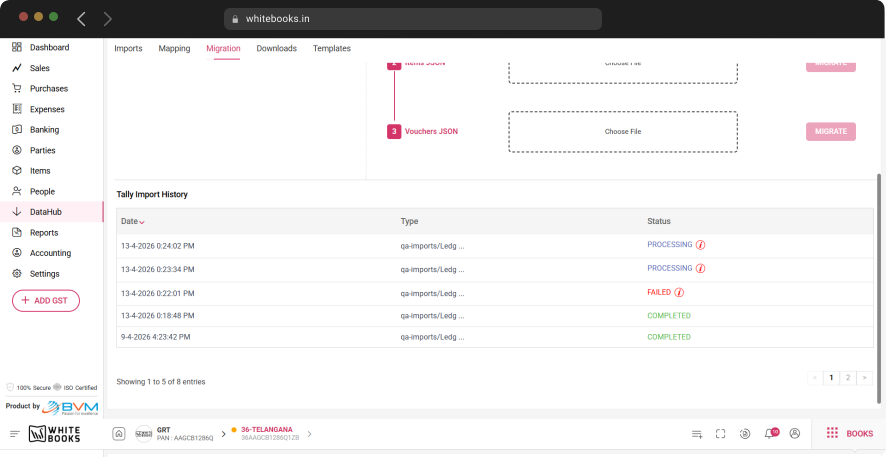
Migration Date Tracking
Every migration is recorded with its execution date, giving teams a clear chronological view of all migration activities. This supports audit trails, period-wise reviews, and easy identification of when specific data was registered.
Migration Type Identification
Each entry captures the migration type—Ledger, Items, or Vouchers—allowing teams to quickly understand which data category was processed. This helps track progress, identify gaps, and determine if any stage requires reprocessing.
Migration Status Visibility
The final status of every migration is recorded, confirming whether it was successful or failed. This enables quick issue identification, timely re-submission, and maintains a reliable history of all migration outcomes.
Get started with WhiteBooks
WhiteBooks ensures accurate Tally migration with TCP setup, JSON extraction, and sequential import of parties, items, and transactions for complete data transfer.
No Credit Card Required