Follow us on our LinkedIn page

Record, Categorize, and Monitor All Revenue in One Place

WhiteBooks manages additional income with manual entry, categorization, period filters, quick receipts, summaries, detailed listings, and payment status. WhiteBooks Additional Income Management Software India runs on India's GSP-certified, cloud-first business management platform used by 25,000+ businesses.

WhiteBooks manages additional income with categorized entries, period filters, instant receipts, payment tracking, and real time summaries for complete, organized records.

otherIncomes-sales-dashboards
Record Additional Income

Additional Income Recording

WhiteBooks enables recording of income transactions not generated through regular sales invoices, allowing businesses to track all additional revenue sources in one place with clear visibility and accurate reporting.
Add Otherincomes

Manual Income Entry

Allows users to record additional income transactions by entering details such as income number, category, transaction date, and total value, ensuring that all revenue sources are properly documented.

Centralized Income Records

Stores all additional income entries within a structured list so users can easily review, update, or manage recorded transactions whenever required.

Comprehensive Revenue Tracking

Helps businesses capture non-invoice income sources such as service charges, adjustments, or miscellaneous earnings to maintain accurate financial records.
Income Categorization

Structured Income Classification

WhiteBooks allows users to organize additional income transactions into defined categories, helping maintain structured financial records, improve clarity, and ensure accurate reporting and compliance readiness.
otherIncomes-register

Category-Based Income Recording

Enables users to assign each income entry to a specific category, ensuring that different revenue sources are properly classified and recorded.

Improved Financial Organization

Categorized income records help maintain a well-structured accounting system and simplify financial reporting processes.

Better Revenue Analysis

Grouping income by category allows businesses to analyze revenue sources and evaluate financial performance more effectively.
Flexible Period Selection

Period-Wise Income Summary

WhiteBooks allows users to filter and review additional income records based on selected reporting periods, enabling accurate financial tracking, quick verification, and compliance-ready reporting.
otherIncomes-dateWise

Month-Wise Income Filtering

Allows users to select a specific month and view only the income transactions recorded during that period. This focused view helps businesses quickly review monthly income activity without having to navigate through the entire list of records.

Financial Period Alignment

Ensures that all income entries are recorded and organized according to the correct financial year and reporting period. This helps maintain accurate financial records and supports proper accounting and compliance reporting.

Quick Period Navigation

Enables users to quickly switch between different months or reporting periods to review past income records. This makes it easier to track income trends over time and perform period-wise financial analysis efficiently.
Quick Income Entry

Fast Income Recording Interface

WhiteBooks provides a convenient option to record additional income directly from the income dashboard, enabling quick capture of other revenue sources, streamlined workflow, and efficient financial management.
otherIncomes-register
Instant Income Creation
The “Add Other Incomes” option allows users to immediately start recording a new income transaction from the dashboard, simplifying the process and reducing the time required to create new entries.
Simplified Data Entry Form
Offers a structured and easy-to-use form where users can efficiently enter important income details such as income category, transaction date, and amount, ensuring consistent and accurate data recording.
Real-Time Income Recording
Captures additional income transactions instantly as they occur, helping businesses maintain up-to-date financial records and ensuring accurate income tracking for reporting and analysis.
Income Summary

Additional Income Insights

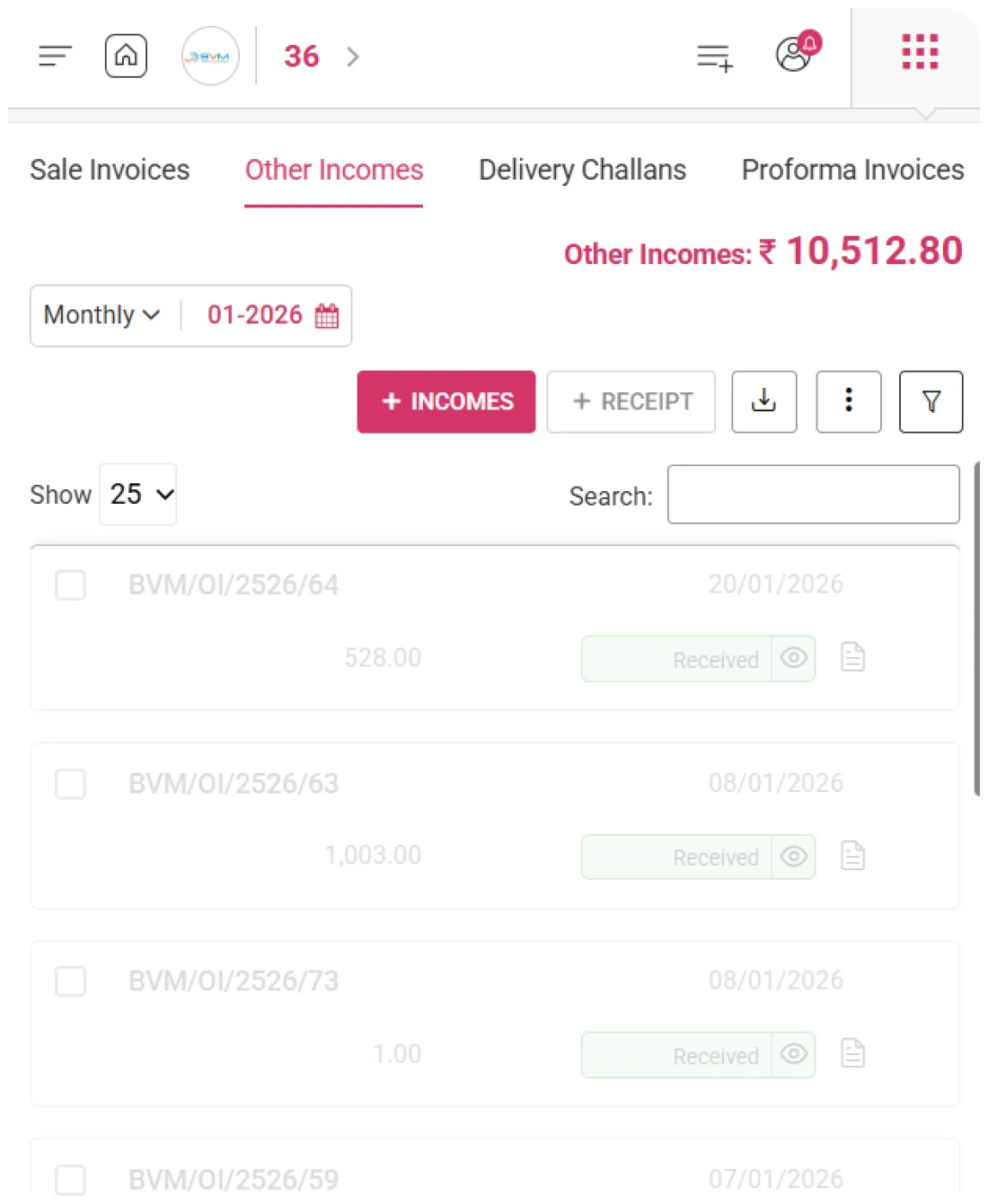
WhiteBooks provides a consolidated view of all additional income transactions for the selected period, enabling quick understanding of income generated beyond regular sales invoices with clear visibility and accurate reporting.
otherIncomes-summary

Total Income Display

Shows the aggregate value of all recorded additional income transactions for the selected period, giving users a clear view of the total income captured in the system.

Quick Financial Snapshot

Offers an instant overview of revenue generated from non-invoice income sources, enabling users to quickly assess additional earnings without navigating to detailed financial reports.

Dynamic Summary Updates

The displayed income value automatically updates based on the selected reporting period, ensuring that users always see an accurate and current summary of additional income transactions.
Receipt Recording

Income Receipt Management

WhiteBooks enables recording of payments received against additional income transactions, ensuring all receipts are properly captured and linked to their entries for accurate tracking, clear visibility, and improved financial control.
otherIncomes-addReceipts

Add Receipt

Enables users to record payment receipts associated with an income entry directly from the income list, allowing quick and convenient entry of received payment details.

Income Payment Linking

Each recorded receipt can be linked to its corresponding income transaction, helping maintain accurate records of which income entries have been fully received or remain pending.

Organized Receipt Tracking

Maintains a structured record of received payments and outstanding income amounts, allowing businesses to easily monitor income collections and maintain clear financial documentation.
Income Details

Detailed Income Records

WhiteBooks displays all additional income entries in a structured format, enabling easy review of transaction details, efficient record management, and improved visibility and control.
otherIncomes-summary

Complete Income Listing

Presents all additional income entries in a clear table format, displaying key fields such as income number, income category, transaction date, and total value for easy reference.

Essential Transaction Information

Provides quick access to important details including income category, amount received, and payment status, helping users understand the status of each income transaction at a glance.

Easy Record Navigation

Enables users to quickly locate and review specific income entries using sorting and search options, making it easier to manage and analyze income records.
Payment Tracking

Monitor Income Payment Status

WhiteBooks tracks the payment status of additional income transactions, providing clear visibility into received and pending amounts, enabling accurate record-keeping and effective receivables management.
otherIncomes-register

Payment Status Indicator

Displays the payment status of each income entry as paid, pending, or partially received, allowing users to quickly understand the current payment condition of every transaction.

Outstanding Income Monitoring

Helps businesses easily identify income entries with pending payments, enabling timely follow-ups and better tracking of outstanding amounts.

Better Receivable Management

Provides clear visibility into pending and received payments, helping businesses manage receivables efficiently and maintain a healthy cash flow.
Get started with WhiteBooks
WhiteBooks tracks additional income with quick entry, categorization, receipt linking, and payment status monitoring for complete revenue control.
No Credit Card Required

Accounting pricing — built around what you actually use

WhiteBooks Accounting runs on a custom pricing model. We size the plan to your filing volume, number of GSTINs, integration scope and support tier — not to a fixed SKU. Most teams move from sandbox to production inside a week.

Start Free

Use the sandbox for as long as you need. No credit card. Real schemas, real responses, no usage caps for evaluation.

Talk to Sales

Tell us your filing volume and integrations. We come back with a written quote, SLA and onboarding plan within one business day.

Enterprise Plans

Multi-GSTIN, SSO, dedicated support, on-premise deployment and custom SLAs available for large teams.

Who this Accounting solution is built for

Every Accounting workflow on this page is shaped by feedback from real practitioners — accountants who file every month, integration engineers wiring our APIs into ERPs, and compliance heads accountable to the board for what gets submitted.

Accountants & Bookkeepers

Manage chart of accounts, vouchers, contra entries, bank statements and trial balance for unlimited clients without spreadsheets.

SME Finance Teams

Real-time P&L, balance sheet and cash-flow reports with drill-down to source documents — no month-end scramble.

Auditors & Reviewers

Read-only auditor logins, locked periods, immutable audit trail and one-click export of ledgers + supporting evidence.

Partner with WhiteBooks

WhiteBooks works with CA firms, ERP vendors, system integrators and channel partners across India and the GCC. Pick the track that matches how you serve clients — we will share commercials, training and co-marketing kits.

CA & Practitioner Partners

Onboard your client base, earn margin on every plan and get a co-branded portal to manage filings, due dates and ITC reconciliation.

Integration Partners

ERPs, POS systems and billing platforms — ship native WhiteBooks GST / e-Invoice / e-Way Bill integrations to your customers without building it yourself.

Channel & Resellers

Regional resellers and consultants — earn recurring commissions, get pre-sales support and a sandbox tenant for every prospect demo.

Frequently Asked Questions

We have put together some commonly asked questions

WhiteBooks Record Additional Income allows you to manually capture non-invoice revenue sources such as service charges, adjustments, and miscellaneous earnings by entering the income number, category, transaction date, and total value. All entries are stored in a centralized income list so you can review, update, or manage them at any time — ensuring your financial records are always complete and nothing gets missed.

WhiteBooks Flexible Period Selection lets you filter your additional income records by choosing a specific month and financial year, displaying only the transactions relevant to that period. You can quickly switch between different months using Quick Period Navigation, and the system ensures all entries are aligned to the correct financial reporting period — making period-wise income tracking and compliance reporting straightforward.

WhiteBooks Income Summary View shows the total aggregate value of all additional income transactions recorded for the selected period as a Quick Financial Snapshot — without requiring you to open detailed reports. The summary updates dynamically whenever the reporting period is changed, so you always see an accurate and current view of revenue from non-invoice sources at a glance.

WhiteBooks Income Details View presents all additional income entries in a structured table showing key fields — income number, category, transaction date, total value, and payment status. You can locate specific entries quickly using sorting and search options, and access essential transaction details at a glance, making it easy to manage, review, and audit all recorded income without navigating multiple screens.

WhiteBooks Income Categorization lets you assign each additional income entry to a defined category — such as service charges, interest, or miscellaneous revenue — ensuring every source of income is properly classified and separated. This Category-Based Income Recording maintains a well-structured accounting system, simplifies financial reporting, and enables better revenue analysis by letting you evaluate each income type independently.

Yes. WhiteBooks Quick Income Entry provides an "Add Other Incomes" option directly on the income dashboard, so you can start recording a new transaction instantly without switching modules. A Simplified Data Entry Form lets you fill in the category, date, and amount in a structured format, and entries are captured in real time — keeping your financial records current and accurate as income occurs.

Yes. WhiteBooks Receipt Recording lets you add payment receipts directly from the income list and link each receipt to its corresponding income transaction through Income Payment Linking — keeping a clear record of which entries are fully received and which remain outstanding. Organized Receipt Tracking then maintains a structured overview of all collected and pending payments, so you can monitor income collections and maintain clear financial documentation at all times.

WhiteBooks Payment Tracking displays the status of every additional income entry as paid, pending, or partially received through a Payment Status Indicator — giving you an instant view of each transaction's collection condition. The Outstanding Income Monitoring feature highlights all entries with pending amounts to enable timely follow-ups, while Better Receivable Management ensures you always have clear visibility into cash flow and outstanding balances across all income records.

Last updated · View changelog

Quick Answer

Record, Categorize, and Monitor All Revenue in One Place

WhiteBooks Accounting Software is a cloud-based books-and-billing platform covering invoices, purchases, expenses, banking, inventory, payroll and financial reports under one login. It connects to 40+ ERPs including SAP, Oracle, Dynamics and Tally via REST API and is used by 25,000+ Indian businesses with 99.99% uptime and 24×7 Indian support. This feature is part of the Accounting module inside WhiteBooks.

25,000+ businesses served
40+ ERPs integrated
99.99% uptime SLA
24×7 Indian support
By CA Atul GargReviewing Editor — WhiteBooks Accounting Editorial DeskReviewed by the WhiteBooks Editorial Board · Last updated 8 June 2026