Add User
WhiteBooks enables businesses to create structured user records for every individual who needs system access. Each user’s identity, contact details, assigned role, and access credentials are captured, making them a verified access identity.
WhiteBooks captures every user's complete identity at the point of creation — including a unique username, email address, mobile number, assigned role, and system access status — creating a single, verified user profile that governs that individual's access permissions, transaction authority, and system interaction scope across every module within WhiteBooks.
WhiteBooks assigns a designated role to every user at the point of registration — establishing the permission boundaries within which that individual can operate across all WhiteBooks modules, ensuring that every user's access to transactions, records, and reports is governed by their assigned role from the moment their system access is activated without requiring separate permission configuration after onboarding.
WhiteBooks assigns an active or inactive status to every user record at the point of creation — ensuring that system access is deliberately activated only for individuals who are ready to operate within the platform, and that access can be deactivated at any time without deleting the user record or disturbing any transaction history associated with that user's prior system activity.
User Register
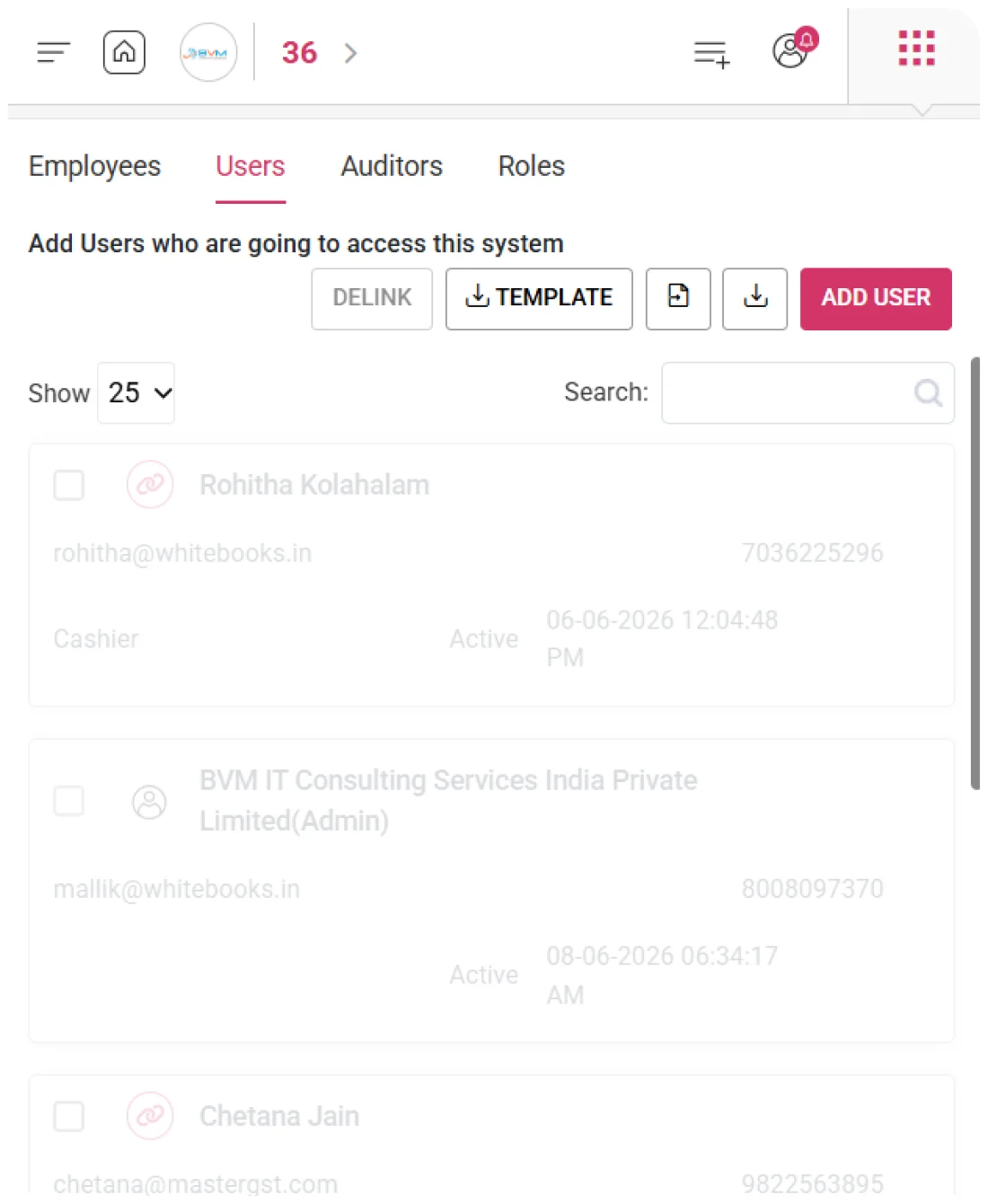
WhiteBooks provides a unified user register that displays every registered system user with their complete profile — username, email, mobile number, assigned role, access status, and last logged-in timestamp — in a single view.
Every user’s full profile is displayed in a structured register, giving administrators instant visibility into all system access configurations, enabling informed management and verification of user accounts.
The register shows when each user last accessed the system, helping identify dormant accounts, verify newly activated users, and monitor login activity across the organization.
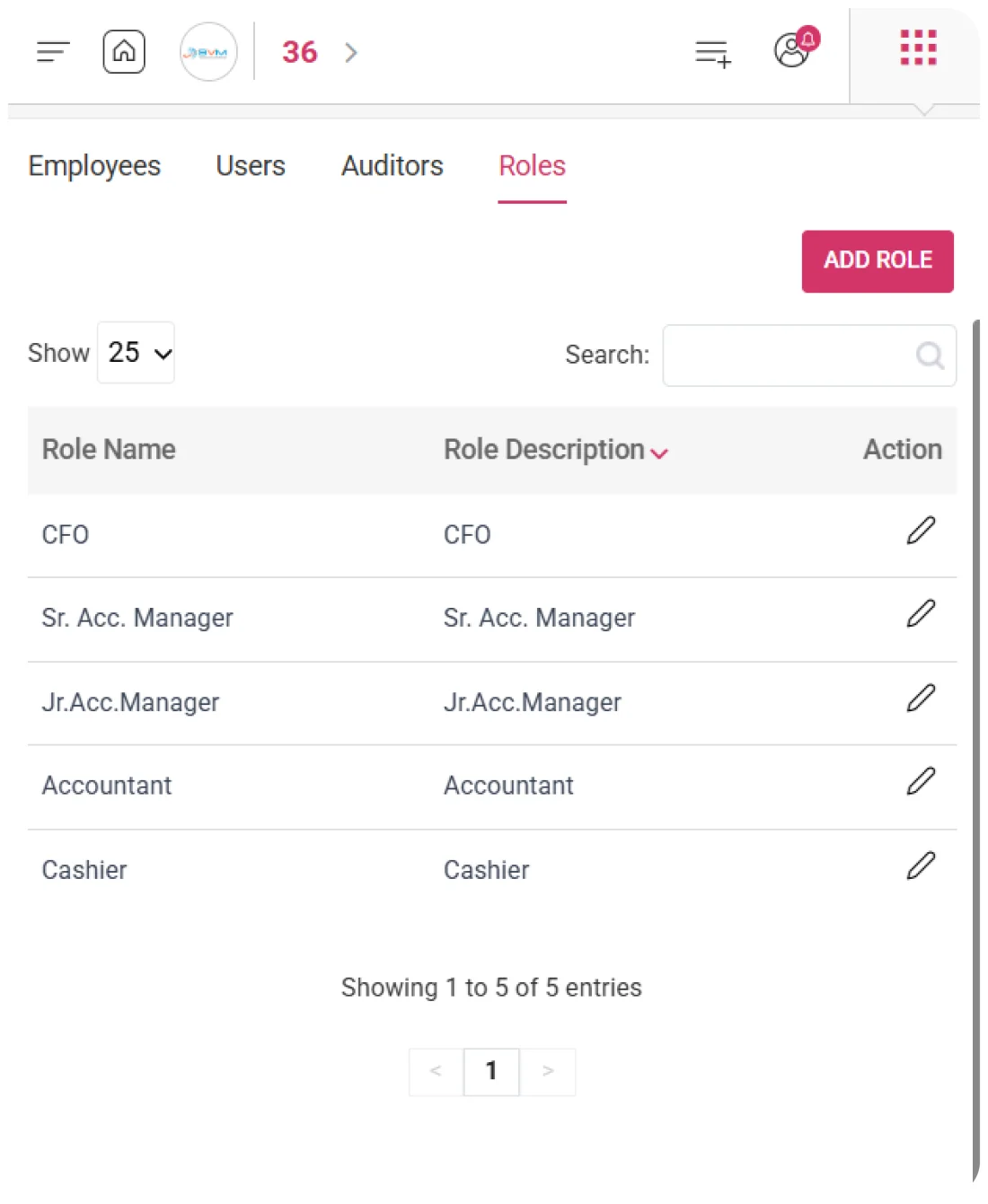
Administrators can see each user’s assigned role directly in the register, providing immediate insight into permission boundaries and enabling quick role review, updates, or realignment with current responsibilities.
Delink
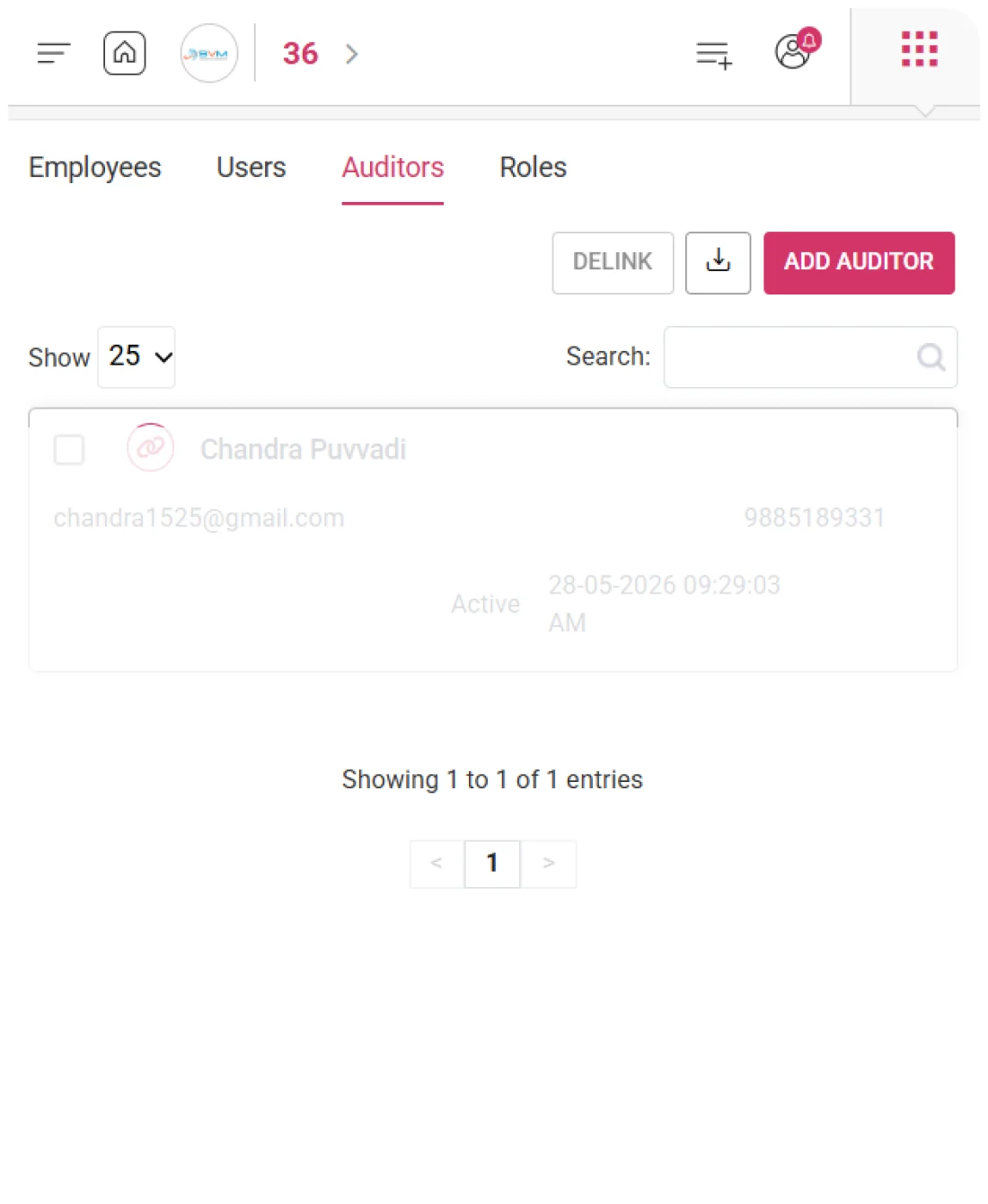
WhiteBooks allows authorized administrators to delink users, instantly revoking system access without deleting records or impacting historical transactions. This ensures secure access control while preserving past activity for audits and reporting.
The Delink action immediately blocks a user from logging in or accessing any module, giving administrators a real-time, reliable way to revoke system access due to role changes, organizational exit, or access rationalization.
Delinked users retain all prior transaction history and system activity in WhiteBooks, ensuring complete audit trails and historical integrity without impacting reports or prior data entries.
Only administrators with the proper authority can execute the Delink action, preventing unauthorized or accidental revocation of system access and protecting the user register’s operational integrity.
Template Import
WhiteBooks lets administrators bulk-register multiple users via a structured template, quickly onboarding teams, migrating users, and configuring access—without manual entry, ensuring accurate role assignments and system readiness.
Administrators populate a downloadable template with the complete user roster and upload it to WhiteBooks, registering all users simultaneously without individual record creation, streamlining system access setup for large teams.
Every imported record is checked for completeness, duplicate usernames, email format accuracy, and valid role assignment. Errors or incomplete entries are flagged in a validation summary, allowing corrections before system access is activated.
Existing user records remain untouched during import, ensuring new registrations do not overwrite, duplicate, or disrupt the profiles or access of currently active users, maintaining full integrity of the user register.
Export
WhiteBooks enables export of the full user register—including username, email, mobile, role, status, and last login—into a structured format for audits, access reviews, reporting, and compliance, keeping system access records governance-ready.
Extract every registered user in a single operation, producing a structured dataset ready for access management reviews, compliance workflows, or reporting without additional formatting.
Use the exported data to build system access reports, analyze role distribution, summarize last login activity, and compare active versus inactive users — enabling informed access rationalization and governance decisions.
Downloaded user records provide formal evidence of system access configurations, supporting internal audits, access control assessments, and governance submissions by verifying registered users, their roles, status, and last login activity.
Instant Retrieval
WhiteBooks offers real-time search above the user register grid, filtering records as you type to instantly show matching users. This enables rapid user identification, faster access reviews, role verification, and login activity checks across any roster size.
The register updates instantly as the search term is entered, progressively showing only matching users without disrupting the grid layout or sorting.
Search simultaneously across username, email, mobile number, assigned role, and status — ensuring any user can be found regardless of which identifier is used.
The grid shows the number of matching records versus the total register size in real time, confirming whether the search yields a unique user or multiple matches requiring further refinement.
Get started with WhiteBooks
WhiteBooks manages users with onboarding, roles, access control, and audit ready exports for secure governance and full visibility.
No Credit Card Required
User Register
Complete System Access Visibility
WhiteBooks provides a unified user register that displays every registered system user with their complete profile — username, email, mobile number, assigned role, access status, and last logged-in timestamp — in a single view.
User Profile Insights
Every user’s full profile is displayed in a structured register, giving administrators instant visibility into all system access configurations, enabling informed management and verification of user accounts.
Last Login Timestamp
The register shows when each user last accessed the system, helping identify dormant accounts, verify newly activated users, and monitor login activity across the organization.
Role Overview
Administrators can see each user’s assigned role directly in the register, providing immediate insight into permission boundaries and enabling quick role review, updates, or realignment with current responsibilities.
User Register
Complete System Access Visibility
WhiteBooks provides a unified user register that displays every registered system user with their complete profile — username, email, mobile number, assigned role, access status, and last logged-in timestamp — in a single view.
User Profile Insights
Every user’s full profile is displayed in a structured register, giving administrators instant visibility into all system access configurations, enabling informed management and verification of user accounts.
Last Login Timestamp
The register shows when each user last accessed the system, helping identify dormant accounts, verify newly activated users, and monitor login activity across the organization.
Role Overview
Administrators can see each user’s assigned role directly in the register, providing immediate insight into permission boundaries and enabling quick role review, updates, or realignment with current responsibilities.
Get started with WhiteBooks
WhiteBooks manages users with onboarding, roles, access control, and audit ready exports for secure governance and full visibility.
No Credit Card Required
Add User
Register and Verify System Users
WhiteBooks enables businesses to create structured user records for every individual who needs system access. Each user’s identity, contact details, assigned role, and access credentials are captured, making them a verified access identity.
Full User Profile Setup
WhiteBooks captures every user's complete identity at the point of creation — including a unique username, email address, mobile number, assigned role, and system access status — creating a single, verified user profile that governs that individual's access permissions, transaction authority, and system interaction scope across every module within WhiteBooks.
User Role Assignment
WhiteBooks assigns a designated role to every user at the point of registration — establishing the permission boundaries within which that individual can operate across all WhiteBooks modules, ensuring that every user's access to transactions, records, and reports is governed by their assigned role from the moment their system access is activated without requiring separate permission configuration after onboarding.
User Status & Access Control
WhiteBooks assigns an active or inactive status to every user record at the point of creation — ensuring that system access is deliberately activated only for individuals who are ready to operate within the platform, and that access can be deactivated at any time without deleting the user record or disturbing any transaction history associated with that user's prior system activity.
Add User
Register and Verify System Users
WhiteBooks enables businesses to create structured user records for every individual who needs system access. Each user’s identity, contact details, assigned role, and access credentials are captured, making them a verified access identity.
Full User Profile Setup
WhiteBooks captures every user's complete identity at the point of creation — including a unique username, email address, mobile number, assigned role, and system access status — creating a single, verified user profile that governs that individual's access permissions, transaction authority, and system interaction scope across every module within WhiteBooks.
User Role Assignment
WhiteBooks assigns a designated role to every user at the point of registration — establishing the permission boundaries within which that individual can operate across all WhiteBooks modules, ensuring that every user's access to transactions, records, and reports is governed by their assigned role from the moment their system access is activated without requiring separate permission configuration after onboarding.
User Status & Access Control
WhiteBooks assigns an active or inactive status to every user record at the point of creation — ensuring that system access is deliberately activated only for individuals who are ready to operate within the platform, and that access can be deactivated at any time without deleting the user record or disturbing any transaction history associated with that user's prior system activity.
Get started with WhiteBooks
WhiteBooks manages users with onboarding, roles, access control, and audit ready exports for secure governance and full visibility.
No Credit Card Required
Delink
Instant User Access Revocation
WhiteBooks allows authorized administrators to delink users, instantly revoking system access without deleting records or impacting historical transactions. This ensures secure access control while preserving past activity for audits and reporting.
Instant Access Revocation
The Delink action immediately blocks a user from logging in or accessing any module, giving administrators a real-time, reliable way to revoke system access due to role changes, organizational exit, or access rationalization.
User History Preservation
Delinked users retain all prior transaction history and system activity in WhiteBooks, ensuring complete audit trails and historical integrity without impacting reports or prior data entries.
Secure User Delinking
Only administrators with the proper authority can execute the Delink action, preventing unauthorized or accidental revocation of system access and protecting the user register’s operational integrity.
Delink
Instant User Access Revocation
WhiteBooks allows authorized administrators to delink users, instantly revoking system access without deleting records or impacting historical transactions. This ensures secure access control while preserving past activity for audits and reporting.
Instant Access Revocation
The Delink action immediately blocks a user from logging in or accessing any module, giving administrators a real-time, reliable way to revoke system access due to role changes, organizational exit, or access rationalization.
User History Preservation
Delinked users retain all prior transaction history and system activity in WhiteBooks, ensuring complete audit trails and historical integrity without impacting reports or prior data entries.
Secure User Delinking
Only administrators with the proper authority can execute the Delink action, preventing unauthorized or accidental revocation of system access and protecting the user register’s operational integrity.
Get started with WhiteBooks
WhiteBooks manages users with onboarding, roles, access control, and audit ready exports for secure governance and full visibility.
No Credit Card Required
Template Import
Bulk User Import
WhiteBooks lets administrators bulk-register multiple users via a structured template, quickly onboarding teams, migrating users, and configuring access—without manual entry, ensuring accurate role assignments and system readiness.
Bulk User Import
Administrators populate a downloadable template with the complete user roster and upload it to WhiteBooks, registering all users simultaneously without individual record creation, streamlining system access setup for large teams.
Validate Data
Every imported record is checked for completeness, duplicate usernames, email format accuracy, and valid role assignment. Errors or incomplete entries are flagged in a validation summary, allowing corrections before system access is activated.
Preserve Register
Existing user records remain untouched during import, ensuring new registrations do not overwrite, duplicate, or disrupt the profiles or access of currently active users, maintaining full integrity of the user register.
Template Import
Bulk User Import
WhiteBooks lets administrators bulk-register multiple users via a structured template, quickly onboarding teams, migrating users, and configuring access—without manual entry, ensuring accurate role assignments and system readiness.
Bulk User Import
Administrators populate a downloadable template with the complete user roster and upload it to WhiteBooks, registering all users simultaneously without individual record creation, streamlining system access setup for large teams.
Validate Data
Every imported record is checked for completeness, duplicate usernames, email format accuracy, and valid role assignment. Errors or incomplete entries are flagged in a validation summary, allowing corrections before system access is activated.
Preserve Register
Existing user records remain untouched during import, ensuring new registrations do not overwrite, duplicate, or disrupt the profiles or access of currently active users, maintaining full integrity of the user register.
Get started with WhiteBooks
WhiteBooks manages users with onboarding, roles, access control, and audit ready exports for secure governance and full visibility.
No Credit Card Required
Export
User Access & Compliance Export
WhiteBooks enables export of the full user register—including username, email, mobile, role, status, and last login—into a structured format for audits, access reviews, reporting, and compliance, keeping system access records governance-ready.
User Data Export
Extract every registered user in a single operation, producing a structured dataset ready for access management reviews, compliance workflows, or reporting without additional formatting.
Role Analysis
Use the exported data to build system access reports, analyze role distribution, summarize last login activity, and compare active versus inactive users — enabling informed access rationalization and governance decisions.
Compliance Documentation
Downloaded user records provide formal evidence of system access configurations, supporting internal audits, access control assessments, and governance submissions by verifying registered users, their roles, status, and last login activity.
Export
User Access & Compliance Export
WhiteBooks enables export of the full user register—including username, email, mobile, role, status, and last login—into a structured format for audits, access reviews, reporting, and compliance, keeping system access records governance-ready.
User Data Export
Extract every registered user in a single operation, producing a structured dataset ready for access management reviews, compliance workflows, or reporting without additional formatting.
Role Analysis
Use the exported data to build system access reports, analyze role distribution, summarize last login activity, and compare active versus inactive users — enabling informed access rationalization and governance decisions.
Compliance Documentation
Downloaded user records provide formal evidence of system access configurations, supporting internal audits, access control assessments, and governance submissions by verifying registered users, their roles, status, and last login activity.
Get started with WhiteBooks
WhiteBooks manages users with onboarding, roles, access control, and audit ready exports for secure governance and full visibility.
No Credit Card Required
Instant Retrieval
Quick Access to User Records
WhiteBooks offers real-time search above the user register grid, filtering records as you type to instantly show matching users. This enables rapid user identification, faster access reviews, role verification, and login activity checks across any roster size.
Real-Time Grid Filtering
The register updates instantly as the search term is entered, progressively showing only matching users without disrupting the grid layout or sorting.
Find Users
Search simultaneously across username, email, mobile number, assigned role, and status — ensuring any user can be found regardless of which identifier is used.
Instant Match Count & Scope
The grid shows the number of matching records versus the total register size in real time, confirming whether the search yields a unique user or multiple matches requiring further refinement.
Instant Retrieval
Quick Access to User Records
WhiteBooks offers real-time search above the user register grid, filtering records as you type to instantly show matching users. This enables rapid user identification, faster access reviews, role verification, and login activity checks across any roster size.
Real-Time Grid Filtering
The register updates instantly as the search term is entered, progressively showing only matching users without disrupting the grid layout or sorting.
Find Users
Search simultaneously across username, email, mobile number, assigned role, and status — ensuring any user can be found regardless of which identifier is used.
Instant Match Count & Scope
The grid shows the number of matching records versus the total register size in real time, confirming whether the search yields a unique user or multiple matches requiring further refinement.
Get started with WhiteBooks
WhiteBooks manages users with onboarding, roles, access control, and audit ready exports for secure governance and full visibility.
No Credit Card Required
User Register
Complete System Access Visibility
WhiteBooks provides a unified user register that displays every registered system user with their complete profile — username, email, mobile number, assigned role, access status, and last logged-in timestamp — in a single view.
User Profile Insights
Every user’s full profile is displayed in a structured register, giving administrators instant visibility into all system access configurations, enabling informed management and verification of user accounts.
Last Login Timestamp
The register shows when each user last accessed the system, helping identify dormant accounts, verify newly activated users, and monitor login activity across the organization.
Role Overview
Administrators can see each user’s assigned role directly in the register, providing immediate insight into permission boundaries and enabling quick role review, updates, or realignment with current responsibilities.
User Register
Complete System Access Visibility
WhiteBooks provides a unified user register that displays every registered system user with their complete profile — username, email, mobile number, assigned role, access status, and last logged-in timestamp — in a single view.
User Profile Insights
Every user’s full profile is displayed in a structured register, giving administrators instant visibility into all system access configurations, enabling informed management and verification of user accounts.
Last Login Timestamp
The register shows when each user last accessed the system, helping identify dormant accounts, verify newly activated users, and monitor login activity across the organization.
Role Overview
Administrators can see each user’s assigned role directly in the register, providing immediate insight into permission boundaries and enabling quick role review, updates, or realignment with current responsibilities.
Get started with WhiteBooks
WhiteBooks manages users with onboarding, roles, access control, and audit ready exports for secure governance and full visibility.
No Credit Card Required
Add User
Register and Verify System Users
WhiteBooks enables businesses to create structured user records for every individual who needs system access. Each user’s identity, contact details, assigned role, and access credentials are captured, making them a verified access identity.
Full User Profile Setup
WhiteBooks captures every user's complete identity at the point of creation — including a unique username, email address, mobile number, assigned role, and system access status — creating a single, verified user profile that governs that individual's access permissions, transaction authority, and system interaction scope across every module within WhiteBooks.
User Role Assignment
WhiteBooks assigns a designated role to every user at the point of registration — establishing the permission boundaries within which that individual can operate across all WhiteBooks modules, ensuring that every user's access to transactions, records, and reports is governed by their assigned role from the moment their system access is activated without requiring separate permission configuration after onboarding.
User Status & Access Control
WhiteBooks assigns an active or inactive status to every user record at the point of creation — ensuring that system access is deliberately activated only for individuals who are ready to operate within the platform, and that access can be deactivated at any time without deleting the user record or disturbing any transaction history associated with that user's prior system activity.
Add User
Register and Verify System Users
WhiteBooks enables businesses to create structured user records for every individual who needs system access. Each user’s identity, contact details, assigned role, and access credentials are captured, making them a verified access identity.
Full User Profile Setup
WhiteBooks captures every user's complete identity at the point of creation — including a unique username, email address, mobile number, assigned role, and system access status — creating a single, verified user profile that governs that individual's access permissions, transaction authority, and system interaction scope across every module within WhiteBooks.
User Role Assignment
WhiteBooks assigns a designated role to every user at the point of registration — establishing the permission boundaries within which that individual can operate across all WhiteBooks modules, ensuring that every user's access to transactions, records, and reports is governed by their assigned role from the moment their system access is activated without requiring separate permission configuration after onboarding.
User Status & Access Control
WhiteBooks assigns an active or inactive status to every user record at the point of creation — ensuring that system access is deliberately activated only for individuals who are ready to operate within the platform, and that access can be deactivated at any time without deleting the user record or disturbing any transaction history associated with that user's prior system activity.
Get started with WhiteBooks
WhiteBooks manages users with onboarding, roles, access control, and audit ready exports for secure governance and full visibility.
No Credit Card Required
Delink
Instant User Access Revocation
WhiteBooks allows authorized administrators to delink users, instantly revoking system access without deleting records or impacting historical transactions. This ensures secure access control while preserving past activity for audits and reporting.
Instant Access Revocation
The Delink action immediately blocks a user from logging in or accessing any module, giving administrators a real-time, reliable way to revoke system access due to role changes, organizational exit, or access rationalization.
User History Preservation
Delinked users retain all prior transaction history and system activity in WhiteBooks, ensuring complete audit trails and historical integrity without impacting reports or prior data entries.
Secure User Delinking
Only administrators with the proper authority can execute the Delink action, preventing unauthorized or accidental revocation of system access and protecting the user register’s operational integrity.
Delink
Instant User Access Revocation
WhiteBooks allows authorized administrators to delink users, instantly revoking system access without deleting records or impacting historical transactions. This ensures secure access control while preserving past activity for audits and reporting.
Instant Access Revocation
The Delink action immediately blocks a user from logging in or accessing any module, giving administrators a real-time, reliable way to revoke system access due to role changes, organizational exit, or access rationalization.
User History Preservation
Delinked users retain all prior transaction history and system activity in WhiteBooks, ensuring complete audit trails and historical integrity without impacting reports or prior data entries.
Secure User Delinking
Only administrators with the proper authority can execute the Delink action, preventing unauthorized or accidental revocation of system access and protecting the user register’s operational integrity.
Get started with WhiteBooks
WhiteBooks manages users with onboarding, roles, access control, and audit ready exports for secure governance and full visibility.
No Credit Card Required
Template Import
Bulk User Import
WhiteBooks lets administrators bulk-register multiple users via a structured template, quickly onboarding teams, migrating users, and configuring access—without manual entry, ensuring accurate role assignments and system readiness.
Bulk User Import
Administrators populate a downloadable template with the complete user roster and upload it to WhiteBooks, registering all users simultaneously without individual record creation, streamlining system access setup for large teams.
Validate Data
Every imported record is checked for completeness, duplicate usernames, email format accuracy, and valid role assignment. Errors or incomplete entries are flagged in a validation summary, allowing corrections before system access is activated.
Preserve Register
Existing user records remain untouched during import, ensuring new registrations do not overwrite, duplicate, or disrupt the profiles or access of currently active users, maintaining full integrity of the user register.
Template Import
Bulk User Import
WhiteBooks lets administrators bulk-register multiple users via a structured template, quickly onboarding teams, migrating users, and configuring access—without manual entry, ensuring accurate role assignments and system readiness.
Bulk User Import
Administrators populate a downloadable template with the complete user roster and upload it to WhiteBooks, registering all users simultaneously without individual record creation, streamlining system access setup for large teams.
Validate Data
Every imported record is checked for completeness, duplicate usernames, email format accuracy, and valid role assignment. Errors or incomplete entries are flagged in a validation summary, allowing corrections before system access is activated.
Preserve Register
Existing user records remain untouched during import, ensuring new registrations do not overwrite, duplicate, or disrupt the profiles or access of currently active users, maintaining full integrity of the user register.
Get started with WhiteBooks
WhiteBooks manages users with onboarding, roles, access control, and audit ready exports for secure governance and full visibility.
No Credit Card Required
Export
User Access & Compliance Export
WhiteBooks enables export of the full user register—including username, email, mobile, role, status, and last login—into a structured format for audits, access reviews, reporting, and compliance, keeping system access records governance-ready.
User Data Export
Extract every registered user in a single operation, producing a structured dataset ready for access management reviews, compliance workflows, or reporting without additional formatting.
Role Analysis
Use the exported data to build system access reports, analyze role distribution, summarize last login activity, and compare active versus inactive users — enabling informed access rationalization and governance decisions.
Compliance Documentation
Downloaded user records provide formal evidence of system access configurations, supporting internal audits, access control assessments, and governance submissions by verifying registered users, their roles, status, and last login activity.
Export
User Access & Compliance Export
WhiteBooks enables export of the full user register—including username, email, mobile, role, status, and last login—into a structured format for audits, access reviews, reporting, and compliance, keeping system access records governance-ready.
User Data Export
Extract every registered user in a single operation, producing a structured dataset ready for access management reviews, compliance workflows, or reporting without additional formatting.
Role Analysis
Use the exported data to build system access reports, analyze role distribution, summarize last login activity, and compare active versus inactive users — enabling informed access rationalization and governance decisions.
Compliance Documentation
Downloaded user records provide formal evidence of system access configurations, supporting internal audits, access control assessments, and governance submissions by verifying registered users, their roles, status, and last login activity.
Get started with WhiteBooks
WhiteBooks manages users with onboarding, roles, access control, and audit ready exports for secure governance and full visibility.
No Credit Card Required
Instant Retrieval
Quick Access to User Records
WhiteBooks offers real-time search above the user register grid, filtering records as you type to instantly show matching users. This enables rapid user identification, faster access reviews, role verification, and login activity checks across any roster size.
Real-Time Grid Filtering
The register updates instantly as the search term is entered, progressively showing only matching users without disrupting the grid layout or sorting.
Find Users
Search simultaneously across username, email, mobile number, assigned role, and status — ensuring any user can be found regardless of which identifier is used.
Instant Match Count & Scope
The grid shows the number of matching records versus the total register size in real time, confirming whether the search yields a unique user or multiple matches requiring further refinement.
Instant Retrieval
Quick Access to User Records
WhiteBooks offers real-time search above the user register grid, filtering records as you type to instantly show matching users. This enables rapid user identification, faster access reviews, role verification, and login activity checks across any roster size.
Real-Time Grid Filtering
The register updates instantly as the search term is entered, progressively showing only matching users without disrupting the grid layout or sorting.
Find Users
Search simultaneously across username, email, mobile number, assigned role, and status — ensuring any user can be found regardless of which identifier is used.
Instant Match Count & Scope
The grid shows the number of matching records versus the total register size in real time, confirming whether the search yields a unique user or multiple matches requiring further refinement.
Get started with WhiteBooks
WhiteBooks manages users with onboarding, roles, access control, and audit ready exports for secure governance and full visibility.
No Credit Card Required
User Register
Complete System Access Visibility
WhiteBooks provides a unified user register that displays every registered system user with their complete profile — username, email, mobile number, assigned role, access status, and last logged-in timestamp — in a single view.
User Profile Insights
Every user’s full profile is displayed in a structured register, giving administrators instant visibility into all system access configurations, enabling informed management and verification of user accounts.
Last Login Timestamp
The register shows when each user last accessed the system, helping identify dormant accounts, verify newly activated users, and monitor login activity across the organization.
Role Overview
Administrators can see each user’s assigned role directly in the register, providing immediate insight into permission boundaries and enabling quick role review, updates, or realignment with current responsibilities.
User Register
Complete System Access Visibility
WhiteBooks provides a unified user register that displays every registered system user with their complete profile — username, email, mobile number, assigned role, access status, and last logged-in timestamp — in a single view.
User Profile Insights
Every user’s full profile is displayed in a structured register, giving administrators instant visibility into all system access configurations, enabling informed management and verification of user accounts.
Last Login Timestamp
The register shows when each user last accessed the system, helping identify dormant accounts, verify newly activated users, and monitor login activity across the organization.
Role Overview
Administrators can see each user’s assigned role directly in the register, providing immediate insight into permission boundaries and enabling quick role review, updates, or realignment with current responsibilities.
Get started with WhiteBooks
WhiteBooks manages users with onboarding, roles, access control, and audit ready exports for secure governance and full visibility.
No Credit Card Required
Add User
Register and Verify System Users
WhiteBooks enables businesses to create structured user records for every individual who needs system access. Each user’s identity, contact details, assigned role, and access credentials are captured, making them a verified access identity.
Full User Profile Setup
WhiteBooks captures every user's complete identity at the point of creation — including a unique username, email address, mobile number, assigned role, and system access status — creating a single, verified user profile that governs that individual's access permissions, transaction authority, and system interaction scope across every module within WhiteBooks.
User Role Assignment
WhiteBooks assigns a designated role to every user at the point of registration — establishing the permission boundaries within which that individual can operate across all WhiteBooks modules, ensuring that every user's access to transactions, records, and reports is governed by their assigned role from the moment their system access is activated without requiring separate permission configuration after onboarding.
User Status & Access Control
WhiteBooks assigns an active or inactive status to every user record at the point of creation — ensuring that system access is deliberately activated only for individuals who are ready to operate within the platform, and that access can be deactivated at any time without deleting the user record or disturbing any transaction history associated with that user's prior system activity.
Add User
Register and Verify System Users
WhiteBooks enables businesses to create structured user records for every individual who needs system access. Each user’s identity, contact details, assigned role, and access credentials are captured, making them a verified access identity.
Full User Profile Setup
WhiteBooks captures every user's complete identity at the point of creation — including a unique username, email address, mobile number, assigned role, and system access status — creating a single, verified user profile that governs that individual's access permissions, transaction authority, and system interaction scope across every module within WhiteBooks.
User Role Assignment
WhiteBooks assigns a designated role to every user at the point of registration — establishing the permission boundaries within which that individual can operate across all WhiteBooks modules, ensuring that every user's access to transactions, records, and reports is governed by their assigned role from the moment their system access is activated without requiring separate permission configuration after onboarding.
User Status & Access Control
WhiteBooks assigns an active or inactive status to every user record at the point of creation — ensuring that system access is deliberately activated only for individuals who are ready to operate within the platform, and that access can be deactivated at any time without deleting the user record or disturbing any transaction history associated with that user's prior system activity.
Get started with WhiteBooks
WhiteBooks manages users with onboarding, roles, access control, and audit ready exports for secure governance and full visibility.
No Credit Card Required
Delink
Instant User Access Revocation
WhiteBooks allows authorized administrators to delink users, instantly revoking system access without deleting records or impacting historical transactions. This ensures secure access control while preserving past activity for audits and reporting.
Instant Access Revocation
The Delink action immediately blocks a user from logging in or accessing any module, giving administrators a real-time, reliable way to revoke system access due to role changes, organizational exit, or access rationalization.
User History Preservation
Delinked users retain all prior transaction history and system activity in WhiteBooks, ensuring complete audit trails and historical integrity without impacting reports or prior data entries.
Secure User Delinking
Only administrators with the proper authority can execute the Delink action, preventing unauthorized or accidental revocation of system access and protecting the user register’s operational integrity.
Delink
Instant User Access Revocation
WhiteBooks allows authorized administrators to delink users, instantly revoking system access without deleting records or impacting historical transactions. This ensures secure access control while preserving past activity for audits and reporting.
Instant Access Revocation
The Delink action immediately blocks a user from logging in or accessing any module, giving administrators a real-time, reliable way to revoke system access due to role changes, organizational exit, or access rationalization.
User History Preservation
Delinked users retain all prior transaction history and system activity in WhiteBooks, ensuring complete audit trails and historical integrity without impacting reports or prior data entries.
Secure User Delinking
Only administrators with the proper authority can execute the Delink action, preventing unauthorized or accidental revocation of system access and protecting the user register’s operational integrity.
Get started with WhiteBooks
WhiteBooks manages users with onboarding, roles, access control, and audit ready exports for secure governance and full visibility.
No Credit Card Required
Template Import
Bulk User Import
WhiteBooks lets administrators bulk-register multiple users via a structured template, quickly onboarding teams, migrating users, and configuring access—without manual entry, ensuring accurate role assignments and system readiness.
Bulk User Import
Administrators populate a downloadable template with the complete user roster and upload it to WhiteBooks, registering all users simultaneously without individual record creation, streamlining system access setup for large teams.
Validate Data
Every imported record is checked for completeness, duplicate usernames, email format accuracy, and valid role assignment. Errors or incomplete entries are flagged in a validation summary, allowing corrections before system access is activated.
Preserve Register
Existing user records remain untouched during import, ensuring new registrations do not overwrite, duplicate, or disrupt the profiles or access of currently active users, maintaining full integrity of the user register.
Template Import
Bulk User Import
WhiteBooks lets administrators bulk-register multiple users via a structured template, quickly onboarding teams, migrating users, and configuring access—without manual entry, ensuring accurate role assignments and system readiness.
Bulk User Import
Administrators populate a downloadable template with the complete user roster and upload it to WhiteBooks, registering all users simultaneously without individual record creation, streamlining system access setup for large teams.
Validate Data
Every imported record is checked for completeness, duplicate usernames, email format accuracy, and valid role assignment. Errors or incomplete entries are flagged in a validation summary, allowing corrections before system access is activated.
Preserve Register
Existing user records remain untouched during import, ensuring new registrations do not overwrite, duplicate, or disrupt the profiles or access of currently active users, maintaining full integrity of the user register.
Get started with WhiteBooks
WhiteBooks manages users with onboarding, roles, access control, and audit ready exports for secure governance and full visibility.
No Credit Card Required
Export
User Access & Compliance Export
WhiteBooks enables export of the full user register—including username, email, mobile, role, status, and last login—into a structured format for audits, access reviews, reporting, and compliance, keeping system access records governance-ready.
User Data Export
Extract every registered user in a single operation, producing a structured dataset ready for access management reviews, compliance workflows, or reporting without additional formatting.
Role Analysis
Use the exported data to build system access reports, analyze role distribution, summarize last login activity, and compare active versus inactive users — enabling informed access rationalization and governance decisions.
Compliance Documentation
Downloaded user records provide formal evidence of system access configurations, supporting internal audits, access control assessments, and governance submissions by verifying registered users, their roles, status, and last login activity.
Export
User Access & Compliance Export
WhiteBooks enables export of the full user register—including username, email, mobile, role, status, and last login—into a structured format for audits, access reviews, reporting, and compliance, keeping system access records governance-ready.
User Data Export
Extract every registered user in a single operation, producing a structured dataset ready for access management reviews, compliance workflows, or reporting without additional formatting.
Role Analysis
Use the exported data to build system access reports, analyze role distribution, summarize last login activity, and compare active versus inactive users — enabling informed access rationalization and governance decisions.
Compliance Documentation
Downloaded user records provide formal evidence of system access configurations, supporting internal audits, access control assessments, and governance submissions by verifying registered users, their roles, status, and last login activity.
Get started with WhiteBooks
WhiteBooks manages users with onboarding, roles, access control, and audit ready exports for secure governance and full visibility.
No Credit Card Required
Instant Retrieval
Quick Access to User Records
WhiteBooks offers real-time search above the user register grid, filtering records as you type to instantly show matching users. This enables rapid user identification, faster access reviews, role verification, and login activity checks across any roster size.
Real-Time Grid Filtering
The register updates instantly as the search term is entered, progressively showing only matching users without disrupting the grid layout or sorting.
Find Users
Search simultaneously across username, email, mobile number, assigned role, and status — ensuring any user can be found regardless of which identifier is used.
Instant Match Count & Scope
The grid shows the number of matching records versus the total register size in real time, confirming whether the search yields a unique user or multiple matches requiring further refinement.
Instant Retrieval
Quick Access to User Records
WhiteBooks offers real-time search above the user register grid, filtering records as you type to instantly show matching users. This enables rapid user identification, faster access reviews, role verification, and login activity checks across any roster size.
Real-Time Grid Filtering
The register updates instantly as the search term is entered, progressively showing only matching users without disrupting the grid layout or sorting.
Find Users
Search simultaneously across username, email, mobile number, assigned role, and status — ensuring any user can be found regardless of which identifier is used.
Instant Match Count & Scope
The grid shows the number of matching records versus the total register size in real time, confirming whether the search yields a unique user or multiple matches requiring further refinement.
Get started with WhiteBooks
WhiteBooks manages users with onboarding, roles, access control, and audit ready exports for secure governance and full visibility.
No Credit Card Required
User Register
Complete System Access Visibility
WhiteBooks provides a unified user register that displays every registered system user with their complete profile — username, email, mobile number, assigned role, access status, and last logged-in timestamp — in a single view.
User Profile Insights
Every user’s full profile is displayed in a structured register, giving administrators instant visibility into all system access configurations, enabling informed management and verification of user accounts.
Last Login Timestamp
The register shows when each user last accessed the system, helping identify dormant accounts, verify newly activated users, and monitor login activity across the organization.
Role Overview
Administrators can see each user’s assigned role directly in the register, providing immediate insight into permission boundaries and enabling quick role review, updates, or realignment with current responsibilities.
User Register
Complete System Access Visibility
WhiteBooks provides a unified user register that displays every registered system user with their complete profile — username, email, mobile number, assigned role, access status, and last logged-in timestamp — in a single view.
User Profile Insights
Every user’s full profile is displayed in a structured register, giving administrators instant visibility into all system access configurations, enabling informed management and verification of user accounts.
Last Login Timestamp
The register shows when each user last accessed the system, helping identify dormant accounts, verify newly activated users, and monitor login activity across the organization.
Role Overview
Administrators can see each user’s assigned role directly in the register, providing immediate insight into permission boundaries and enabling quick role review, updates, or realignment with current responsibilities.
Get started with WhiteBooks
WhiteBooks manages users with onboarding, roles, access control, and audit ready exports for secure governance and full visibility.
No Credit Card Required
Add User
Register and Verify System Users
WhiteBooks enables businesses to create structured user records for every individual who needs system access. Each user’s identity, contact details, assigned role, and access credentials are captured, making them a verified access identity.
Full User Profile Setup
WhiteBooks captures every user's complete identity at the point of creation — including a unique username, email address, mobile number, assigned role, and system access status — creating a single, verified user profile that governs that individual's access permissions, transaction authority, and system interaction scope across every module within WhiteBooks.
User Role Assignment
WhiteBooks assigns a designated role to every user at the point of registration — establishing the permission boundaries within which that individual can operate across all WhiteBooks modules, ensuring that every user's access to transactions, records, and reports is governed by their assigned role from the moment their system access is activated without requiring separate permission configuration after onboarding.
User Status & Access Control
WhiteBooks assigns an active or inactive status to every user record at the point of creation — ensuring that system access is deliberately activated only for individuals who are ready to operate within the platform, and that access can be deactivated at any time without deleting the user record or disturbing any transaction history associated with that user's prior system activity.
Add User
Register and Verify System Users
WhiteBooks enables businesses to create structured user records for every individual who needs system access. Each user’s identity, contact details, assigned role, and access credentials are captured, making them a verified access identity.
Full User Profile Setup
WhiteBooks captures every user's complete identity at the point of creation — including a unique username, email address, mobile number, assigned role, and system access status — creating a single, verified user profile that governs that individual's access permissions, transaction authority, and system interaction scope across every module within WhiteBooks.
User Role Assignment
WhiteBooks assigns a designated role to every user at the point of registration — establishing the permission boundaries within which that individual can operate across all WhiteBooks modules, ensuring that every user's access to transactions, records, and reports is governed by their assigned role from the moment their system access is activated without requiring separate permission configuration after onboarding.
User Status & Access Control
WhiteBooks assigns an active or inactive status to every user record at the point of creation — ensuring that system access is deliberately activated only for individuals who are ready to operate within the platform, and that access can be deactivated at any time without deleting the user record or disturbing any transaction history associated with that user's prior system activity.
Get started with WhiteBooks
WhiteBooks manages users with onboarding, roles, access control, and audit ready exports for secure governance and full visibility.
No Credit Card Required
Delink
Instant User Access Revocation
WhiteBooks allows authorized administrators to delink users, instantly revoking system access without deleting records or impacting historical transactions. This ensures secure access control while preserving past activity for audits and reporting.
Instant Access Revocation
The Delink action immediately blocks a user from logging in or accessing any module, giving administrators a real-time, reliable way to revoke system access due to role changes, organizational exit, or access rationalization.
User History Preservation
Delinked users retain all prior transaction history and system activity in WhiteBooks, ensuring complete audit trails and historical integrity without impacting reports or prior data entries.
Secure User Delinking
Only administrators with the proper authority can execute the Delink action, preventing unauthorized or accidental revocation of system access and protecting the user register’s operational integrity.
Delink
Instant User Access Revocation
WhiteBooks allows authorized administrators to delink users, instantly revoking system access without deleting records or impacting historical transactions. This ensures secure access control while preserving past activity for audits and reporting.
Instant Access Revocation
The Delink action immediately blocks a user from logging in or accessing any module, giving administrators a real-time, reliable way to revoke system access due to role changes, organizational exit, or access rationalization.
User History Preservation
Delinked users retain all prior transaction history and system activity in WhiteBooks, ensuring complete audit trails and historical integrity without impacting reports or prior data entries.
Secure User Delinking
Only administrators with the proper authority can execute the Delink action, preventing unauthorized or accidental revocation of system access and protecting the user register’s operational integrity.
Get started with WhiteBooks
WhiteBooks manages users with onboarding, roles, access control, and audit ready exports for secure governance and full visibility.
No Credit Card Required
Template Import
Bulk User Import
WhiteBooks lets administrators bulk-register multiple users via a structured template, quickly onboarding teams, migrating users, and configuring access—without manual entry, ensuring accurate role assignments and system readiness.
Bulk User Import
Administrators populate a downloadable template with the complete user roster and upload it to WhiteBooks, registering all users simultaneously without individual record creation, streamlining system access setup for large teams.
Validate Data
Every imported record is checked for completeness, duplicate usernames, email format accuracy, and valid role assignment. Errors or incomplete entries are flagged in a validation summary, allowing corrections before system access is activated.
Preserve Register
Existing user records remain untouched during import, ensuring new registrations do not overwrite, duplicate, or disrupt the profiles or access of currently active users, maintaining full integrity of the user register.
Template Import
Bulk User Import
WhiteBooks lets administrators bulk-register multiple users via a structured template, quickly onboarding teams, migrating users, and configuring access—without manual entry, ensuring accurate role assignments and system readiness.
Bulk User Import
Administrators populate a downloadable template with the complete user roster and upload it to WhiteBooks, registering all users simultaneously without individual record creation, streamlining system access setup for large teams.
Validate Data
Every imported record is checked for completeness, duplicate usernames, email format accuracy, and valid role assignment. Errors or incomplete entries are flagged in a validation summary, allowing corrections before system access is activated.
Preserve Register
Existing user records remain untouched during import, ensuring new registrations do not overwrite, duplicate, or disrupt the profiles or access of currently active users, maintaining full integrity of the user register.
Get started with WhiteBooks
WhiteBooks manages users with onboarding, roles, access control, and audit ready exports for secure governance and full visibility.
No Credit Card Required
Export
User Access & Compliance Export
WhiteBooks enables export of the full user register—including username, email, mobile, role, status, and last login—into a structured format for audits, access reviews, reporting, and compliance, keeping system access records governance-ready.
User Data Export
Extract every registered user in a single operation, producing a structured dataset ready for access management reviews, compliance workflows, or reporting without additional formatting.
Role Analysis
Use the exported data to build system access reports, analyze role distribution, summarize last login activity, and compare active versus inactive users — enabling informed access rationalization and governance decisions.
Compliance Documentation
Downloaded user records provide formal evidence of system access configurations, supporting internal audits, access control assessments, and governance submissions by verifying registered users, their roles, status, and last login activity.
Export
User Access & Compliance Export
WhiteBooks enables export of the full user register—including username, email, mobile, role, status, and last login—into a structured format for audits, access reviews, reporting, and compliance, keeping system access records governance-ready.
User Data Export
Extract every registered user in a single operation, producing a structured dataset ready for access management reviews, compliance workflows, or reporting without additional formatting.
Role Analysis
Use the exported data to build system access reports, analyze role distribution, summarize last login activity, and compare active versus inactive users — enabling informed access rationalization and governance decisions.
Compliance Documentation
Downloaded user records provide formal evidence of system access configurations, supporting internal audits, access control assessments, and governance submissions by verifying registered users, their roles, status, and last login activity.
Get started with WhiteBooks
WhiteBooks manages users with onboarding, roles, access control, and audit ready exports for secure governance and full visibility.
No Credit Card Required
Instant Retrieval
Quick Access to User Records
WhiteBooks offers real-time search above the user register grid, filtering records as you type to instantly show matching users. This enables rapid user identification, faster access reviews, role verification, and login activity checks across any roster size.
Real-Time Grid Filtering
The register updates instantly as the search term is entered, progressively showing only matching users without disrupting the grid layout or sorting.
Find Users
Search simultaneously across username, email, mobile number, assigned role, and status — ensuring any user can be found regardless of which identifier is used.
Instant Match Count & Scope
The grid shows the number of matching records versus the total register size in real time, confirming whether the search yields a unique user or multiple matches requiring further refinement.
Instant Retrieval
Quick Access to User Records
WhiteBooks offers real-time search above the user register grid, filtering records as you type to instantly show matching users. This enables rapid user identification, faster access reviews, role verification, and login activity checks across any roster size.
Real-Time Grid Filtering
The register updates instantly as the search term is entered, progressively showing only matching users without disrupting the grid layout or sorting.
Find Users
Search simultaneously across username, email, mobile number, assigned role, and status — ensuring any user can be found regardless of which identifier is used.
Instant Match Count & Scope
The grid shows the number of matching records versus the total register size in real time, confirming whether the search yields a unique user or multiple matches requiring further refinement.
Get started with WhiteBooks
WhiteBooks manages users with onboarding, roles, access control, and audit ready exports for secure governance and full visibility.
No Credit Card Required
Frequently Asked Questions
We have put together some commonly asked questions
WhiteBooks creates a structured user record capturing a unique username, email address, mobile number, assigned role, and system access status. This verified profile becomes the central reference governing that individual's access permissions, transaction authority, and system interaction scope across every module within WhiteBooks from the moment access is activated.
WhiteBooks continuously records the last logged-in timestamp for every user and displays it directly in the user register — giving administrators an always-accurate view of login activity without manual tracking. Dormant accounts are immediately identifiable, enabling timely access reviews, newly activated user verification, and organization-wide login monitoring across any roster size.
WhiteBooks allows authorized administrators to delink users, instantly blocking system access across all modules without deleting the user record or disturbing any prior transaction history. Every delink action is restricted to administrators with proper authority — ensuring full accountability for access revocation, audit trail integrity, and complete historical preservation for reporting and compliance.
WhiteBooks assigns a designated role to every user at the point of registration, establishing the permission boundaries within which that individual can operate across all modules. These role assignments govern access to transactions, records, and reports from the moment system access is activated — eliminating the need for separate permission configuration after onboarding and ensuring consistent access governance.
WhiteBooks provides a unified user register displaying every registered system user with their complete profile — username, email, mobile number, assigned role, access status, and last logged-in timestamp — in a single view. Role and status are shown together, giving administrators immediate insight into permission boundaries and access configurations without opening individual user records.
WhiteBooks assigns an active or inactive status to every user record, ensuring system access is deliberately activated only for individuals ready to operate within the platform. Deactivation can be applied at any time without deleting the user record or disturbing prior transaction history — and the register reflects the current access state in real time for informed access rationalization decisions.
WhiteBooks offers real-time search above the user register grid, filtering records as you type across username, email, mobile number, assigned role, and status simultaneously — ensuring any user can be found regardless of which identifier is used. The grid also displays matching records versus total register size in real time, confirming whether the search yields a unique result or requires further refinement.
WhiteBooks supports bulk user onboarding via a structured template — administrators upload usernames, emails, mobile numbers, roles, and access statuses in one operation, with pre-import validation checking for duplicates, format errors, and invalid role assignments before final registration. The entire user register can also be exported as a structured dataset for access management reviews, role distribution analysis, compliance audits, and governance submissions.
sales@whitebooks.in | +91 9032111788
WhiteBooks.in A product of BVM IT Consulting Services India Private Limited (www.bvmcs.com), A GSP (GST Suvidha Provider) License holder from GSTIN(Govt.).